


 Log In

Free gifts available with your purchase


Sequence Organic Sounds
Bloom Palette Object merges organic one-shots and loops from household objects, machinery, and tuned foley with the rich acoustic character of instruments and percussion from around the world - all powered by Excite Audio’s new Sequencer.
Often in digital music, a lack of ‘real’ sounds can lead to lifeless and cold sounding tracks. This versatile instrument is built to bring real-life sounds and textures into your productions inspired by the music of Four Tet, Burial, Fred Again, and more.

Object is the first instalment in a new category of Bloom instruments called Palettes designed to combine sounds from multiple sources delivering everything from unique songstarters to detailed ear candy for your music.
The all-new Sequencer enables you to arrange complex patterns, interlocking rhythms, chord progressions, and even sequence complete beats. Unlike traditional sequencers, Bloom has been designed to not only trigger one-shots, but also sequence loops.
Paired with powerful pitch and effect modulation, Bloom Palette Object is the key to giving your music reality.
What Can Bloom Palette Object Do?
- Integrate a wide array of organic sounds into your music.
- Provide inspiration with instant song-starters.
- Sequence complex patterns and rhythms with the new drum sequencer.
- Craft compelling soundscapes and textures inspired by household objects and rare instruments.
- Utilise the three distinct effects and four unique macros for extensive sound manipulation.
- (New!) Allow you to import your own samples and personalise the instrument.
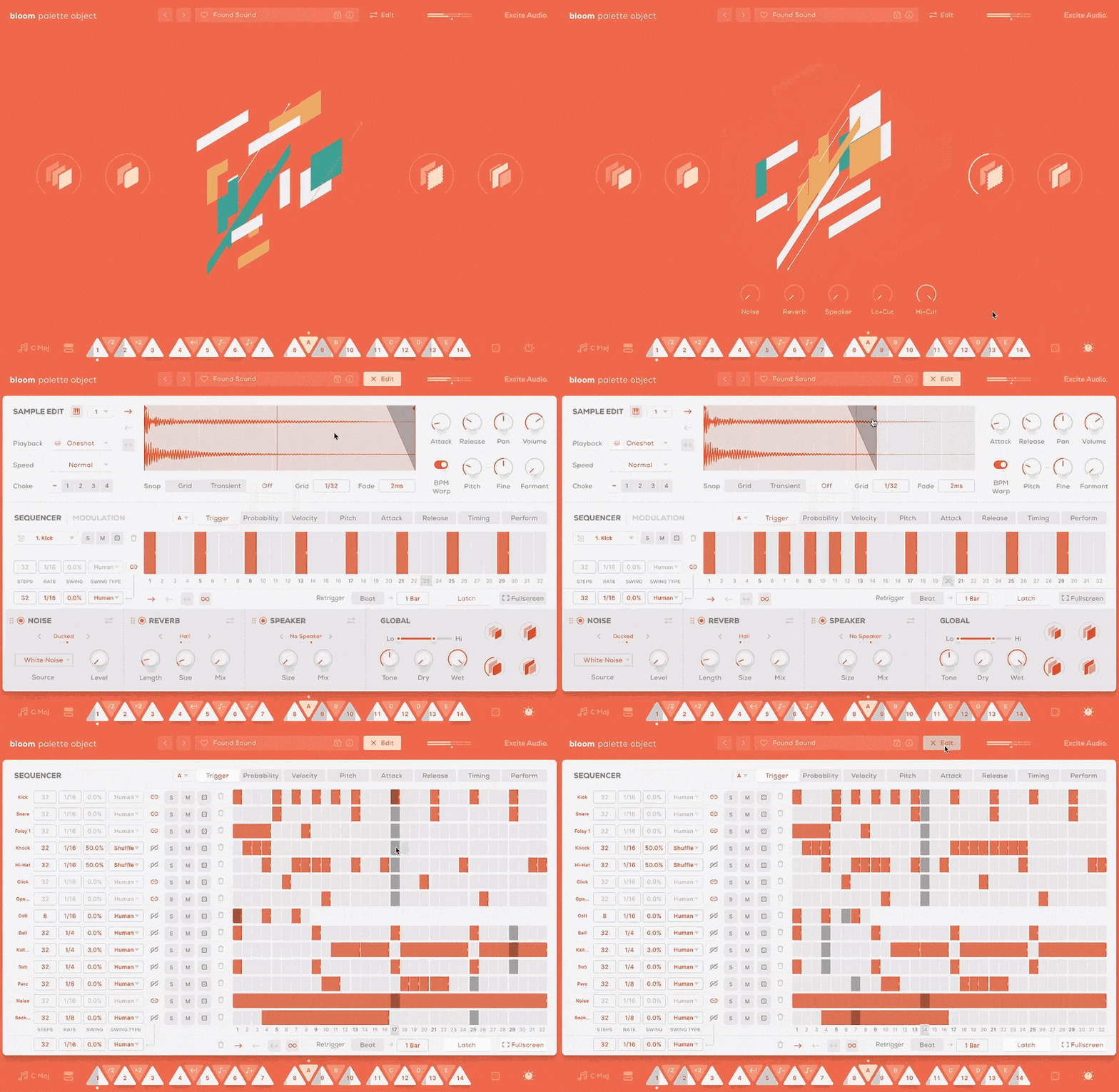
Sound Sources
Bloom Palette Object offers a diverse collection of meticulously captured sound sources, blending musical instruments such as the Taishogoto, Vibraphone, and Upright Bass with raw textures of everyday items like Velcro, Glass Bottles, and Mechanical Ratchets.
Recorded by professional foley artists and sound designers, these sounds are perfect for bringing your projects to life with unexpected layers and depth. Some of the sounds include:
- Household Foley
- Mechanical & Electrical Items
- Tuned Foley
- Textures & Noises
- Acoustic Drums & Percussion
- Instrument One-Shots
- Rhythmic Loops
- Melodic Loops
How it Works
Start in your desired tempo, choose a sample bank or preset, and trigger one of 14 bpm-synced samples spread across two octaves. White notes set off drum samples and loops, while black notes alter properties like playback speed and pitch and trigger sequences and effect modulation.
Four powerful macros control a specialised chain of effects, fine-tuned to the diverse sound palette samples that form Bloom Palette Object.
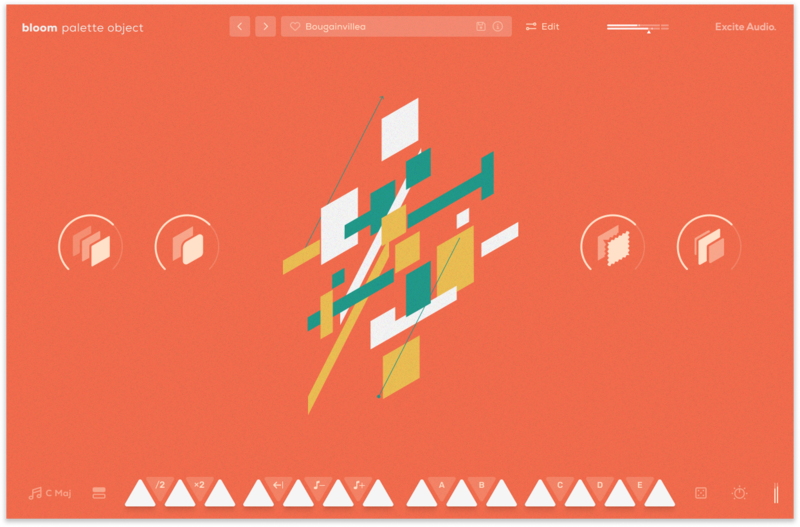
The Main Page
There are eight banks of sounds to choose from - organised into easy to find categories, and the sounds in each bank can be dragged onto any of the 14 white notes.
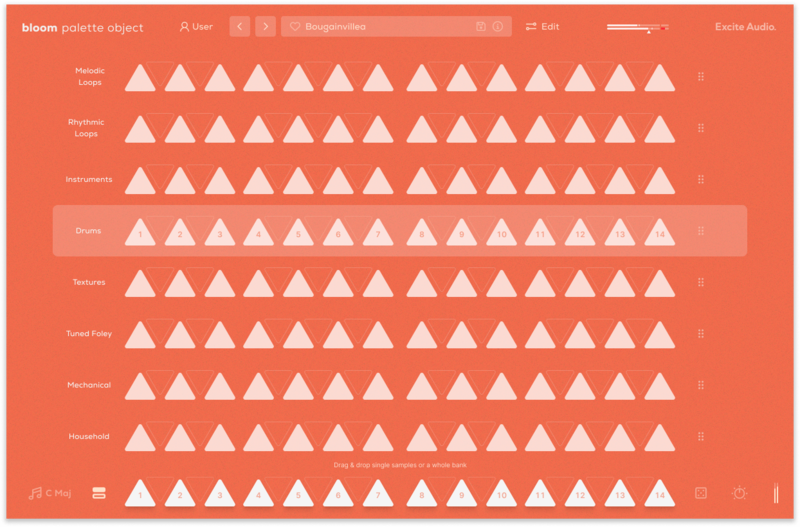
Audition and Load Samples & Banks
The Edit Page: Sculpt Your Sound
The Edit page is the central hub for refining and making the library of samples your own. Adjust start and end points, manipulate playback speed and direction, and tweak the timbre with pitch and formant controls.
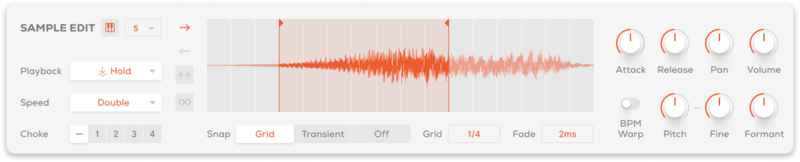
Sample Edit Section
Import Your Own Samples
Make the Bloom instrument your own with the ability to drag and drop audio files into it. You can do this via the waveform view on the edit page or any empty slot on the banks page. Set the key and BPM of your samples to make them integrate seamlessly with the Bloom engine.
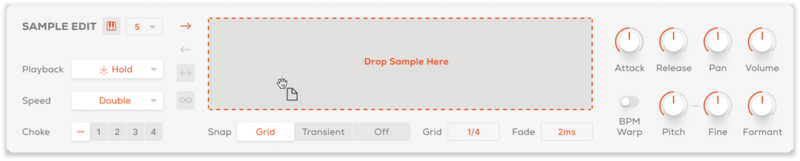
Sample Import
Unlike traditional sequencers, the Bloom Sequencer is designed for triggering and layering one-shots and looping sequences, allowing for endless rhythmic and melodic creation. In the modulation section, automate pitch, volume, and filter settings as well as three effects to add depth and dimension to your music.
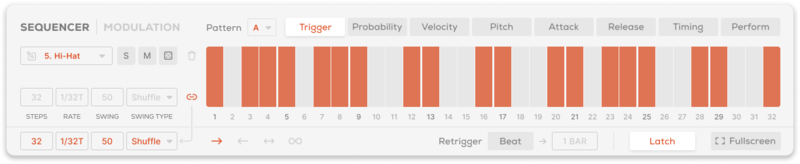
Sequencer Section
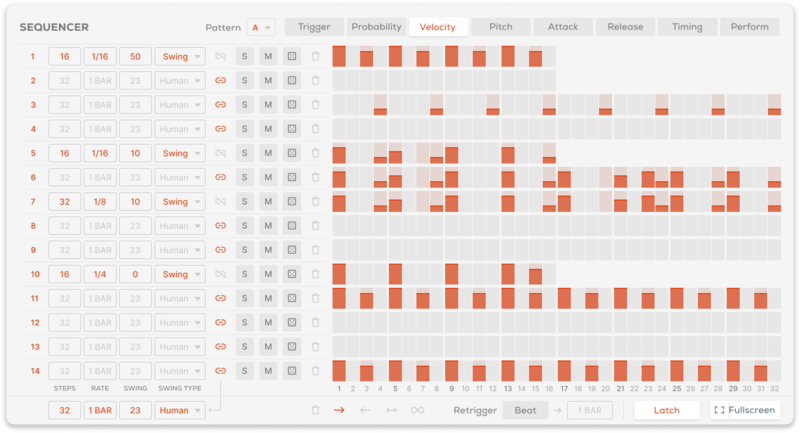
Sequencer in Fullscreen Mode
Bloom Palette Object offers three bespoke effects modules: Noise for adding organic texture and atmospheric layers that respond to your audio. Reverb to create space and depth using Hall, Plate and Spring algorithms from the Lifeline Series. Speaker simulates different reamping techniques and loud speakers, from handheld devices to guitar amps to studio monitors.

Effects Section
Features
- 14 Sample Keys
- 5 Factory Modifiers: Half-time, Double-Time, Reverse, Octave Down, Octave Up
- 5 Custom Modifiers for Triggering Sequences
- 8 Sample Banks / 112 Foley Samples
- Samples Synced to Host BPM
- Key Selection
- Sample Randomise
- 4 Macros: Smooth, Echo, Tape, Width
- 5 Main FX Parameters: Noise, Reverb, Speaker, Lo-Cut, Hi-Cut
- Global Bypass
- 250 Presets
- All samples that come with Bloom Palette Object are royalty-free
- Import up to 112 of your own samples (these can be swapped at any time)
Edit Page - Sample Edit
- Waveform Display
- Playback Direction: Forwards, Backwards, Pendulum, Loop
- Playback Modes: Hold, Latch, Relative
- Playback Speed: Normal, Double, Half
- 4 Choke Groups
- Start / End Markers with Snap to Grid, Snap to Transient
- Sample Crossfade, Attack, Release, Pan, Volume
- Sample Pitch, Fine, Formant, Pitch Warp
Edit Page - Sequencer
- Sample Mode for triggering sequences
- FX Modulation: Reverb, Speaker, Noise, Lo-Cut, Hi-Cut, Pitch, Volume
- Playback Direction: Forwards, Backwards, Pendulum, Loop
- Sample / Modulation Randomise
- Global / Track Step Rate, Sync, Swing, Steps, Latch, Beat Retrigger controls
- Track Trigger, Velocity, Probability, Attack, Release, Timing and Perform
Edit Page - FX
- 3 Rearrangable Effects: Noise, Reverb, Speaker
- 15 Noise Types: Vinyl Crackle, Cassette & Tape Static, Crowd Noise, White Noise, Amp Hiss & more
- Noise Mode: Constant, Dynamic, Ducked
- Noise Parameters: Level, Envelope Threshold / Release, Tone
- Reverb Modes: Plate, Hall, Spring
- Reverb Parameters: Length, Size, Mix, Pre-Delay, Duck, Lo-Cut, Hi-Cut, Input, Output
- Speaker Modes: Device, Cabinet, Hi-Fi, No Speaker
- Speaker Parameters: Size, Mix, Distance, Age, Bass Thru, Tone, Input, Output
- Global Lo-Cut, Hi-Cut, Tone, Dry, Wet
Learn More About Bloom Palette Object
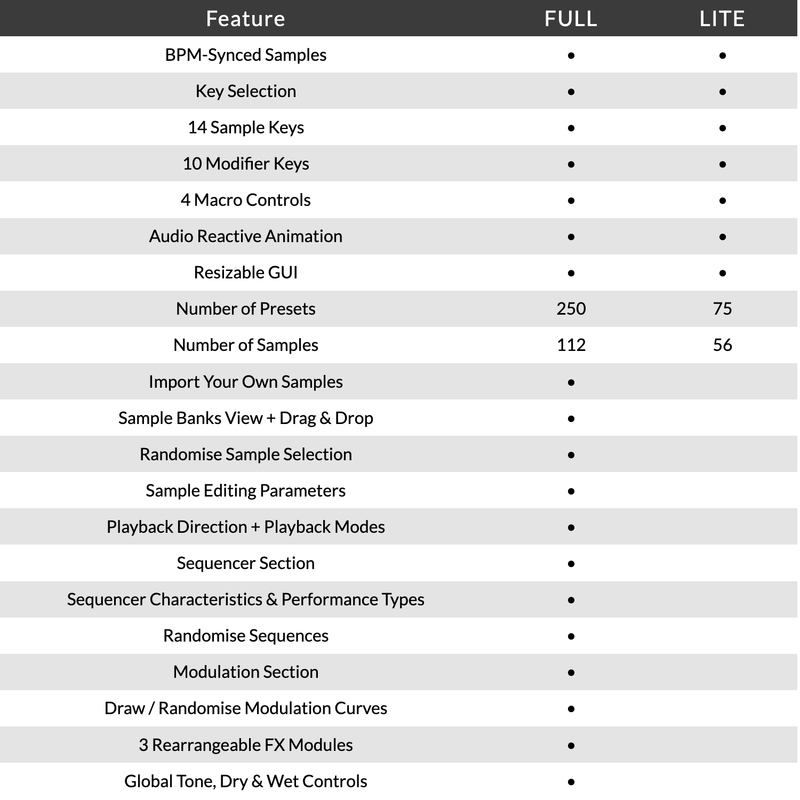
Version Comparison
System Requirements
macOS
- macOS 10.15 or higher (Intel / Native Apple Silicon supported).
- Plugin Formats: VST, VST3, AU, AAX, Standalone.
- DAW's Supported: Ableton Live, Pro Tools, Logic Pro, FL Studio, Cubase, Nuendo, Reaper, Reason + more.
- Compatibility: 64-bit compatible only.
- Recommended Buffer Size: 512 Samples or higher
Windows
- Windows 7 or higher
- Plugin formats: VST, VST3, AAX, Standalone
- DAWs supported: Ableton Live, Pro Tools, FL Studio, Cubase, Nuendo, Reaper, Reason + more.
- Compatibility: 64-bit compatible only.
- Recommended Buffer Size: 512 Samples or higher
Please note: An internet connection is required to authorise this software.
Important note: When accessing this software via a Rent to Own plan or the Beatport Studio membership, it's installed and run through the Beatport Access portal. An internet connection is required every 30 days to validate your license.

Proxima
Proxima is one of Holland’s most exciting electronic music artists of the last decade, with a string of outstanding releases on Shogun Audio, UKF, Hospital and many more.
"The versatile sequencer, ease of use and incredible samples make Bloom Palette Object a joy to use in the studio."

Mick Schultz
American music producer and songwriter for Rihanna, Jeremih, Zendaya & more.
"This plugin is great. It sounds amazing instantly and I love the double-time feature."

GEST
Top-tier, industrially-minded Drum & Bass duo on Shogun Audio.
"Another fantastic instrument from Excite Audio that is going be a mainstay in our toolbox! The new built-in sequencer really opens up the creative possibilities and streamlines the workflow."
Reviews Summary
While it aims to provide a helpful overview, it may not capture every perspective or detail. We encourage you to read individual reviews to make an informed decision.
Customers highly appreciate this plugin and the Bloom series for sound design, playful experimentation, and adding unique, unconventional textures to music productions. Users praise the fantastic sequencer, easy-to-tweak parameters, and high-quality found-sound samples. While most consider it an inspiring and fun creative tool, some noted minor drawbacks, such as the potential restrictiveness of relying on premade samples and the need to sift through many presets to find the right fit for a track.


