


.jpg)
Buy SUBCRAFT, get a free gift with purchase:
Please note: This is the standard SUBCRAFT purchase path. Owners of any UJAM product can take advantage of a discounted crossgrade HERE.

Modern Bass Magic
The ultimate sub bass instrument
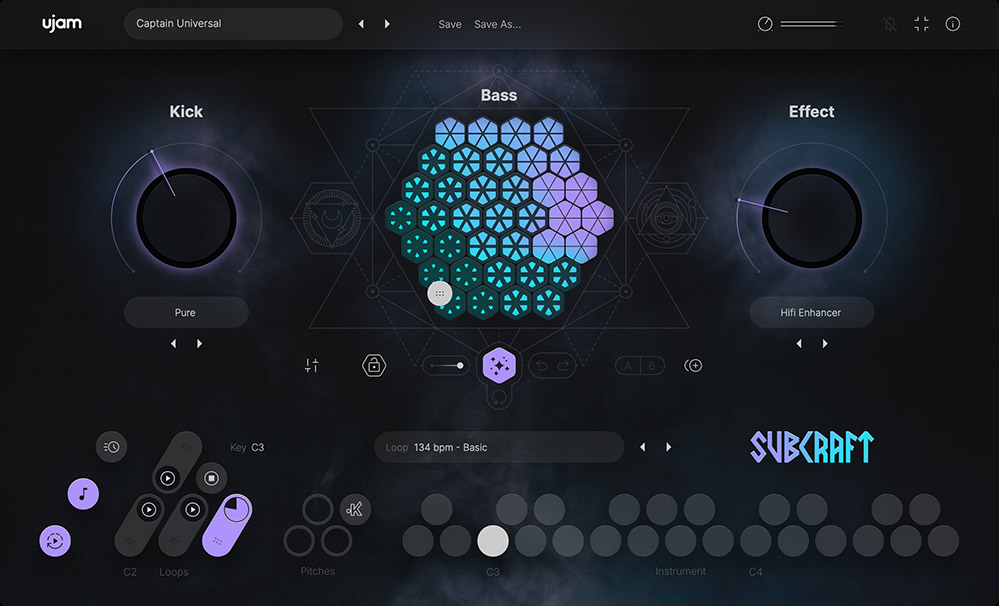
SUBCRAFT is an 808/sub bass instrument with built-in MIDI phrases, creative FX and a kick drum engine. Every possible bass tone and note that comes out of SUBCRAFT has been painstakingly tuned, processed and mixed by our professional audio engineers to maximize bass power and consistency.
This means that SUBCRAFT is single-handedly the most consistent and reliable sub bass tool to exist on the market, and you can hear the difference no matter what speakers or headphones you’re listening on.
I got 808 problems but low-end ain’t one
Magically perfect sub bass and kicks - achieved by engineering sophistication. Select or create unlimited sounds, explore with creative and intelligent UI controls and never worry about your low end foundation again.
Abracadabra!
Don’t just trust us - listen for yourself: These brief examples show how Subcraft shines as the bass and kick foundation in various musical genres.
Bass Terrain
This creative control navigates through endless combinations of sub tones and overtones, all pre-processed and phase aligned to ensure that you find the best possible bass tone that sits perfectly in your mix.
Generate
The Generate feature invents entirely new terrains of sound and shuffles all of Subcraft’s parameters for instant inspiration when you’re feeling stuck.
Kick
The integrated kick module gives your bassline more punch with a selection of perfectly phase-aligned kick samples. Higher kick values will also trigger the automated ducking feature, ensuring a healthy relationship between kick and bass.
Phrase Player
Built-in phrases for instant inspiration - the intuitive Phrase Player Engine offers over 120 phrases that you can edit via Drag-and-Drop. Or send them to other devices via Direct MIDI Out!
Features
- Proprietary auto-mixing DSP guarantees consistent bass definition
- Integrated sub bass and kick drum engine
- Extensive, yet easy-to-use sound design features
- Intelligent randomization for unlimited inspiration
System Requirements
Operating Systems
- Windows: Windows 10 — Windows 11
- Mac: macOS Catalina (10.15) — macOS Sequoia (15)
- Supported on Intel Macs & Apple silicon Macs (Rosetta and native).
- You may have success on earlier versions but UJAM doesn’t support and fully qualify them.
Important note: When accessing this software via a Rent to Own plan or the Beatport Studio membership, it's installed and run through the Beatport Access portal. An internet connection is required every 30 days to validate your license.

Billy Bush
"Gotta say it’s pretty wild and seemingly endless in its possibilities… It has that extra harmonic touch and I love how it helps sub bass to be audible on smaller systems. Loving it so far!"

Tony Bruno
"UJAM has done it again! Subcraft kicks ass! I’ve had several “go to” plug-ins for 808’s before but this destroys them! And like all of UJAM’s instruments, the architecture is laid out in a way that’s intuitive and just plain fun to use! You guys ROCK!"

Zardonic
"This hits DEEP!!"

Important Note: Usynth Euphoria is used as an example.
Mac Installation
1. Visit www.ujam.com/partner-checkout/?partner=pib
2. Enter the 'Redeem Code', which is available within your Plugin Boutique User Account > Click 'Check License'.

3. Click 'Sign up' to create a ujam account or Click 'Login' if you already own an existing account.

4. Enter your email address and password > Click 'Continue' where you will be sent an account set up email by ujam.


5. Click the link in your confirmation email > enter your email and password > Click 'Continue'.

6. Find your newly purchased product > Click 'Download' to install the ujam App.

7. Click the 'UJAM-0.3.1' file and run through the installation process.
8. Open the UJAM App and Click 'Sign In'.

9. Find your newly purchased product and Click 'Download'.

10. Open your DAW and launch 'USYNTH'.

Your product is now installed and ready to use!
Windows Installation
1. Visit www.ujam.com/partner-checkout/?partner=pib
2. Enter the 'Redeem Code', which is available within your Plugin Boutique User Account > Click 'Check License'.
3. Click 'Sign up' to create a ujam account or Click 'Login' if you already own an existing account (if you already have a ujam account, skip to step __.)
4. Enter your email address and password > Click 'Continue' where you will be sent an account set up email by ujam.
5. Click the link in your confirmation email > enter your email and password > Click 'Continue'.
6. Find your newly purchased product > Click 'Download' to install the ujam App.

7. Click the 'UJAM+Setup+0.3.1.exe' file and run through the installation process.
8. Open the UJAM App and Click 'Sign In'.
9. Find your newly purchased product and Click 'Download'.
10. Open your DAW and launch 'USYNTH'.
Your product is now installed and ready to use!


