/ Virtual Instruments / Vox Humana
UJAM

Vox Humana

4.7 (44 Reviews)
$19.00
UJAM Vox Humana
UJAM Vox Humana
UJAM Vox Humana
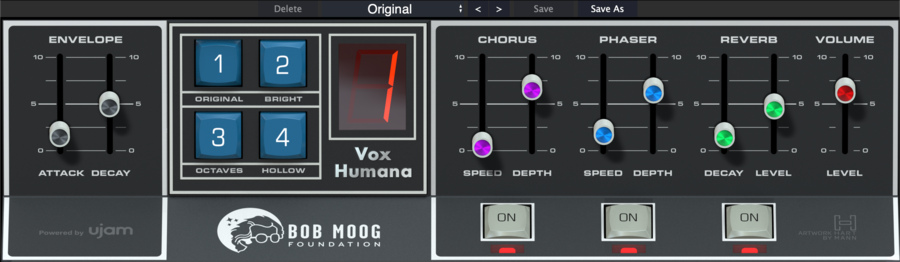
UJAM Vox Humana - UI
Buy Now
Product information

From the Bob Moog Foundation and UJAM

Get an iconic sound, support a great cause!

UJAM is teaming up with the Bob Moog Foundation to bring you Vox Humana from the legendary Polymoog 280A. By purchasing, not only will you be adding one of the defining sounds in pop and electronic music to your arsenal, you will also support the Bob Moog Foundation's efforts in education, preservation, and the Moogseum.

Sounds great, feels great

  • Virtual instrument based on the iconic Vox Humana sound
  • Original Polymoog meticulously recorded by synth expert Alex Ball
  • Beautiful, simple yet powerful user interface featuring sound variations, envelope, multi-effects, presets
  • 100% of proceeds support the work of the Bob Moog Foundation (for more info see below)

The Bob Moog Foundation

The foundation inspires through science education, archive preservation, and interactive learning, with programs like a sound-focused school, historic archives, and an interactive museum in Asheville, NC.

System Requirements

Operating Systems

  • Windows: Windows 10 — Windows 11
  • Mac: macOS Catalina (10.15) — macOS Sequoia (15)
  • Supported on Intel Macs & Apple silicon Macs (Rosetta and native).
  • You may have success on earlier versions but UJAM doesn’t support and fully qualify them.

Important note: When accessing this software via a Rent to Own plan or the Beatport Studio membership, it's installed and run through the Beatport Access portal. An internet connection is required every 30 days to validate your license.

Installation Instructions

Important Note: Usynth Euphoria is used as an example.

Mac Installation

1. Visit www.ujam.com/partner-checkout/?partner=pib

2. Enter the 'Redeem Code', which is available within your Plugin Boutique User Account > Click 'Check License'.

3. Click 'Sign up' to create a ujam account or Click 'Login' if you already own an existing account.

4. Enter your email address and password > Click 'Continue' where you will be sent an account set up email by ujam.

5. Click the link in your confirmation email > enter your email and password > Click 'Continue'.

6. Find your newly purchased product > Click 'Download' to install the ujam App.

7. Click the 'UJAM-0.3.1' file and run through the installation process.

8. Open the UJAM App and Click 'Sign In'.

9. Find your newly purchased product and Click 'Download'.

10. Open your DAW and launch 'USYNTH'.

Your product is now installed and ready to use!

Windows Installation

1. Visit www.ujam.com/partner-checkout/?partner=pib

2. Enter the 'Redeem Code', which is available within your Plugin Boutique User Account > Click 'Check License'.

3. Click 'Sign up' to create a ujam account or Click 'Login' if you already own an existing account (if you already have a ujam account, skip to step __.)

4. Enter your email address and password > Click 'Continue' where you will be sent an account set up email by ujam.

5. Click the link in your confirmation email > enter your email and password > Click 'Continue'.

6. Find your newly purchased product > Click 'Download' to install the ujam App.

7. Click the 'UJAM+Setup+0.3.1.exe' file and run through the installation process.

8. Open the UJAM App and Click 'Sign In'.

9. Find your newly purchased product and Click 'Download'.

10. Open your DAW and launch 'USYNTH'.

Your product is now installed and ready to use!

Plugin Boutique Rewards

Discover the most rewarding loyalty programme among all plugin retailers.

  • Free Loopmasters Samplepacks
  • Discounts on products and courses
  • Extra Virtual Cash claimed immediately at checkout
Find out more

Follow us:

X (Twitter) Facebook YouTube Instagram
Logo Logo

Plugin Boutique Limited, Part of the Beatport Group LLC.

Copyright © 2011-2025 Plugin Boutique. All rights reserved