


 Log In

Free gifts available with your purchase

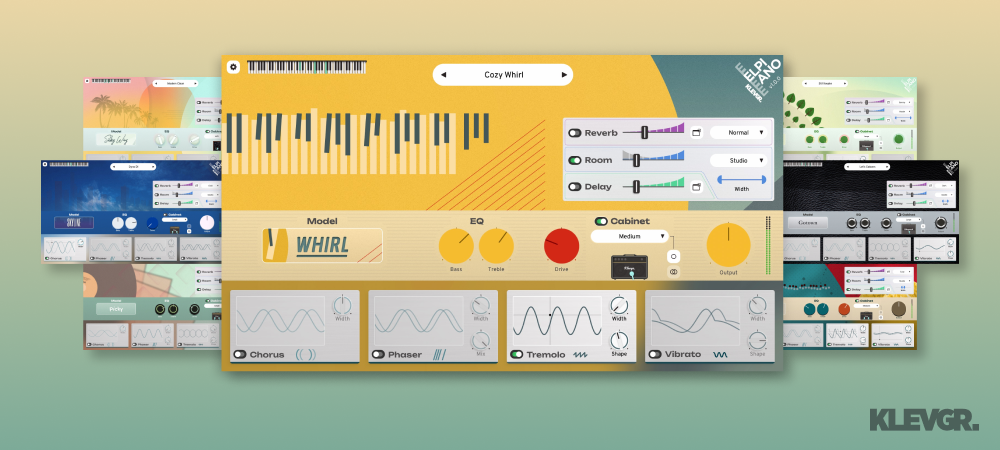
Electric soul, infinite control
Elpiano is an electric piano plugin that feels alive under your fingertips. Designed to capture the soul and character of vintage electromechanical pianos, Elpiano delivers an expressive, dynamic playing experience that goes beyond static samples. It's both powerful and lightweight, delivering everything from silky-smooth, dreamy chords to punchy funk grooves with authentic feel and natural playability.
A dream cast
Ten distinct piano models are included in Elpiano, each with its own sonic identity. From pristine, silky tones to gritty, well-worn textures, every model responds with depth and realism.
Explore warm, bell-like chimes, dusty vintage timbres, or raw, overdriven growls—each sound has been carefully crafted with an almost obsessive attention to detail. Built-in effects, cabinets, and tone-shaping tools offer even more ways to sculpt your sound into something personal and unique.
Feel the groove
Every detail of Elpiano’s playability has been fine-tuned to ensure a natural, expressive response.
Whether you’re laying down delicate jazz voicings, digging into funky rhythms, or crafting experimental textures, the instrument reacts with precision and nuance. The intuitive interface keeps everything within reach, letting you focus entirely on your music.
More than keys
Elpiano includes five cabinet models in both mono and stereo configurations, a collection of inspiring and diverse presets, and a range of built-in effects like drive, reverb, room simulation, delay, tremolo, vibrato, chorus and phaser. A classic EQ section adds warmth and presence.
Elpiano brings an unparalleled level of responsiveness to the electric piano world, delivering a truly expressive playing experience. Every model and preset has been designed to ensure that every nuance of your performance is captured just as it should be. Whether you're after a pristine studio tone, a gritty vintage character, or something completely unexpected, Elpiano has you covered.
Features
- 10 different piano models
- 5 different cabinets, with mono- and stereo configuration
- 50 various presets
- Plenty of effects with smart functions (Reverb, Room, Delay, Chorus, Phaser, Tremolo, Vibrato)
- Traditional vintage EQ
- Drive control
System Requirements
- Requires macOS 10.10 or later (optimized for the M1 processor),
- Windows 7 (SP1) or later,
- AU, VST3 or AAX compatible 64-bit host.

























Reviews Summary
While it aims to provide a helpful overview, it may not capture every perspective or detail. We encourage you to read individual reviews to make an informed decision.
Users praise the electric piano plugin for its sweet, organic sound quality, dynamic responsiveness, lightweight CPU usage, and affordable price. While reviewers love its clean interface and unique presets, some note limitations including a lack of heavy overdrive or grit, fewer deep customization options compared to competing modeling plugins, and no support for .tun files.


