Log In

Free gifts available with your purchase

There is a sound going around at the moment, in fact, it's been bouncing around for a while, occasionally threatening to break into the mainstream but ultimately retreating back to the underground. It's not Future Bass or EDM, it's not LoFi or Hip-Hop… it's somehow of all these things, all chopped up, side-chained, and then compressed into a sleazy electronic pulse.
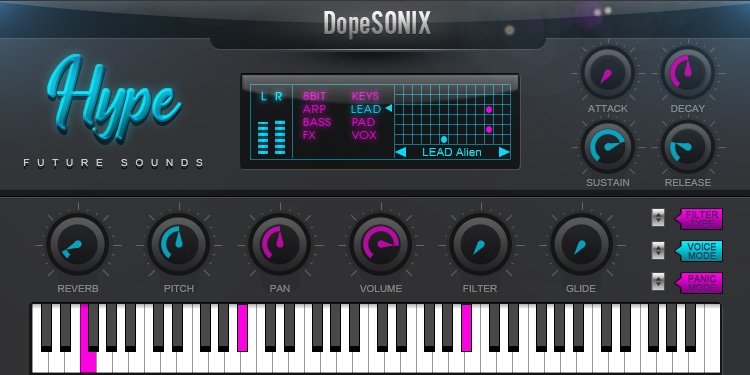
The Hype: Future Sounds plug-in includes three hundred fresh patches and plus a variety of essential FX which will enable you to captures this LA Beats inspired sound without the need for a collection of analogue or VST synths.
Dilla Rhythm’s | Analog Vibes | EDM Techniques
Load up your computer, fire up your DAW, install Hype, add HUGE amounts of your favourite delay and reverb, play or program a dope MIDI section, put it on repeat and explore the huge variety of sounds Hype offers…enjoy!
- 8 Bit - The classic sound of the golden era of mid-90’s computing. DopeSONIX has included a nice variety of Atari-esque leads, Gameboy style bleeps, retro pads, and more vintage console goodness.
- Arps - A fine selection of short, punchy sounds and crystal clear tones that are perfect for arpeggio midi patterns and fast lead lines that will cut through any mix for any genre.
- Bass - Here within the bass patches, you will find a sweet collection of dirty and quirky 808’s, deep sub-basses, and a whole host of atmospheric, analogue-inspired fatness.
- Keys - You can't make this type of plug-in without including a versatile selection of contemporary club sounds and traditional analogue style vibes to fulfil all your sonic requirements
- Leads - DopeSONIX has included an amazing collection of usable synth sounds including beefy Moog-ish tones, razor-sharp synths, and even gentle bells and plucks: perfect for any prominent lead line or counter melody.
- Pads - Without a doubt, pads are the perfect space-filling yet subtle backdrop to any style of track. Warm delicate textures, ethereal harmonics and string-like ambience are all included here.
- Vox - You know the modern vox sound! Chopped up male and female vocals, massively pitched, overly compressed, autotuned to death, and just perfect for that modern beats vibe.
- Modern FX - To top off the patches DopeSONIX have included a huge, useful library of exciting risers, massive hits, huge drops, and devastating crashes.
Features
- 300 futuristic presets including leads, pads, keys, bass, vox and more
- 100 key-labelled MIDI files for all styles including chord progressions, melodies and basslines
- Built-in flexible pitch, pan, glide and gain controls
- Includes a built-in analogue style reverb
- Includes a built-in High/Low Pass Filter
- Poly, mono and legato modes
- Stereo output level meter
- Full ADSR controls
- Ultra-low CPU usage
- Ultra-fast patch loading
System Requirements
Mac
- OS X 10.4 and above (Monterey / Apple Silicon supported)
- 1.1 GB disk space required
- 2 GB RAM
- Audio Units (AU) or VST DAW compatible host required (64-bit only)
Windows
- Windows 7 / 8 / 10
- 1.1GB disk space required
- 2 GB RAM
- VST compatible DAW host is required (32 or 64-bit)
Important Note: This software is NOT compatible with Pro-Tools!