Klevgrand

Borsta

4.8 (420 Reviews)
$59.99
Klevgrand Borsta - Main
Klevgrand Borsta - GUI
Klevgrand Borsta - Overview gallery thumbnail
Buy Now
Product information

Brushed Percussion 

Borsta is a new innovative percussion instrument specially designed for strokes and brushes. Its unique audio engine allows for an endless number of truly natural-sounding brushing phrases and rhythms. What sets Borsta apart from similar instruments is that its audio engine supports continuous changes in intensity. This makes it possible to create very life-like brushing phrases and patterns, something that can't be achieved with traditional sample-based instruments.

The parallel envelope and events sequencers allow you to determine exactly when to start a stroke, how the stroke's pressure/speed should evolve over time and when to end it. On top of that, all instruments also offers multi-sampled one-shots with advanced choking capabilities. Each instrument is based on more than 400 high-quality samples, recorded for playing with different velocities and round robins.
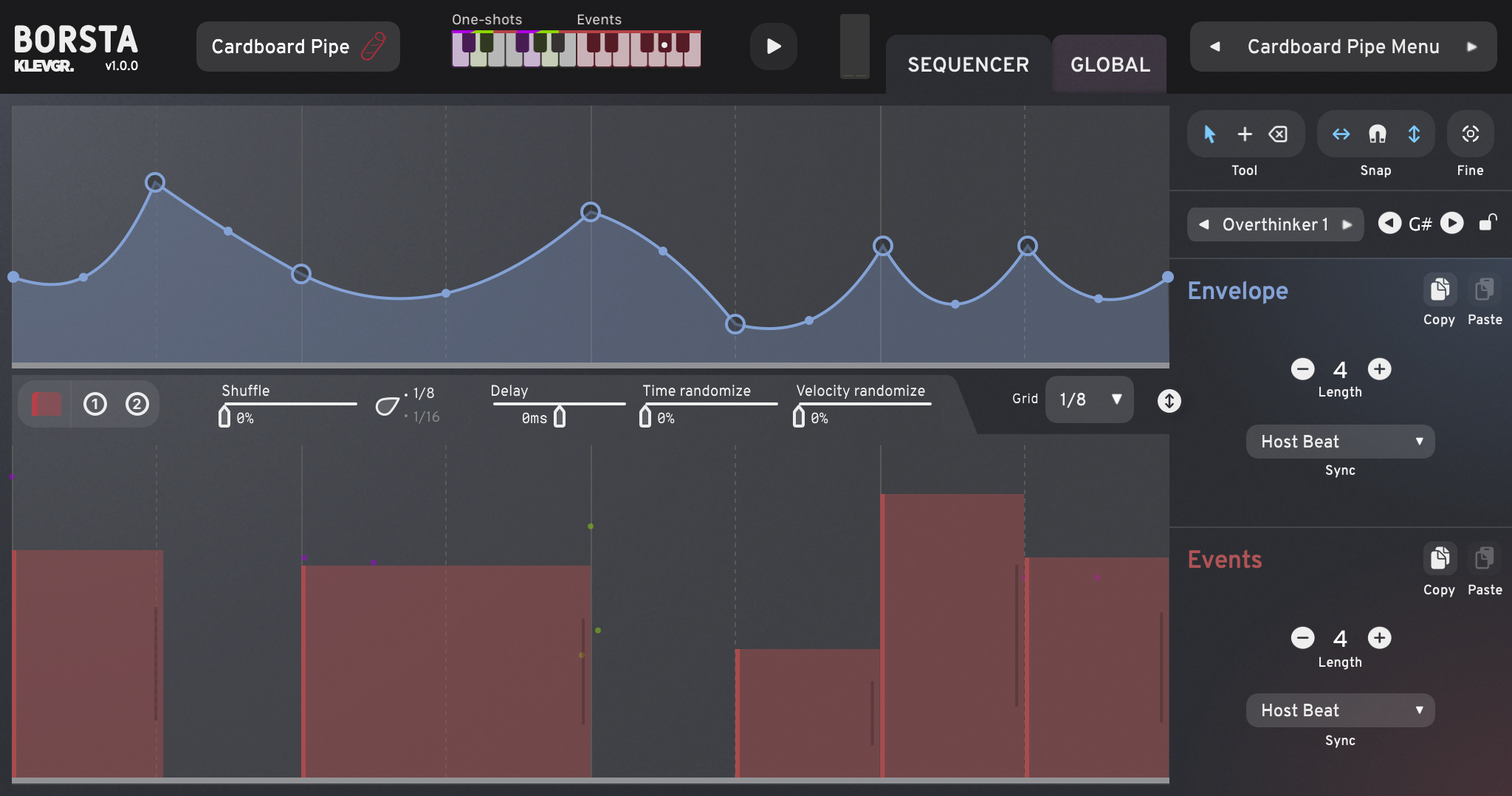
Borsta emulates a single drum instrument at a time, but comes with 18 different instruments to choose between. The sequences are played one at a time, however switching between sequences can be done seamlessly via MIDI, and additional one-shot samples can be triggered using an ordinary MIDI track.

The instruments are all structured and MIDI-mapped in a uniform way, which makes it possible to use the same sequence on any instrument. For instance, a traditional swing pattern will sound musically correct no matter whether you choose a Frame Drum, Tambourine or Snare Drum - it will just sound like the musician changed instruments. Borsta is a Swedish verb, meaning ”to brush”.

Features 

  • 18 high-quality instruments with 6 multi-sampled one shots each 
  • 230 pre-made factory sequences 
  • 60 Global presets covering different sounds and genres 
  • Separate volume and velocity curve control of each sound type 
  • Room simulation (9 different rooms) 
  • Reverb with adjustable decay time (6 different algorithms) 
  • Timbre adjustment control (harmonics) 
  • Overall pitch 
  • Three band equalizer 
  • Rusty Bucket 
  • Guira 
  • Pancake Drum 
  • Tambourine 
  • Frame Drum 
  • Pizza Box 
  • Cardboard Pipe 
  • Cajon 
  • Pandeiro 
  • Bakestone 
  • Cymbal Chains 
  • Snare Drum 1 
  • Snare Drum 2 
  • Snare Drum 3 
  • LOFI Snare Drum 
  • Metal Spade 
  • Djembe 
  • Iron Sticks 

System Requirements

  • macOS 10.10 or later (optimized for the M1-processor)
  • Windows 7 SP1 or later
  • AU, VST-2, VST-3, AAX

Installation Instructions

Please Note: Pana is used as the example:

Mac

License Redemption

1. Navigate to https://klevgrand.com/redeem > Paste your 16 digit redemption code found in your Plugin Boutique User Account > Click 'Submit!'.

2. Your redemption code has been accepted > Scroll down to Step 2.

3. Click either 'Sign in' if you already have a Klevgrand account, or 'Create new account' if you do not > Fill in your personal details > Click 'I'm ready'.

4. Your account has now been created.

5. Navigate to your email inbox and locate the activation email that you should have received from Klevgrand > Click 'Let me in!' to activate your account.

6. Create a password for your account > Click 'Enter Klevgrand'.

7. Your software and serial number is now available within your Klevgrand account > Click the Apple logo to download the installer file.

Installation

1. Launch the pana_x_x_x_macOS.dmg installer file.

2. Double click the KLEVGR. logo to launch the installer.

3. Click 'Continue'.

4. Click 'Continue'.

5. Click 'Agree'.

6. Click 'Install'.

7. Enter your system password > Click 'Install Software'.

8. Click 'Close'.

9. Navigate back to your Klevgrand My Account page > Click on the serial number to copy it to your clipboard.

10. Launch your DAW > Create a new audio track > Insert Pana onto the channel > Paste your serial number into the box.

Your software is now activated and ready to use within your DAW

Windows

License Redemption

1. Navigate to https://klevgrand.com/redeem > Paste your 16 digit redemption code found in your Plugin Boutique User Account > Click 'Submit!'.

2. Your redemption code has been accepted > Scroll down to Step 2.

3. Click either 'Sign in' if you already have a Klevgrand account, or 'Create new account' if you do not > Fill in your personal details > Click 'I'm ready'.

4. Your account has now been created.

5. Navigate to your email inbox and locate the activation email that you should have received from Klevgrand > Click 'Let me in!' to activate your account.

6. Create a password for your account > Click 'Enter Klevgrand'.

7. Your software and serial number is now available within your Klevgrand account > Click the Windows logo to download the installer file.

Installation

1. Unpack the pana_x_x_x_win.zip installer file > Launch the pana_x_x_x_win.exe file.

2. Click 'I accept the agreement' > Click 'Next'.

3. Click 'Next'.

4. Click 'Next'.

5. Click 'Next'.

6. Click 'Install'.

7. Click 'Finish'.

8. Navigate back to your Klevgrand My Account page > Click on the serial number to copy it to your clipboard.

9. Launch your DAW > Create a new audio track > Insert Pana onto the channel > Paste your serial number into the box.

Your software is now activated and ready to use within your DAW

Plugin Boutique Rewards

Discover the most rewarding loyalty programme among all plugin retailers.

  • Free Loopmasters Samplepacks
  • Discounts on products and courses
  • Extra Virtual Cash claimed immediately at checkout
Find out more

Follow us:

X (Twitter) Facebook YouTube Instagram
Logo Logo

Plugin Boutique Limited, Part of the Beatport Group LLC.

Copyright © 2011-2025 Plugin Boutique. All rights reserved
























