


 Log In
.jpeg)
Free gifts available with your purchase
Important Note: This is an upgrade path for existing owners of CUBE Mini. The standard purchase path for CUBE is also available HERE.
Upgrade to Unlock CUBE’s Full Sonic Potential
CUBE Mini’s stunning presets, 3D interface, and deep FX give you a taste of what’s possible in the Lunacy Audio ecosystem, but that just scratches the surface. Upgrading to CUBE unlocks a whole new universe of advanced sonic-shaping features to take your tracks to the next level. Plus, you get 4 times as many exquisitely-sampled sound sources and stunning presets.
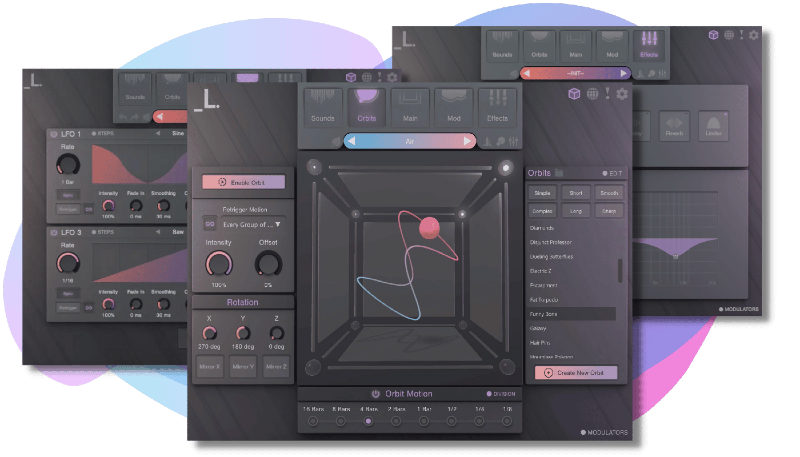
Unleash the Full Power of CUBE’s Sonic-Sculpting Capabilities
The full version of CUBE comes with an arsenal of advanced sound design features, giving you endless inspiration for EDM, house, hip hop, pop & genre-bending experimental tracks.
- Custom Orbits - choose from over 50+ orbit presets to create slowly evolving textures, shifting soundscapes, faster rhythmic pulses, and everything in between–OR draw your own orbits with the orbit customizer
- Advanced modulation - level up your sound design tool kit with 4 detailed LFOs, a powerful macro control, and a beautifully designed modulation matrix
- Drag and Drop Your Own Sample - import your own samples and let the real fun begin. Just drag and drop any of your favorite WAV or SFZ sample files, then mix and max with factory sounds to create truly unique sounds
- 70+ new sound sources - broaden your sonic palette with a whole new collection of sampled instruments with multiple dynamic layers: wild analog synths, lush pads, crisp percussion hits, vivid strings, intimate keys, and more
- 380 new presets - painstakingly crafted by Lunacy’s collective of expert sound designers, using cutting-edge processing techniques
System Requirements
Mac
- macOS 10.9 and later (Intel / M1 Apple Silicon supported) (64-bit only)
- AU / VST / AAX / Standalone
- Supported by all major DAWs
- At least 4 GB of RAM (8 GB recommended), and 2 GB of free drive space.
- Access to a stable internet connection for downloading and activating the product is required.
- Built with JUCE and HISE 2.1.0
Windows
- Windows 7 and later (64-bit only)
- VST / AAX / Standalone
- Supported by all major DAWs
- At least 4 GB of RAM (8 GB recommended), and 2 GB of free drive space.
- Access to a stable internet connection for downloading and activating the product is required.
- Built with JUCE and HISE 2.1.0
Awards

MusicTech
The world's leading media brand at the intersection of music and technology.
"It’s not often we’re left open-mouthed by how good a synth is, but Cube has us gawping like village idiots." 9/10
Sound On Sound
Music Technology Magazine
“[With CUBE] you are unlikely to run out of novel sonic options any time soon… there are endless potluck options available to inspire.”
FutureMusic
Up to the minute news and reviews for all music makers.
“A very impressive soft synth, fun, intuitive and extremely easy to produce cool, unique sounds.” - The Best New Synths of 2021


