/ Virtual Instruments / Clavinet
Waves

Clavinet

$24.99 $79.00

68% off until Dec 07

Waves Clavinet
Waves Clavinet
Waves Clavinet
Waves Clavinet gallery thumbnail
Buy Now
Product information

Clavinet

The Original Funk Keyboard, Meticulously Multi-Sampled

The D6 clavinet has cast its gritty, twangy spell on musicians as diverse as Steve Wonder, the Rolling Stones, Herbie Hancock, the Band, Funkadelic, Steely Dan, the Wailers, and Fleetwood Mac. And now, Waves has painstakingly captured this instantly recognizable sound, in all its funky glory.

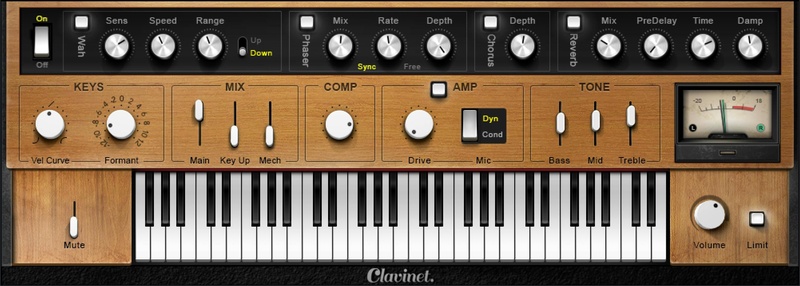
By multi-sampling every texture, articulation, and hammer strike in both muted and unmuted modes, Clavinet nails the classic tone of this keyboard king—but most importantly, it nails the feel.

Features

  • Exceptionally responsive velocity control for stellar dynamics
  • Supplemented with built-in effects often used with the clav
  • Includes EQ, compression, and limiting for a mix-ready sound
  • Envelope-follower autowah tracks your playing’s dynamics
  • Amp simulator with choice of mics gives the authentic on-stage sound
  • Use stand-alone for live performance, or as a plug-in
  • Presets with the classic sounds you’ll recognize from multiple hits
  • Phase, chorus, and reverb add depth and modulation

System Requirements

Mac

  • macOS Monterey 12, Ventura 13, Sonoma 14, Sequoia 15
  • VST / AU / AAX

PC

  • Windows 10+
  • VST / AAX
Installation Instructions

1. Head to https://www.waves.com/create-account

2. Enter your email and choose a password to create an account (if you already have a Waves account, choose Log in, enter your details and head to Step 5) > click 'Submit'

3. Open your email inbox > click the activation link in the email from Waves

4. Click 'Log in here' > Log in to your Waves account

5. Click 'Register New Products'

6. Enter the Serial Number found in your Plugin Boutique user account > click 'Submit'

7. Click download in your Plugin Boutique user account or head to https://www.waves.com/downloads/central > download the Waves Central app for your operating system

8. Install Waves Central > Open Waves Central

9. Click 'Log in' > enter your log in details

10. Click the 'Install Products' tab

11. Tick the blue dot on all products you wish to install or click the top dot to install all products > click 'Install & Activate'

12. Click 'OK'

13. Open your DAW > open the Waves plugin

Your Waves plugins are installed and ready to use, enjoy!

Plugin Boutique Rewards

Discover the most rewarding loyalty programme among all plugin retailers.

  • Free Loopmasters Samplepacks
  • Discounts on products and courses
  • Extra Virtual Cash claimed immediately at checkout
Find out more

Follow us:

X (Twitter) Facebook YouTube Instagram
Logo Logo

Plugin Boutique Limited, Part of the Beatport Group LLC.

Copyright © 2011-2025 Plugin Boutique. All rights reserved