Buy Ample China Konghou, get a free gift with purchase:
Ample China Konghou (ACKH) captures the elegant resonance of the 76-string Peacock-type Konghou, brought to life by virtuoso performer Ye Lin. Built on the new Ample Sound 4.0 engine, this deeply sampled virtual instrument delivers nuanced articulations, rich mic detail, and a uniquely expressive glissando system—making it the most advanced Konghou library available for modern production. From delicate tremolos to sweeping pentatonic glissandi, ACKH blends ancient beauty with cutting-edge flexibility.
Features
- Sampled from a Peacock 76-string Konghou, performed by Ye Lin
- 8 expressive articulations, including arpeggios, tremolos, harmonics, and pre-vibrato
- Recorded with 5 close and ambient mics, offering AB and MS stereo modes
- Special Konghou Glissando engine—auto-generates scales between two notes with full control over timing, intensity, and tonality
- Powered by the Ample Sound 4.0 engine, with a redesigned 5K-ready UI and updated Riffer editor
- Riffer Piano Roll enables intuitive articulation editing and full MIDI compatibility
- Tremolo and bending systems custom-tailored to Konghou performance styles
- Voice-independent SAHDS modulation for envelope shaping per note
- Studio-grade FX: 8-band EQ, dual compressor, 6-tap echo, and IR reverb with 3D spectrum view
- iLok protected (no dongle required)
System Requirements
- Windows: Windows 7/8/10/11, 64-bit only.
- Mac: 10.9 or higher
- VST2, VST3, AU, AAX and Standalone host.
- 10 GB Hard Disk, Intel i5 or higher.
Installation
Important Note: Both the instrument and its sample library must be installed in order for your Ample Sound plugin to work.
Mac
1. Click DOWNLOAD within your Plugin Boutique User Account.
2. The downloaded file contains links to your software packages. Download both the Mac instrument and its sample library, then open the instrument installation file (the file which does not include 'Library' in its name).
3. Click Continue.
4. Click Agree.
5. Click Continue.
6. Click Install.
7. Once installation has completed, click Close.
8. Next, open the downloaded library installation file (this will include 'Library' in its name). Click Continue.
9. Click Install.
10. Once installation has completed, click Close.
Windows
1. Click DOWNLOAD within your Plugin Boutique User Account.
2. The downloaded file contains links to your software packages. Download both the Windows instrument and its sample library, then open the instrument installation file (the file which does not include 'Library' in its name).
3. Click I accept the agreement, then click Next.
4. Click Next.
5. Click Next.
6. Click Next.
7. Click Next.
8. Click Install.
9. Once installation has completed, click Next.
10. Click Finish.
11. Once the instrument has been installed, open the sample library installation file (this will include 'Library' in its name).
12. Click Next.
13. Click Next.
14. Click Install.
15. Once installation has completed, click Finish.
Activation
Note: You will need an iLok account in order to activate your Ample Sound software.
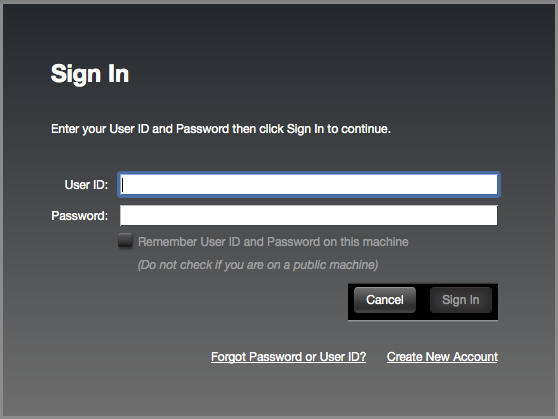
1. Open the iLok License Manager > Click Sign In.

2. Enter your iLok User ID and Password > Click Sign In.

3. Click the '• • Ɪ' icon.

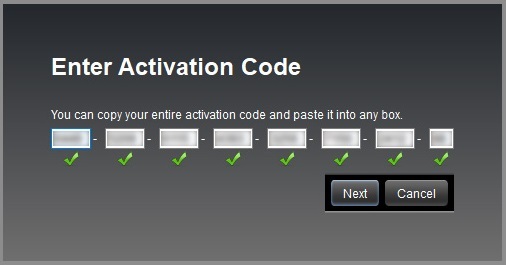
4. Enter the activation code listed under 'Serial Number' within your Plugin Boutique User Account > Click Next.

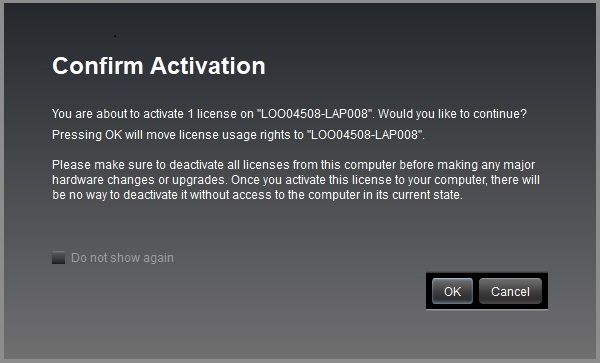
5. Select your computer as the activation location > Click Activate.
6. Click OK.

Your software is now activated and ready to use in your DAW.