Buy Ample China Dongxiao, get a free gift with purchase:
Ample China Dongxiao (ACDX) delivers the soulful, breath-infused tone of the traditional Chinese vertical bamboo flute in a deeply expressive virtual instrument, performed by Xiaokui Ding and built with Ample Sound’s advanced Woodwind Sample Engine. Capturing the sound of a masterbuilt Deep Blue Sea series G key Dongxiao by Linqiu Zhong, this 4.8 GB library features nuanced articulations across Head, Body, and Special FX groups — from graceful ascents and vibrato swells to improvisational phrases and intricate legato transitions. With powerful tone-shaping controls, adjustable wind layers, and a suite of studio-grade FX, ACDX offers composers and producers a beautifully detailed and highly playable recreation of one of China’s most evocative instruments.
Features
- Sampled from a G key Deep Blue Sea Dongxiao, crafted by Linqiu Zhong
- Three articulation groups: Head, Body, and Special FX, with real-time keyswitching
- Dynamic legato system with velocity-triggered phrasing and Double Legato mode
- Endless articulation transitions for evolving performances
- Creative Mirroring reverses articulations live for greater expression
- Adjustable Wind layer adds natural breath and realism
- 5 mic positions, with Mono, Modern, and Traditional mic modes
- Built-in FX suite: 8-band EQ, dual compressor, 6-tap delay, IR reverb
- SAHDS modulation system for per-voice control over vibrato and dynamics
System Requirements
- Windows: Windows 7/8/10/11, 64-bit only.
- Mac: 10.9 or higher
- VST2, VST3, AU, AAX and Standalone host.
- 10 GB Hard Disk, Intel i5 or higher.

Installation
Important Note: Both the instrument and its sample library must be installed in order for your Ample Sound plugin to work.
Mac
1. Click DOWNLOAD within your Plugin Boutique User Account.
2. The downloaded file contains links to your software packages. Download both the Mac instrument and its sample library, then open the instrument installation file (the file which does not include 'Library' in its name).
3. Click Continue.
4. Click Agree.
5. Click Continue.
6. Click Install.
7. Once installation has completed, click Close.
8. Next, open the downloaded library installation file (this will include 'Library' in its name). Click Continue.
9. Click Install.
10. Once installation has completed, click Close.
Windows
1. Click DOWNLOAD within your Plugin Boutique User Account.
2. The downloaded file contains links to your software packages. Download both the Windows instrument and its sample library, then open the instrument installation file (the file which does not include 'Library' in its name).
3. Click I accept the agreement, then click Next.
4. Click Next.
5. Click Next.
6. Click Next.
7. Click Next.
8. Click Install.
9. Once installation has completed, click Next.
10. Click Finish.
11. Once the instrument has been installed, open the sample library installation file (this will include 'Library' in its name).
12. Click Next.
13. Click Next.
14. Click Install.
15. Once installation has completed, click Finish.
Activation
Note: You will need an iLok account in order to activate your Ample Sound software.
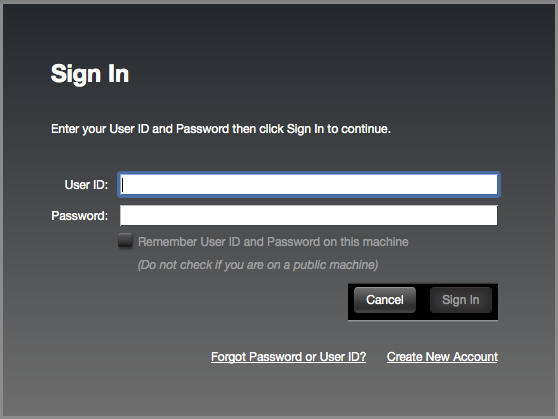
1. Open the iLok License Manager > Click Sign In.

2. Enter your iLok User ID and Password > Click Sign In.

3. Click the '• • Ɪ' icon.

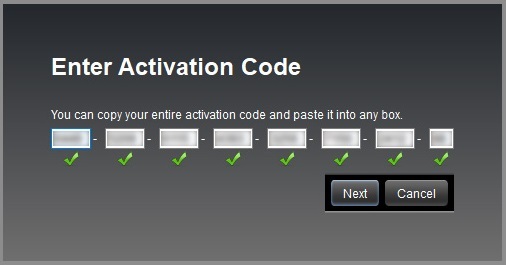
4. Enter the activation code listed under 'Serial Number' within your Plugin Boutique User Account > Click Next.

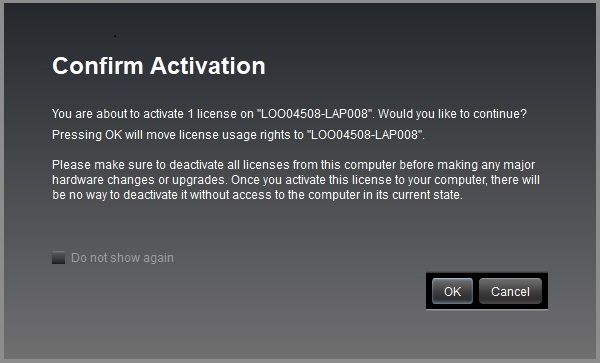
5. Select your computer as the activation location > Click Activate.
6. Click OK.

Your software is now activated and ready to use in your DAW.