Buy Ample China Pipa, get a free gift with purchase:
Ample China Pipa delivers a rich and expressive virtual recreation of the iconic Chinese lute through two distinct libraries: Master for traditional timbres and Expert for a modern, performance-forward tone. Featuring performances by two renowned Pipa soloists—Professor Yin Chen and Lisha Shang—this instrument captures the depth, nuance, and agility of real-world playing, all sampled from a hand-crafted Feng Wei Pipa. With a diverse articulation set, advanced tremolo and bend modeling, flexible legato, and a powerful strumming engine, Ample China Pipa offers stunning realism, whether you're composing classical pieces or pushing sonic boundaries.
Features
- Two sample libraries: Master (traditional) and Expert (modern), totaling 8.6 GB
- Recorded with AB and MS stereo techniques; mic volume fully adjustable
- 11 detailed articulations, including multiple tremolo types, legato slide, strum, and polyphonic legato
- Advanced tremolo control with 90 velocity-based start points and auto-looping
- Expressive bend system powered by physical modeling
- Realistic resonance and fret noise for enhanced authenticity
- Strum engine with 26 playing styles, strum legato, chord detection, and customizable rhythms
- Built-in EQ, compressor, echo, and IR reverb with real-time visual feedback
- Includes Pipa FX samples and natural strum recordings for lifelike performances
System Requirements
- Windows: Windows 7/8/10/11, 64-bit only.
- Mac: 10.9 or higher
- VST2, VST3, AU, AAX and Standalone host.
- Intel i5 or higher
Installation
Important Note: Both the instrument and its sample library must be installed in order for your Ample Sound plugin to work.
Mac
1. Click DOWNLOAD within your Plugin Boutique User Account.
2. The downloaded file contains links to your software packages. Download both the Mac instrument and its sample library, then open the instrument installation file (the file which does not include 'Library' in its name).
3. Click Continue.
4. Click Agree.
5. Click Continue.
6. Click Install.
7. Once installation has completed, click Close.
8. Next, open the downloaded library installation file (this will include 'Library' in its name). Click Continue.
9. Click Install.
10. Once installation has completed, click Close.
Windows
1. Click DOWNLOAD within your Plugin Boutique User Account.
2. The downloaded file contains links to your software packages. Download both the Windows instrument and its sample library, then open the instrument installation file (the file which does not include 'Library' in its name).
3. Click I accept the agreement, then click Next.
4. Click Next.
5. Click Next.
6. Click Next.
7. Click Next.
8. Click Install.
9. Once installation has completed, click Next.
10. Click Finish.
11. Once the instrument has been installed, open the sample library installation file (this will include 'Library' in its name).
12. Click Next.
13. Click Next.
14. Click Install.
15. Once installation has completed, click Finish.
Activation
Note: You will need an iLok account in order to activate your Ample Sound software.
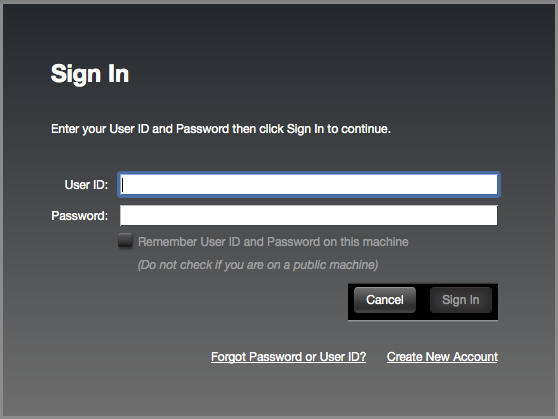
1. Open the iLok License Manager > Click Sign In.

2. Enter your iLok User ID and Password > Click Sign In.

3. Click the '• • Ɪ' icon.

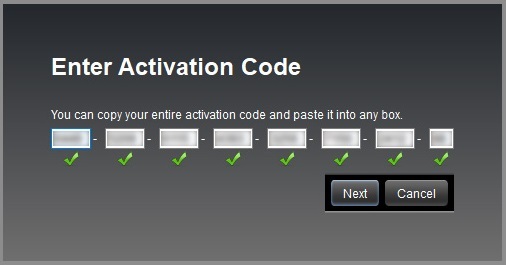
4. Enter the activation code listed under 'Serial Number' within your Plugin Boutique User Account > Click Next.

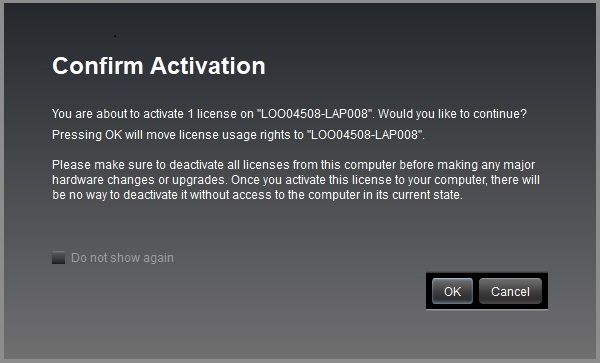
5. Select your computer as the activation location > Click Activate.
6. Click OK.

Your software is now activated and ready to use in your DAW.