


 Log In

Free gifts available with your purchase

Tekno Keyz is a virtual instrument based on the famous sounds of Techno-Pop from the 90s!
This plugin brings sounds inspired by the works of famous acts such as Technotronic, 2 Unlimited, Snap, La Boutche, Dr. Alban, KLF, and others.
Presets and sample maps include categories such as stabs, anthem melody lines, big synths, huge basses, FX, risers, drops, arpeggiated basslines, and even drum kits ready to load and play.
An extensive synthesis engine adds another level of sound design available for the user to sculpt their own patches or edit the factory sounds.
A huge multi-FX engine and arpeggiator further powers the dream sound of this plugin.
Main Features
- Up to 200 Factory Presets
- 2 Multisample Maps Engines
- 32 Step Arpeggiator
- Library Relocate
- Edit / Save Presets and Arps
- 9 Swappable Effects Available
Additional Features
Factory Presets:
- Comes Bundled with over 200 Factory Presets, 14 Anthem Leads, 34 Basses, 16 Drum Kits, 12 Fx Kits, 6 Guitars, 22 Keys, 12 Leads, 17 Orchestral Presets, 12 Organs, 09 Pads, 10 Risers, 12 Bass Arp Sequences,
- 19 Stabs, 10 Synths, 15 Vox Presets, 03 World sounds.
Multi-Sample Maps:
- 19 Bass Maps, 21 Stab Maps, 11 Dance Organ Maps, 16 Drum Kit Maps, 6 Multisample FX Maps, 6 Guitar Maps, 24 Keys Maps, 17 Orchestral Sounds Maps, 17 Synth Maps, 13 Vox Maps.
- The 2 Multisample Maps Engines A and B can be Layered or Split on the keyboard with automatic assignment via MIDI.
- All Controls on the plugin are MIDI mappable easily with a “right-click”.
Library Relocate :
- Easily place the content on any internal or external drive of your computer and just use the settings icon to
- Locate your library once. You can move the content anywhere at any time and re-connect it with the plugin.
Synthesis Features:
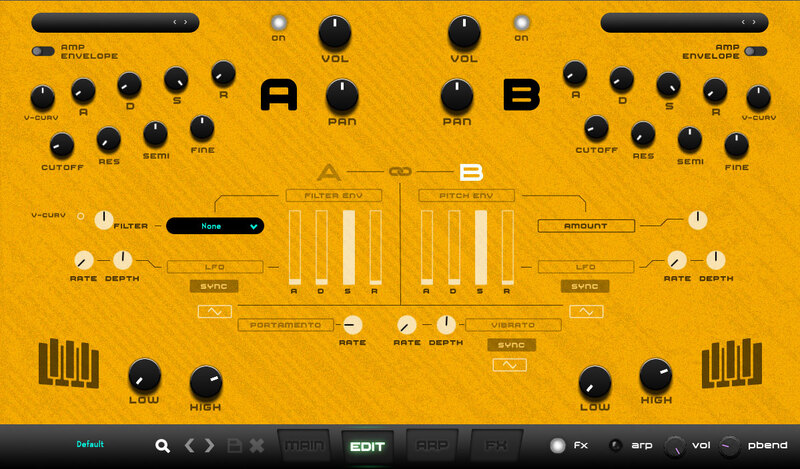
Each Engine Features :
- Amp Envelope – ADSR
- Filter envelope – ADSR
- Pitch Envelope – ADSR3 LFOs for Filter, Volume, and Pitch respectively.
- All Syncable to tempo. Featuring Rate and Depth Controls.
- Analog Modelled Ladder Filter with LP, HP, and BP modes with 12 or 24dB / Oct selections.
- Filter Cutoff and Resonance controls.
- Pitch Transpose, Tune.
- Portamento (Glide) with rate parameter.
- Velocity to Volume Curve adjustment & Velocity to Filter Cutoff Curve Adjustment.
- Key Range – assignable (via MIDI as well) for Both Engines A & B.
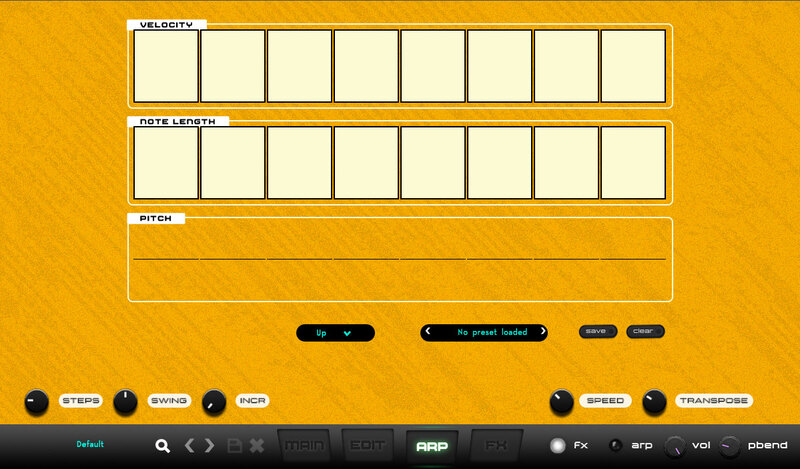
Arpeggiator:
- Up to 32 step Arpeggiator synced to tempo with Modulation in steps for :
- Velocity, Note Length, and Pitch.
- Save your own patterns and load factory patterns.
- Step Increment, Swing, and other features are also implemented.
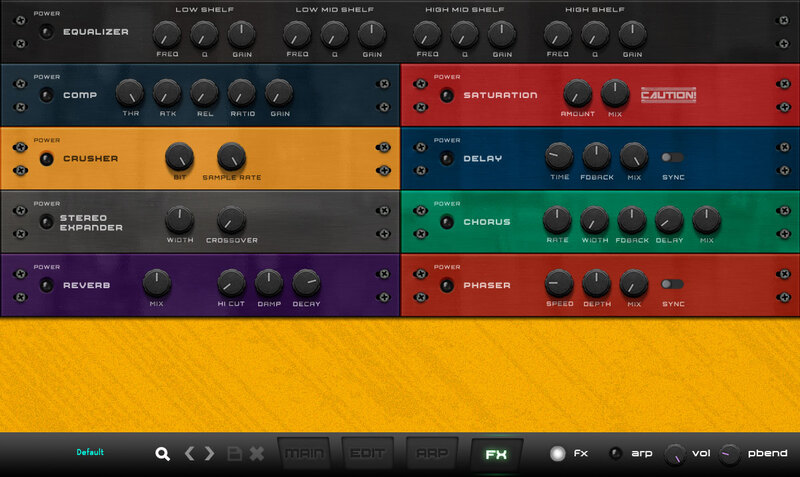
FX Engine:
- 9 Swappable Effects available :
- Reverb, Chorus/Flanger, Phaser, 4 Band EQ, Compressor, Bit Crusher, Delay, Saturator, Stereo Expander
System Requirements
Mac
- macOS 10.14 Mojave or later (64-bit only)
- Intel / M1 Apple Silicon Processor
- 2 GB RAM
- 300 MB Hard Disk Space
- VST3, AU, AAX
PC
- Windows 10 or later (64-bit only)
- Intel i5 or later / AMD Athlon 64 or equivalent
- 2 GB RAM
- 300 MB Hard Disk Space
- VST3, AAX
Tested on:
Mac: Logic Pro 7.2, Ableton Live 11, Pro Tools 12, Fl Studio 20
Important Note: M1 Mac users running Logic Pro (10.7.2 and above) or Ableton (11.1) please use the 'OSX-M1' installer. All other DAWs should use the regular 'OSX' installer.
Windows: Ableton Live 11, Pro Tools 12, Fl Studio 20, Bitwig, Reaper, Cubase
Known Issues:
- Slight arpeggiator drift in Logic and Pro Tools (fix coming in update)













