


Buy Borsta, get a free gift with purchase:

Brushed Percussion
Borsta is a new innovative percussion instrument specially designed for strokes and brushes. Its unique audio engine allows for an endless number of truly natural-sounding brushing phrases and rhythms. What sets Borsta apart from similar instruments is that its audio engine supports continuous changes in intensity. This makes it possible to create very life-like brushing phrases and patterns, something that can't be achieved with traditional sample-based instruments.
The parallel envelope and events sequencers allow you to determine exactly when to start a stroke, how the stroke's pressure/speed should evolve over time and when to end it. On top of that, all instruments also offers multi-sampled one-shots with advanced choking capabilities. Each instrument is based on more than 400 high-quality samples, recorded for playing with different velocities and round robins.
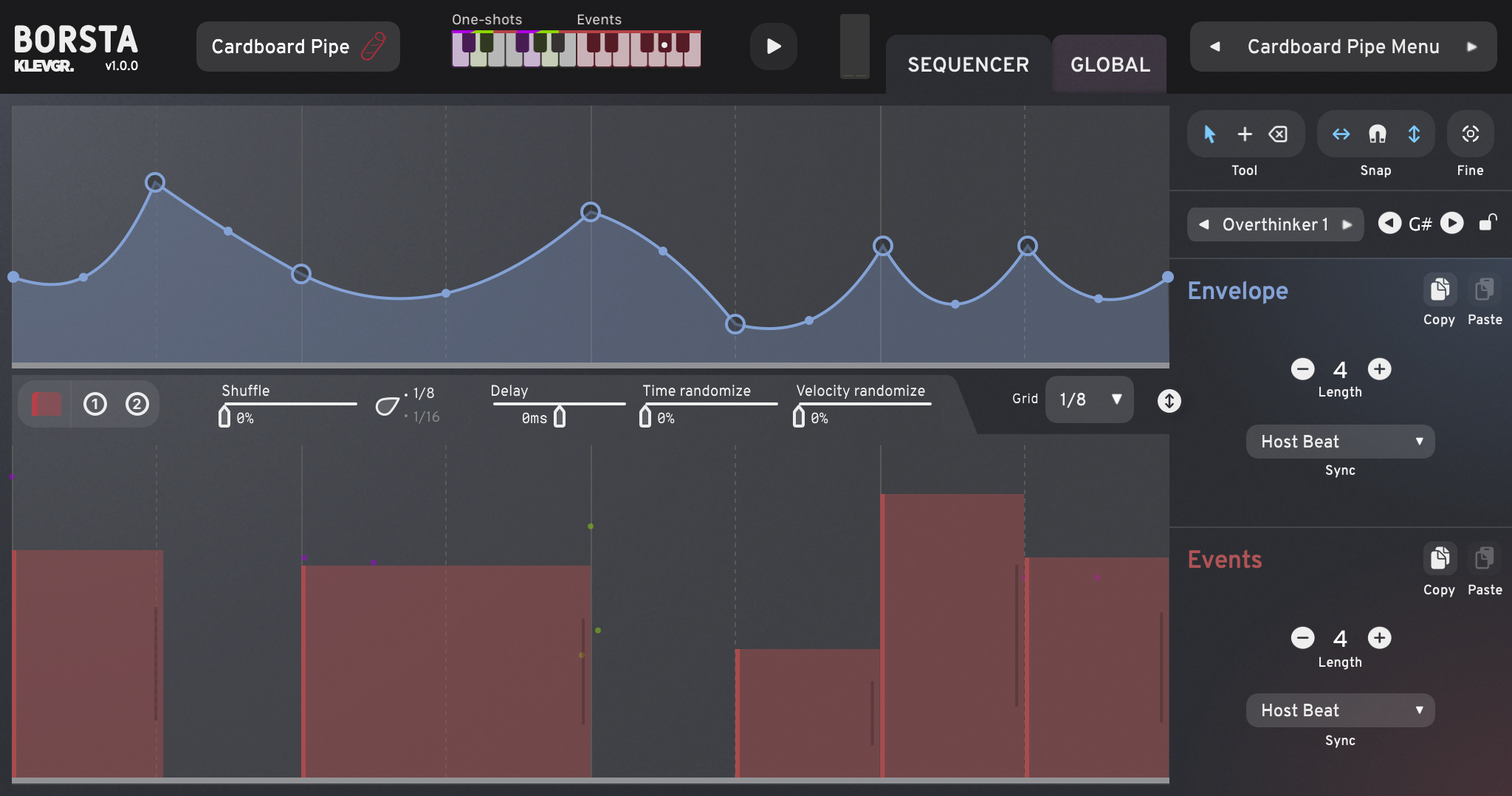
Borsta emulates a single drum instrument at a time, but comes with 18 different instruments to choose between. The sequences are played one at a time, however switching between sequences can be done seamlessly via MIDI, and additional one-shot samples can be triggered using an ordinary MIDI track.
The instruments are all structured and MIDI-mapped in a uniform way, which makes it possible to use the same sequence on any instrument. For instance, a traditional swing pattern will sound musically correct no matter whether you choose a Frame Drum, Tambourine or Snare Drum - it will just sound like the musician changed instruments. Borsta is a Swedish verb, meaning ”to brush”.
Features
- 18 high-quality instruments with 6 multi-sampled one shots each
- 230 pre-made factory sequences
- 60 Global presets covering different sounds and genres
- Separate volume and velocity curve control of each sound type
- Room simulation (9 different rooms)
- Reverb with adjustable decay time (6 different algorithms)
- Timbre adjustment control (harmonics)
- Overall pitch
- Three band equalizer
- Rusty Bucket
- Guira
- Pancake Drum
- Tambourine
- Frame Drum
- Pizza Box
- Cardboard Pipe
- Cajon
- Pandeiro
- Bakestone
- Cymbal Chains
- Snare Drum 1
- Snare Drum 2
- Snare Drum 3
- LOFI Snare Drum
- Metal Spade
- Djembe
- Iron Sticks
System Requirements
- macOS 10.10 or later (optimized for the M1-processor)
- Windows 7 SP1 or later
- AU, VST-2, VST-3, AAX
Please Note: Pana is used as the example:
Mac
License Redemption
1. Navigate to https://klevgrand.com/redeem > Paste your 16 digit redemption code found in your Plugin Boutique User Account > Click 'Submit!'.

2. Your redemption code has been accepted > Scroll down to Step 2.

3. Click either 'Sign in' if you already have a Klevgrand account, or 'Create new account' if you do not > Fill in your personal details > Click 'I'm ready'.

4. Your account has now been created.

5. Navigate to your email inbox and locate the activation email that you should have received from Klevgrand > Click 'Let me in!' to activate your account.

6. Create a password for your account > Click 'Enter Klevgrand'.

7. Your software and serial number is now available within your Klevgrand account > Click the Apple logo to download the installer file.

Installation
1. Launch the pana_x_x_x_macOS.dmg installer file.

2. Double click the KLEVGR. logo to launch the installer.

3. Click 'Continue'.

4. Click 'Continue'.

5. Click 'Agree'.

6. Click 'Install'.

7. Enter your system password > Click 'Install Software'.

8. Click 'Close'.

9. Navigate back to your Klevgrand My Account page > Click on the serial number to copy it to your clipboard.

10. Launch your DAW > Create a new audio track > Insert Pana onto the channel > Paste your serial number into the box.

Your software is now activated and ready to use within your DAW

Windows
License Redemption
1. Navigate to https://klevgrand.com/redeem > Paste your 16 digit redemption code found in your Plugin Boutique User Account > Click 'Submit!'.
2. Your redemption code has been accepted > Scroll down to Step 2.
3. Click either 'Sign in' if you already have a Klevgrand account, or 'Create new account' if you do not > Fill in your personal details > Click 'I'm ready'.
4. Your account has now been created.
5. Navigate to your email inbox and locate the activation email that you should have received from Klevgrand > Click 'Let me in!' to activate your account.
6. Create a password for your account > Click 'Enter Klevgrand'.
7. Your software and serial number is now available within your Klevgrand account > Click the Windows logo to download the installer file.
Installation
1. Unpack the pana_x_x_x_win.zip installer file > Launch the pana_x_x_x_win.exe file.

2. Click 'I accept the agreement' > Click 'Next'.

3. Click 'Next'.

4. Click 'Next'.

5. Click 'Next'.

6. Click 'Install'.

7. Click 'Finish'.

8. Navigate back to your Klevgrand My Account page > Click on the serial number to copy it to your clipboard.
9. Launch your DAW > Create a new audio track > Insert Pana onto the channel > Paste your serial number into the box.
Your software is now activated and ready to use within your DAW


