


 Log In

Free gifts available with your purchase

BigKick - Kick Drum Synthesiser
How many hours have you wasted searching through samples for the right kick? Or have you layered kick drums together and still not got the result you were after?
Do you want complete flexibility over the low end and attack of your kick?
The drums are the rhythm and groove of any track. And, the kick drum is the heartbeat of that groove. So you know how important it is to get the kick drum right in the mix. Big Kick was created with the sole intention of allowing you to achieve the results you have always wanted.
BigKick gets rid of the frustration and makes kick drum design easy and enjoyable. Download the demo now and discover how quickly you can get great professional results.
- “As powerful a kick drum instrument as you’re likely to find” – Music Tech Magazine
- “…the range of sounds it can produce is superb … for anyone involved in dance music it is a must …” – Sound On Sound review August 2014
Benefits:
- Achieve great bottom-end: design a drum that fits perfectly with your bass
- A quick and frustration-free solution: cut out hours of hunting through samples
- Get more out of your existing kick drum sample collection
- Start from scratch or use presets from D-Product, the Freemasons, Kris O'Neil and many more
Features
- Combines synthesis for flexibility and samples for extra-character
- Drag-and-drop: instant sample import and export to your DAW or Desktop. Drag finished samples straight out of the plugin to your host’s sampler. Or drag sounds straight from your track onto the Load Sample button to layer them with the synthesized kick drum!
- Flexible: Replicates most electronic kick drum sounds - with creative options to help you create the sounds of the future
- Big library: Factory library includes >300 attack types and 110 presets
- Tuned kick drums. Set the pitch to match your bass-line, or play the pitch of the kick drum with your MIDI keyboard
- Use your own samples: Easily integrates with your existing sample libraries
- Easy-to-use: Easier to use than any previous kick drum design tool. No complex envelopes to set - just sensible knobs for instant results
- Auto-play: click auto-play for an instant kick-drum metronome. Get started jamming without programming a single midi note
- Bonus samples: 100 free kick drums from the Loopmasters library come with the demo – yours to keep whether or not you buy the plugin!
- Creative options: Overdrive, three unique waveforms and a hard clipper
- Two kick drum body models: Original (covering a range of styles) and tough (which gets a harder-edged more electronic sound – great for trance and other clean, tight and hard genres)
- Safety first: A high pass filter helps you avoid nasty surprises in the sub-bass
- Preset management: Great new preset handling features, including folder creation, renaming, easier preset browsing, preset-pack creation tools and much more
- Fine-tuning: Built-in EQ to make your presets sit right in the mix quickly and a punch control to tuck the drum into your mix, or have it leap out and smack you in the face
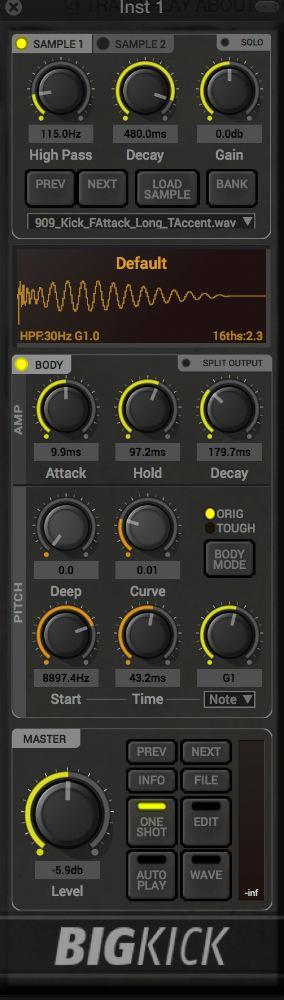
- Split output mode can be enabled using the button on the front of the UI. This routes the attack samples to a separate channel in your DAW for further processing, allowing the user to use other plugins for processing the kick attack and body separately
- The second sample layer allows for more fine-tuning of your kick sound
Attack
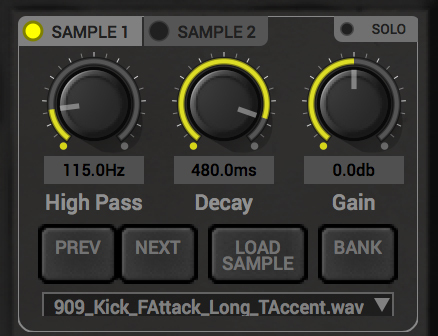
Load your existing kick samples to utilise their attack and character.
Body
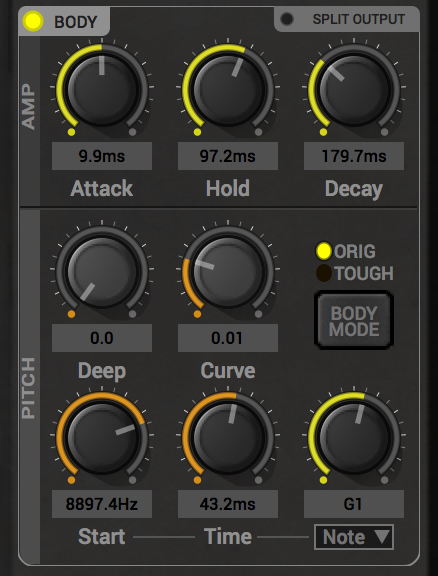
Tone Generator to shape the perfect low end into your kick with detailed envelope, pitch and note parameters.
View
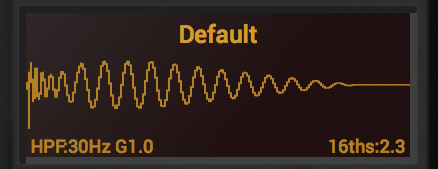
See your Kick Drum shape in real time then simply drag the sample straight into your DAW.
Preset Designers:
- Audialize
- Cutline
- Daniel Daly
- D-Product
- Freemasons
- Jamie Anderson
- Jim Credland
- John Lead
- Kris O’Neil
- Niche Audio
- Rasmus Faber and Timo Garcia
- With extra input from Nick Sentience
BigKick Expansion Packs Available!
There is a great collection of bespoke, genre inspired Expansion Packs specifically designed and available for BigKick!
Features
- 64 crafted kick drum presets
- 32 attack hits
- 32 attack presets
- Simply load in your presets with the new BigKick Preset Manager
System Requirements
Mac
- OS X 10.15 or later (M1 Apple Silicon compatible) (64-bit only)
- VST 2.4, VST3, AU, AAX
Please Note: AAX Format requires Pro Tools 10.3.6 and later.
Windows
- Windows 10 and above (64-bit only)
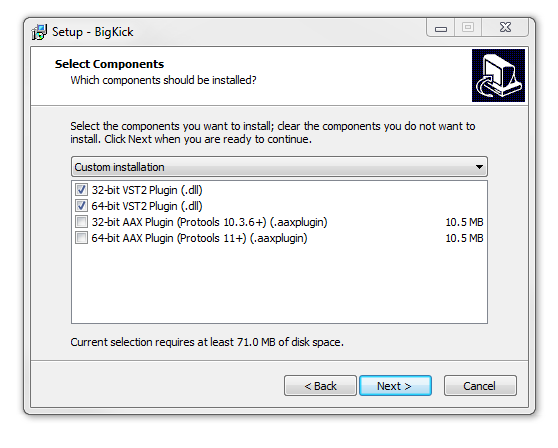
- VST 2.4, VST3, AAX
Please Note: AAX Format requires Pro Tools 10.3.6 and later.
Important Notes:
- BigKick is compatible with most major DAWs and is available for both Mac and PC computers.
- The plugin is 750 pixels high; as a result, may have minor issues in some sequencers on some netbooks or very low-resolution monitors.
Important note: When accessing this software via a Rent to Own plan or the Beatport Studio membership, it's installed and run through the Beatport Access portal. An internet connection is required every 30 days to validate your license.
Awards

Jerome Isma-Ae
German progressive house producer/DJ and owner of 'Jee Productions', Jerome Isma-ae.
"An essential tool in my daily studio-work. Fast and easy editing, there is almost no faster way to get the perfect kick for your track".
Joker
Dubstep Pioneer.
"The control and flexibility BigKick gives you instantly makes your kicks sound phat and fit in the mix!"
Jamie Anderson
"One of the best loved DJ/Producers in the Tech-House world.” iDJ Magazine.
"Highly recommended!"
The kick drum is at the heart of many kinds of music, and Plugin Boutique can help you get it just right. There are a fair few software drum modules on the market but very few of them actually focus entirely on one kind of drum sound, opting instead to model whole kits. Most are very good,...
Read MoreBig Kick is one of those specialist plug-ins that, as soon as you install it, makes you wonder how you ever managed without. It doesn't do much - just kick drums, that's it - but it does them easily, quickly and without fuss. As usual with these things, I downloaded the plug-in and my installe...
Read MoreWhether it’s astrophysics, astroturfing or ass-clapping, the key always lies in getting the basics right. In production, getting your ideas down as quickly as possible in a slick, workable format is the underlying intention behind all modern DAWs - get that sound in the right ballpark before t...
Read More
Reviews Summary
While it aims to provide a helpful overview, it may not capture every perspective or detail. We encourage you to read individual reviews to make an informed decision.
BigKick is widely praised by users as an intuitive, versatile, and high-quality kick drum synthesizer and shaping plugin across multiple music genres. Reviewers appreciate its fast workflow, analog-like sound quality, easy pitch and tail tuning, and the ability to design tailored kicks without endlessly browsing sample libraries. Minor criticisms include mixed opinions on preset variety, an apparent lack of recent software updates/maintenance, and one reviewer who encountered technical or sound issues resulting in thin-sounding kicks. Overall, most customers consider it an effective, valuable, and fun tool for sculpting kick drums.


