


 Log In
Free gifts available with your purchase
Drum Sampling Re-Defined
Sample The Future
BATTERY 4 is the cutting-edge drum sampler – the worldwide studio choice for creative beat production.
Supercharge Your Beats
BATTERY 4 combines an updated library with a radically-intuitive workflow that keeps the focus on creativity. With a clear, compelling interface, BATTERY 4 launches drum sampling into the future.
Cells in Harmony
Setting up kits is instantaneous. Factory samples and kits load with an ultra-clear color-coding system. Load your own samples and assign them colors for instant visual recognition. Innovative drag-and-drop MIDI learn lets you assign sounds to performance controllers with uninterrupted creative flow.
Sound Wrangler
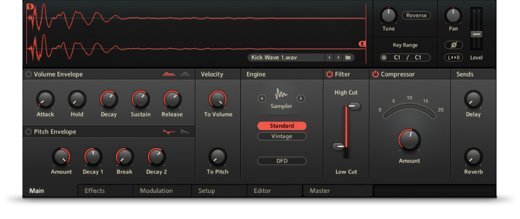
Working with samples has never been easier. Seven sample modes including classic sampler and groovebox emulations give you superior tonal variety. The Time Machine Pro algorithm delivers unparalleled time stretching. A gorgeous waveform display lets you adjust start and end points, volume curves, and more. And instant cell rendering allows for easy kit building and creative sound design.
Effects Everywhere
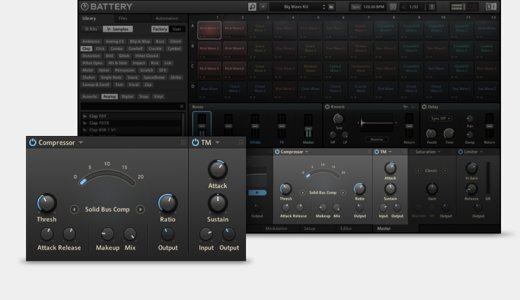
BATTERY 4 delivers powerful on-board effects – SOLID EQ, SOLID BUS COMP, TRANSIENT MASTER, tape saturation, LoFi, and a powerful convolution reverb. Apply them to cells, groups of cells or to the master outs. Create chains, re-order effects, and sidechain with drag-and-drop ease on four busses and the master channel.
When You Need More Drums
The BATTERY 4 library is vast, but sometimes you just need that special sound. Expansions offer tailor-made kits for BATTERY 4, based on specific genres. Spend less time searching for the right kicks, snares, hi hats, percussion and FX, with drum kits made to match your style.
Features
- Lightning-fast workflow for maximum creativity
- Supercharged library for electronic and urban styles
- Inspiring effects, intuitive routing and sidechaining
System Requirements
- Intel Mac (i5 or higher): macOS 11, 12 or 13 (latest update), 4 GB RAM
- Apple Silicon Mac (native mode or using Rosetta 2): macOS 11, 12 or 13 (latest update)
- Windows 10, 11 (latest Service Pack), Intel Core i5 or equivalent CPU, 4 GB RAM.
- An Internet connection and a graphics card that supports OpenGL 2.1 or higher are required to download and activate this product. Once installed and activated, the product can be used offline.
- Supported interfaces: Windows (64-bit only): Stand-alone, VST, VST3, AAX
- Mac OS X (64-bit only): Stand-alone, VST, VST3, AU, AAX
- 0.6 GB free disk space, 4.6 GB for complete installation.


