Log In
Free gifts available with your purchase
Beat Machine III – VST / AU – The Complete Drum Machine
When DopeSONIX released Beat Machine 1 and Beat Machine 2 these were aimed directly at the Hip Hop producer market. They realised that if we made another VST drum machine we had to expand our horizons and explore new genres. With Beat Machine 3 we believe we have managed to create a drum machine plug-in that covers pretty much every genre of music possible.
Beat Machine 3 will help you create everything from drum and bass breaks to rock rhythms, future bass bangers and tech-house standards. Your only limitation will be your own imagination.
Every Possible Drum Beat Imaginable!
Use one of the 300 MIDI drum patterns included, add it to your DAW of choice, select one of the 300 included drum kits and away you go. Not happy with the drum kit? scroll through the extensive and varied collection until you find one that fits your track. It's that easy!
Boom Bap
The classic sound of the golden era of Hip Hop production. Hard and heavy kicks, crunchy snares and dirty hi-hats all processed with a cool MPC vibe.
Breaks
These drum sounds were taken from a variety of classic style live drum breaks, so expect plenty of perfectly suited sounds all layered with that gritty vinyl atmosphere.
Drill
You know the flex, hard-hitting 808 drum kits with a deadly modern twist. Tights kicks are designed to complement the 808 bass, snappy snares and bright hi-hats to cut through any mix.
EDM
This is our biggest selection within the plug-in as we had to incorporate many styles under one umbrella. Everything from Tech House, Future Bass, DnB, Dubstep, Afrobeats, UK Garage and even old school Disco!
Live
We have included an amazing collection of perfectly sampled live drum kits ranging from Jazzy brush vibes to heavy rock drums and everything in between. Perfect for a whole variety of genres that require a live kit.
LoFi
We’ve created a collection of hazy LoFi drum kits with that Boom Bap essence softened for the Chillout, study beats crowd. Dripping with warmth and soothing character.
Machines
A complete collection of sampled vintage drum machines perfect for all styles of production ranging from classic 80’s pop to modern-day cyberpunk and synth-wave.
Trap
Huge, hard-hitting festival and club sounds take the 808 drum kit aesthetic and move it onto another level. Just what you need to make your drum beats hit bigger than ever before.
Weird
We choose this weird category for all the drum kits that didn’t quite fit into any established genres. Expect off the wall drum sounds designed for experimental drum patterns and productions.
Features
- 300 High-quality drum kits for almost every style imaginable.
- 300 MIDI drum patterns for all styles inc Trap, Drill, LoFi, Boom Bap, Rock, EDM, House, DnB and more.
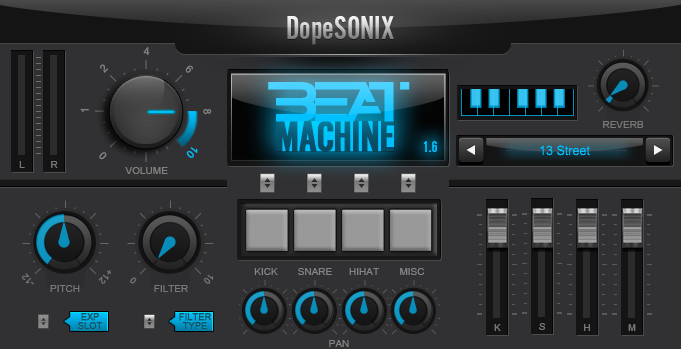
- Built-in flexible pitch, pan and gain controls.
- Includes a built-in analogue style reverb.
- Includes a built-in Hi/Lo Pass Filter
- Stereo output level meter.
- Stereo or Multi-Out routing options.
- Ultra low CPU usage [perfect if you own a laptop / tablet / low spec PC/MAC].
- Ultra-fast patch loading [flick through patches in lightning-quick times].
- Program your drum MIDI patterns manually or use a MIDI/USB controller/keyboard/MPD.
System Requirements
Windows
- Windows 7 or later (Windows 11 supported) (32 or 64-bit)
- 800 MB Disk Space
- 1 GB RAM
- 32 / 64-bit VST host
Mac
- Mac OS X 10.4 and later (Monterey / Apple Silicon supported)
- 800 MB Disk Space
- 2 GB RAM
- 64-bit AU or VST host
Please Note: This product is not compatible with Pro Tools.