Klevgrand

Slammer

4.7 (225 Reviews)
$19.99 $39.99

50% off until Dec 11

Klevgrand Slammer
Klevgrand Slammer
Klevgrand Slammer - GUI
Klevgrand Slammer - Overview Video gallery thumbnail
Klevgrand Slammer - Demo Video gallery thumbnail
Klevgrand Slammer - Example Video gallery thumbnail
Klevgrand Slammer - Live Drumming Demo Video gallery thumbnail
Buy Now
Product information

Drum Instrument

Instantly fun drumming with carefully sampled drums

Slammer is a multi-sampled drum plug-in that contains 30 different instruments made from a large number of carefully recorded and edited samples. Integrated custom-built real-time effects combined with some clever routing makes Slammer a versatile and flexible virtual instrument that is capable of rendering anything from natural acoustic to heavily distorted and compressed drum sounds.

Each sound can be customized with a wide array of settings like pitch, filtering, effect sends, decay time, velocity mapping, and much more.

There’s also a “Dirt” section for distortion and compression, a reverb, and tone control. The amount of “dirt” and reverb can be tweaked individually for each instrument. On top of all, Slammer comes with a set of factory presets, covering anything from light and slick to heavy and gritty.

If you're looking for a drum instrument, giving you 'instant gratification' from the first hit, this is it.

Anatomy

Main View
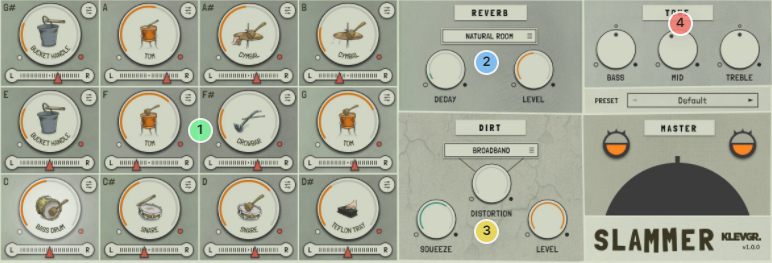
1. A dozen of noises - There are 12 sound slots, each with selectable sounds + lots of individual settings

2. Go to your room! - A very nice built-in reverb module.

3. De-polish - Squeeze & distortion will add lots of character to your kit.

4. Tone in - No-fuss EQ for the final touch

Instrument Details
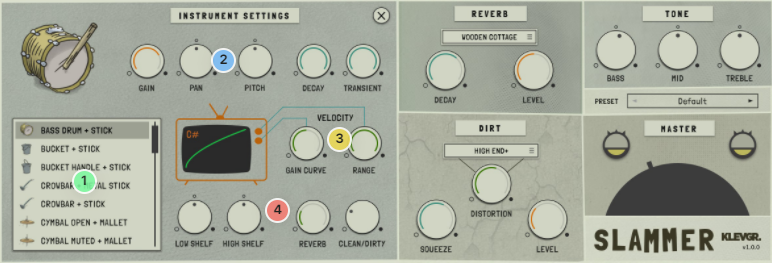
1. The hit list - A well-balanced smörgåsbord of all the sounds you may need.

2. Jet-settings - Individual settings for shaping the gain, pan, pitch, decay, and transient impact.

3. Above the curve - Control the curve that decides how the instrument responds to your key velocity

4. Final touch - Simple EQ + reverb & dirt send control.

Features

  • 30 multi-sampled instruments using more than 2000 samples
  • 12 slots/instrument players with individual tweaking possibilities
  • Compression and Distortion section (dirt) with 8 different dist algorithms
  • Reverb with several presets
  • Plenty of factory presets
  • Global tone control

System Requirements

  • macOS 10.10 or later (optimized for the M1-processor)
  • Windows 7 SP1 or later
  • AU, VST-2, VST-3, AAX

Installation Instructions

Please Note: Pana is used as the example:

Mac

License Redemption

1. Navigate to https://klevgrand.com/redeem > Paste your 16 digit redemption code found in your Plugin Boutique User Account > Click 'Submit!'.

2. Your redemption code has been accepted > Scroll down to Step 2.

3. Click either 'Sign in' if you already have a Klevgrand account, or 'Create new account' if you do not > Fill in your personal details > Click 'I'm ready'.

4. Your account has now been created.

5. Navigate to your email inbox and locate the activation email that you should have received from Klevgrand > Click 'Let me in!' to activate your account.

6. Create a password for your account > Click 'Enter Klevgrand'.

7. Your software and serial number is now available within your Klevgrand account > Click the Apple logo to download the installer file.

Installation

1. Launch the pana_x_x_x_macOS.dmg installer file.

2. Double click the KLEVGR. logo to launch the installer.

3. Click 'Continue'.

4. Click 'Continue'.

5. Click 'Agree'.

6. Click 'Install'.

7. Enter your system password > Click 'Install Software'.

8. Click 'Close'.

9. Navigate back to your Klevgrand My Account page > Click on the serial number to copy it to your clipboard.

10. Launch your DAW > Create a new audio track > Insert Pana onto the channel > Paste your serial number into the box.

Your software is now activated and ready to use within your DAW

Windows

License Redemption

1. Navigate to https://klevgrand.com/redeem > Paste your 16 digit redemption code found in your Plugin Boutique User Account > Click 'Submit!'.

2. Your redemption code has been accepted > Scroll down to Step 2.

3. Click either 'Sign in' if you already have a Klevgrand account, or 'Create new account' if you do not > Fill in your personal details > Click 'I'm ready'.

4. Your account has now been created.

5. Navigate to your email inbox and locate the activation email that you should have received from Klevgrand > Click 'Let me in!' to activate your account.

6. Create a password for your account > Click 'Enter Klevgrand'.

7. Your software and serial number is now available within your Klevgrand account > Click the Windows logo to download the installer file.

Installation

1. Unpack the pana_x_x_x_win.zip installer file > Launch the pana_x_x_x_win.exe file.

2. Click 'I accept the agreement' > Click 'Next'.

3. Click 'Next'.

4. Click 'Next'.

5. Click 'Next'.

6. Click 'Install'.

7. Click 'Finish'.

8. Navigate back to your Klevgrand My Account page > Click on the serial number to copy it to your clipboard.

9. Launch your DAW > Create a new audio track > Insert Pana onto the channel > Paste your serial number into the box.

Your software is now activated and ready to use within your DAW

Plugin Boutique Rewards

Discover the most rewarding loyalty programme among all plugin retailers.

  • Free Loopmasters Samplepacks
  • Discounts on products and courses
  • Extra Virtual Cash claimed immediately at checkout
Find out more

Follow us:

X (Twitter) Facebook YouTube Instagram
Logo Logo

Plugin Boutique Limited, Part of the Beatport Group LLC.

Copyright © 2011-2025 Plugin Boutique. All rights reserved