Buy XO Expansion: Sub Liminal by ATEQ, get a free gift with purchase:
Hypnotic techno, dub & minimal beats and samples
Sub Liminal is your VIP backdoor entrance to the sound of the underground techno club scene. Handcrafted by Berlin based mastermind producer and sound designer ATEQ (Florian Lepa), it offers pure minimal techno and dub perfection, ready to spark inspiration and fuel your productions.
Raised in raves that - in true Berlin fashion - sometimes start on Friday and end on Monday, ATEQ knows clubbing is a marathon, not a sprint.
The same goes for his productions - it's hypnotic meditations on pummeling kick drums, textured snares, crisp hi-hats, and inspiring percussion, handcrafted and melded in pitch-perfect symbiosis.
Sub Liminal delivers transcending soundscapes paired with unique samples crafted from ATEQs organic and meticulous sound design process, where he lets his modular synthesizers and drum machines oscillate and blend into equally captivating and unique sounds.
ATEQ
ATEQ's love for electronic music started at an early age when he discovered Jean-Michel Jarre and Kraftwerk. Ever since he's explored the artistic outer rims of music creation and sound design.
The Berlin native (real name Florian Lepa) is somewhat of a best kept secret of the German capital s influential underground electronic scene, playing clubs, and releasing music via his own label "Pale Product . If you know ATEQ, you know.
His singular mix of techno, dub, and minimal electronic music draped in hypnotic, cinematic soundscapes creates visual worlds for the listener. Lepa draws inspiration from his background as a visual artist and the interaction and synergies created in audiovisual mediums.
He constantly chases happy accidents, letting modular synthesizers and drum machines react with one another, capturing the controlled chaos and later sifting out the gold. This way, nothing is ever the same, and I can always find inspiration, he concludes.
Features
- Mix-ready, fully editable loops
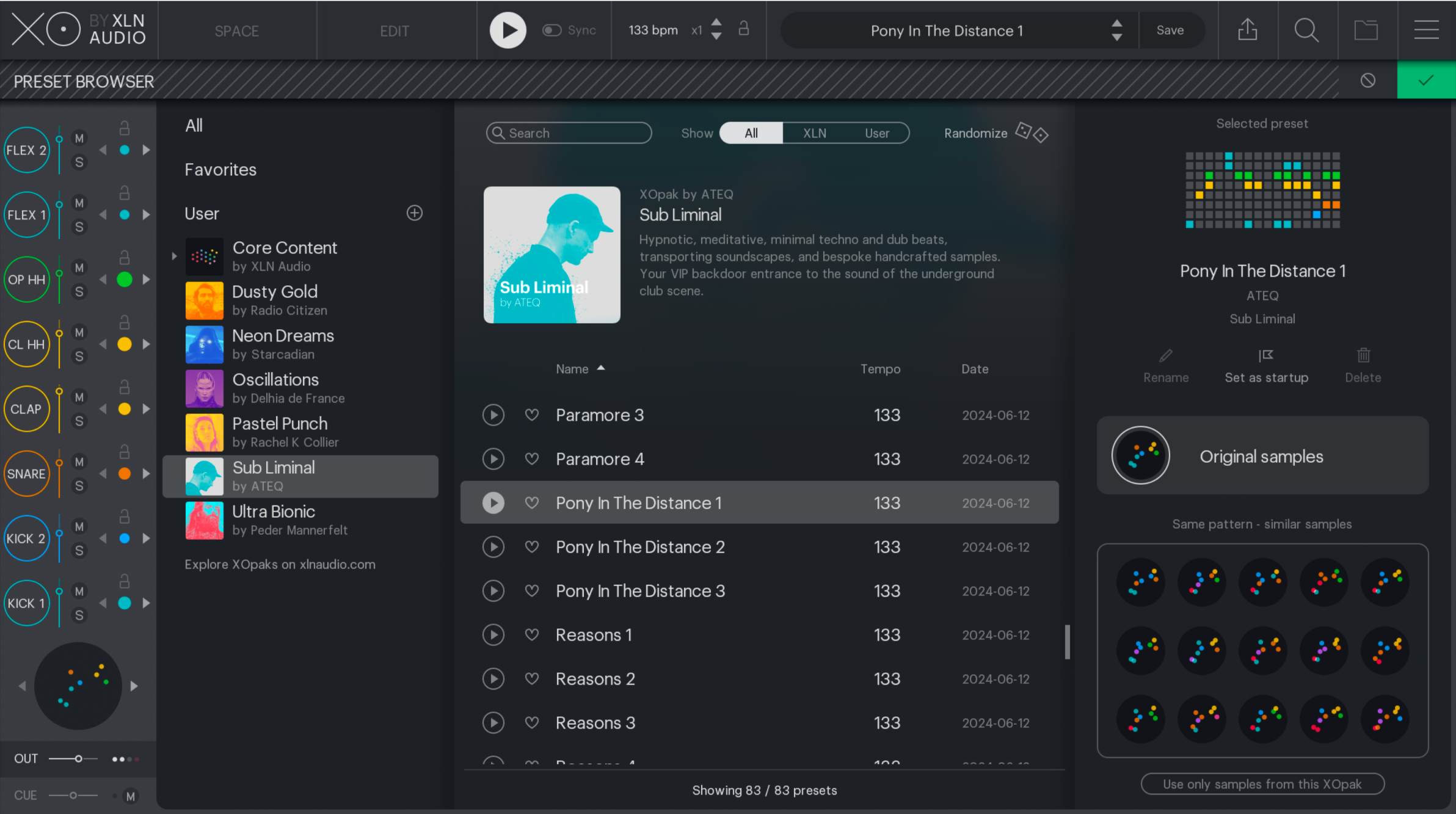
- 83 inspiring presets & 383 curated one-shot samples
- Hypnotic and meditative minimal techno beats & samples
System Requirements
- XLN Audio's XO is required in order to use this expansion pack.
Please Note: XOpak: Preheated is used as an example.
Account Registration
(If you have already created an XLN Audio account previously, please skip this part).
1. Go to the XLN Audio registration page (where you can now register for an account, and register your product key at the same time).
2. Enter your details, click 'I have a product key to register' and enter the code found in your Plugin Boutique account (displayed as Serial Number).
3. Click 'I agree to the Terms & Conditions' and then click REGISTER.

You have now created an XLN Audio account and registered your product key.
Product Registration
(If you registered your product earlier when creating an account, skip this part).
1. Log in to your XLN Audio account.

2. Hover over My Account and select Register Product Key.

3. Enter the product key found in your Plugin Boutique account and click REGISTER PRODUCT KEY.

Your product has now been added to your XLN Audio account.
Mac
XLN Online Installer Installation
1. Download the Mac XLN Online Installer from your Plugin Boutique account and open it.
2. Double-click to install the XLN Online Installer.

3. Click Open (depending on your version of macOS, you may not encounter this security message).

4. Enter your password and click OK.

5. Click Open to finalise the security prompt.

6. Log in to your XLN Audio account.

7. Enter a name for your Mac and click Register Computer.

The XLN Online Installer is now installed.
Product Installation
1. Make sure your new product is selected and click 'Click to start - Install: 1'.

2. Your software will now install.

3. Open your DAW and launch XO > click 'Show Presets'.

Your XOpak is now ready for use!

Windows
Online Installer Installation
1. Download the Windows XLN Audio Online Installer from your Plugin Boutique account and open it.
2. Click Yes to allow the application to run.
3. Log into your XLN Audio account.

4. Enter a name for your computer and click Register Computer.
The XLN Online Installer is now installed.
Product Installation
1. Make sure your new product is selected and click 'Click to start - Install: 1'.

2. Your software will now install.

3. Open your DAW and launch XO > click 'Show Presets'.

Your XOpak is now ready for use!
