/ Expansion Packs / BigKick Expansion V15 - EDM V1 Kicks with Scott Diaz
Plugin Boutique

BigKick Expansion V15 - EDM V1 Kicks with Scott Diaz

4.6 (182 Reviews)
$5.00 $15.00

66% off until Dec 07

BigKick Expansion V15 - EDM V1 Kicks with Scott Diaz - Main Image
Buy Now
Product information

Our Fifteenth BigKick Expansion Comes Courtesy of Scott Diaz

Speaker thumping kick drums carefully crafted for varied styles of EDM. 

This expansion features a collection of 64 well rounded and heavy speaker-smashing kick drums. All the kicks have serious weight delivered through the sub tone generator preciously mixed with with the transient character from the attack samples featured from Scott's personal sample collection. Drop the kicks directly into your new EDM productions or edit and personalise using BigKick's controls to sculpt your perfect kick drum.  

Features

  • 64 crafted kick drum presets
  • 32 attack hits
  • 32 attack presets
  • Simply load in your presets with the new BigKick Preset Manager

System Requirements

  • The full version of BigKick is required to run this expansion pack

Important Note: Plugin Boutique's BigKick Drum Generator is required to run this software!

Installation Instructions
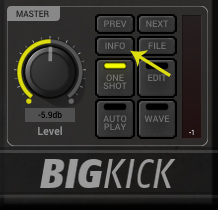
Note: Kilholm expansion used as the example.

Mac

1. Download the .zip folder from within your User Account, and double-click it to open and reveal its contents.

2. Open BigKick within your DAW and click the ‘Info’ tab.

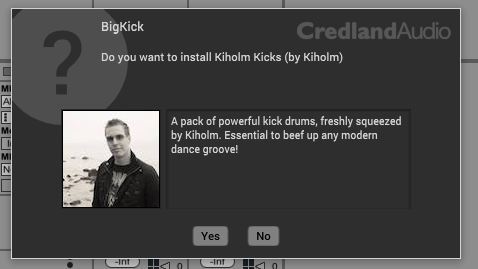
3. Click ‘Yes’ to confirm that you wish to install the expansion pack.

4. Locate the .big file from within the extracted folder and click ‘Open’.

5. Click ‘Yes’ to confirm that you wish to install the expansion pack.

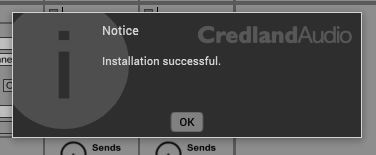
6. Once the installation is complete you will receive this message > click ‘OK’ to finish the installation.

The Expansion Pack is now Ready for Use Within BigKick!

Windows

1. Download the .zip folder from within your User Account, and double-click it to open and reveal its contents.

2. Open BigKick within your DAW and click the ‘Info’ tab.

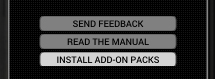
3. Click ‘Install Add-On Packs’.

4. Locate the .big file from within the extracted folder and click ‘Open’.

5. Click ‘Yes’ to confirm that you wish to install the expansion pack.

6. Once the installation is complete you will receive this message > click ‘OK’ to finish the installation.

The Expansion Pack is now Ready for Use Within BigKick!

Bundle & Save

Plugin Boutique BigKick Complete Expansion Bundle
$59.00
$139.00 (57% off)

Plugin Boutique Rewards

Discover the most rewarding loyalty programme among all plugin retailers.

  • Free Loopmasters Samplepacks
  • Discounts on products and courses
  • Extra Virtual Cash claimed immediately at checkout
Find out more

Follow us:

X (Twitter) Facebook YouTube Instagram
Logo Logo

Plugin Boutique Limited, Part of the Beatport Group LLC.

Copyright © 2011-2025 Plugin Boutique. All rights reserved