Buy BigKick Expansion V16 - Drum & Bass V3 Kicks with MachineCode, get a free gift with purchase:
Our Sixteenth BigKick Expansion Comes Courtesy of MachineCode
Precisely crafted kick drums for future Drum & Bass.
Fresh from album projects on EatBrain and Critical Music, Current Value & Dean Rodell (Aka MachineCode) have delved into their kick drum sample collection and expertly produced 64 rounded and driving kick presets for the BigKick.
The duo's extensive and cutting edge productions are released on the leading labels within Drum & Bass and regularly receive air play from Noisia. This expansion delivers exactly what you would expect from the sonic masters.
Check out the audio demo above to hear the kick drums in action!
Features
- 64 crafted kick drum presets
- 32 attack hits
- 32 attack presets
- Simply load in your presets with the new BigKick Preset Manager.
System Requirements
- The full version of BigKick is required to run this expansion pack
Important Note: Plugin Boutique's BigKick Drum Generator is required to run this software!
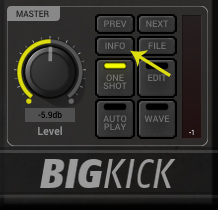
Note: Kilholm expansion used as the example.
Mac
1. Download the .zip folder from within your User Account, and double-click it to open and reveal its contents.
2. Open BigKick within your DAW and click the ‘Info’ tab.

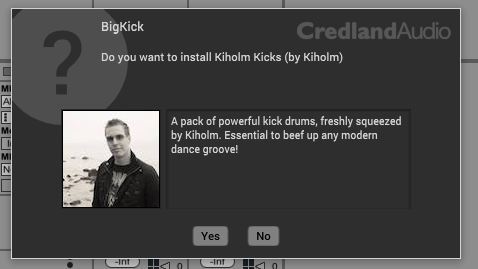
3. Click ‘Yes’ to confirm that you wish to install the expansion pack.

4. Locate the .big file from within the extracted folder and click ‘Open’.

5. Click ‘Yes’ to confirm that you wish to install the expansion pack.

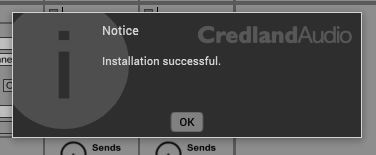
6. Once the installation is complete you will receive this message > click ‘OK’ to finish the installation.
The Expansion Pack is now Ready for Use Within BigKick!

Windows
1. Download the .zip folder from within your User Account, and double-click it to open and reveal its contents.
2. Open BigKick within your DAW and click the ‘Info’ tab.

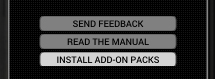
3. Click ‘Install Add-On Packs’.

4. Locate the .big file from within the extracted folder and click ‘Open’.


5. Click ‘Yes’ to confirm that you wish to install the expansion pack.

6. Once the installation is complete you will receive this message > click ‘OK’ to finish the installation.
The Expansion Pack is now Ready for Use Within BigKick!