/ Expansion Packs / BigKick Expansion - PsiFi Kicks
Plugin Boutique

BigKick Expansion - PsiFi Kicks

4.7 (238 Reviews)
$5.00 $15.00

66% off until Dec 07

BigKick Expansion - PsiFy Kicks Rectangle Image
Buy Now
Product information

PsiFi Kicks is a collection of 64 crafted kick drum presets for the powerfully flexible BigKick drum generator.

This pack contains a multitude of A-List kick drums which have been meticulously designed to fill the dancefloors for all styles of Trance, Psytrance, Progressive, Goa to full-on psychedelic productions and more.

Each kick drum has been tested to lock in tight with hard-hitting ubiquitous 16th note bassline sequences, providing you with the weight and power needed to kickstart your psychedelic journey.

Purchase this pack today and inject the PsiFi edge to your music with instant results!

Check out the audio demo to hear a selection of these presets in action.

Features

  • 64 crafted kick drum presets
  • 32 attack presets
  • Simply load in your presets with the new BigKick Preset Manager

System Requirements

  • The full version of BigKick is required to run this expansion pack

Important note: Plugin Boutique's BigKick Drum Generator is required to run this these presets!
Installation Instructions

Note: Kilholm expansion used as the example.

Mac

1. Download the .zip folder from within your User Account, and double-click it to open and reveal its contents.

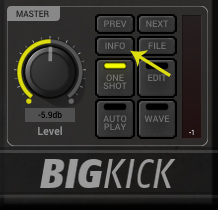
2. Open BigKick within your DAW and click the ‘Info’ tab.

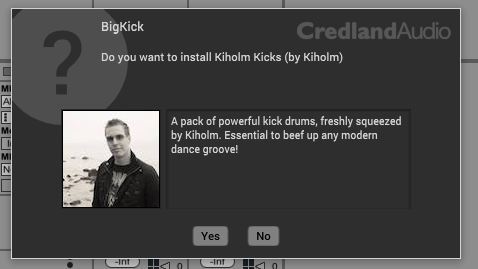
3. Click ‘Yes’ to confirm that you wish to install the expansion pack.

4. Locate the .big file from within the extracted folder and click ‘Open’.

5. Click ‘Yes’ to confirm that you wish to install the expansion pack.

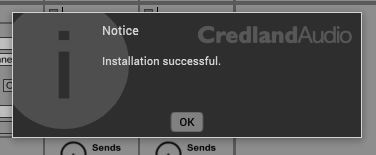
6. Once the installation is complete you will receive this message > click ‘OK’ to finish the installation.

The Expansion Pack is now Ready for Use Within BigKick!

Windows

1. Download the .zip folder from within your User Account, and double-click it to open and reveal its contents.

2. Open BigKick within your DAW and click the ‘Info’ tab.

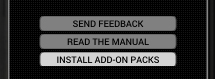
3. Click ‘Install Add-On Packs’.

4. Locate the .big file from within the extracted folder and click ‘Open’.

5. Click ‘Yes’ to confirm that you wish to install the expansion pack.

6. Once the installation is complete you will receive this message > click ‘OK’ to finish the installation.

The Expansion Pack is now Ready for Use Within BigKick!

Bundle & Save

Plugin Boutique BigKick Complete Expansion Bundle
$59.00
$139.00 (57% off)

Plugin Boutique Rewards

Discover the most rewarding loyalty programme among all plugin retailers.

  • Free Loopmasters Samplepacks
  • Discounts on products and courses
  • Extra Virtual Cash claimed immediately at checkout
Find out more

Follow us:

X (Twitter) Facebook YouTube Instagram
Logo Logo

Plugin Boutique Limited, Part of the Beatport Group LLC.

Copyright © 2011-2025 Plugin Boutique. All rights reserved