/ Expansion Packs / Vacuum Pro Expansion: Total Eclipse
AIR Music Technology

Vacuum Pro Expansion: Total Eclipse

4.8 (57 Reviews)
$19.99
Total Eclipse
Total Eclipse
Buy Now
Product information

Important Note: You must own Vacuum Pro in order to use this expansion.

​In the darkness where forged 30 incredible new patch pre-sets for this superb sounding analogue soft synth from Air Music Tech.

This Library was conceived with the idea that not all sounds need to necessarily be for EDM.  Bring these incredible sounds out into the light. You will find in this pack Pads, Bass, FX , String sounds, it has everything. Play with chords or single notes and use of the mod wheel for extra fx.

System Requirements

Mac: 

  • Mac OS X 10.8.5-10.12; Core Duo Processor (Core i5 or i7 Recommended)

PC: 

  • Windows 10, 8 or Windows 7 Service Pack 1; Minimum Dual Core 2GHz (Intel Core i5 or i7 Recommended)

Formats:

VST (32 bit and 64 bit) qualified for:

  • Ableton Live, Cubase, Arsenal

AU (64 bit only) qualified for:

  • Logic Pro X

AAX qualified for:

  • ProTools 11.x (64 bit)

RTAS qualified for:

  • 32-bit ProTools

Please Note:

  • Minimum RAM 4GB (8GB or more recommended)
  • 1GB free hard drive space required (Download and Installation)
  • Internet Access Required (Download and Authorization)
  • You must already own Vacuum Pro to use this expansion
  • No iLok key required
Installation Instructions

Please Note: Vacuum Pro Expansion: Dystopian World is used as an example.

Mac

1. Download the preset pack from within your Plugin Boutique User Account > double-click the .zip file to extract the contents.

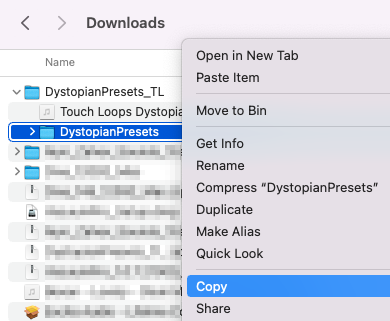
2. Navigate through the folder until you locate the 'Presets' folder > Rename the folder to 'DystopianPresets' (or whatever the preset pack's name is) > Right-click the folder and select 'Copy'.

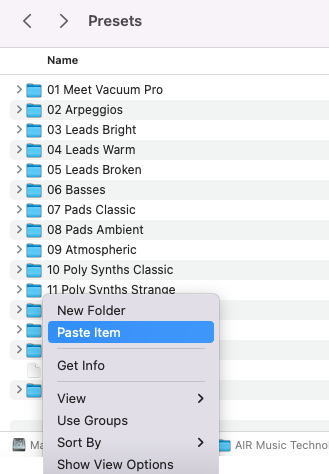
3. Navigate to "Macintosh HD / Applications / AIR Music Technology / VacuumPro / Presets" > Right-click and select 'Paste Item'.

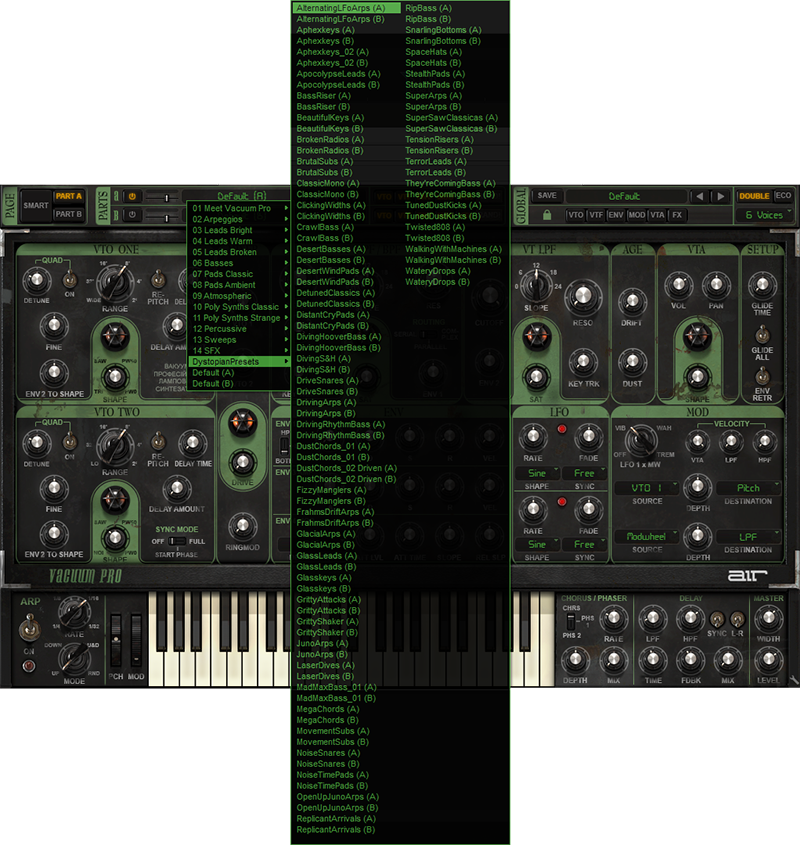
4. Open your DAW > Launch VacuumPro > Click the preset browser by clicking 'Default' > Navigate to 'DystopianPresets' > Select a patch.

Your presets are now installed and ready to use.

Windows

1. Download the preset pack from within your Plugin Boutique User Account > double-click the .zip file to extract the contents.

2. Navigate through the folder until you locate the 'Presets' folder > Rename the folder to 'DystopianPresets' (or whatever the preset pack's name is) > Right-click the folder and select 'Copy'.

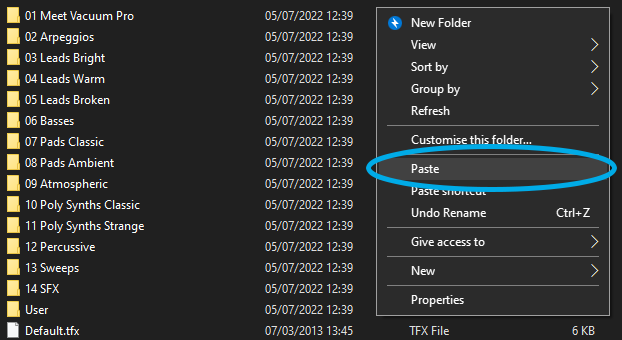
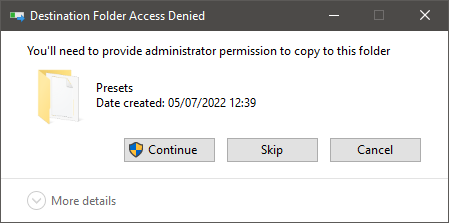
3. Navigate to "Windows (C:) / Program Files (x86) / AIR Music Technology / VacuumPro / Presets" > Right-click and select 'Paste'.

4. Click 'Continue'.

5. Open your DAW > Launch VacuumPro > Click the preset browser by clicking 'Default' > Navigate to 'DystopianPresets' > Select a patch.

Your presets are now installed and ready to use.

Plugin Boutique Rewards

Discover the most rewarding loyalty programme among all plugin retailers.

  • Free Loopmasters Samplepacks
  • Discounts on products and courses
  • Extra Virtual Cash claimed immediately at checkout
Find out more

Follow us:

X (Twitter) Facebook YouTube Instagram
Logo Logo

Plugin Boutique Limited, Part of the Beatport Group LLC.

Copyright © 2011-2025 Plugin Boutique. All rights reserved