/ Expansion Packs / XO Expansion: Ultra Bionic
XLN Audio

XO Expansion: Ultra Bionic

4.8 (98 Reviews)
$19.00 $39.00

51% off until Dec 08

XLN Audio XOpak: Ultra Bionic
Buy Now
Product information

Techno & Electro. Artful Noises and Beats.

Take your sound into new dimensions of noise with experimental Techno genius Peder Mannerfelt and his well-loved collection of modular synth glitchery. From breakbeat electro to hardcore rave.

One of the shining lights of the IDM world Peder Mannerfelt gives you exclusive access to his incredible collection of music-making machines. He tweaked, coaxed, and sampled the hell out of them to create a sonic palette of artful noises. The XO Expansion consists of individual samples organized by Mannerfelt into 118 ticking, crackling mini masterpieces for you to incorporate into your sound.

Mannerfelt used his substantial private collection, amassed over years of experimentation and messing around with vintage modular synthesizers, patch cables, and effect pedals. There are clicks and clacks from long-lost 8-bit SynthStations, great booming bass sounds from bespoke 90s synthesizers, Peder's go-to snare hit from a Korg PS 3200. Kicks made from the sound of a recorded car door and run through a dizzying array of effects - it's like scrap metal music with all the little pops, glitches, and fizzles you'll need to link it all together into a beat.

XLN's favourites are the sounds that Mannerfelt made with his late '60s EMS SYNTHI modular synth. This thing has to be seen to be believed - and after having been used by Mannerfelt on Russian raves in massive abandoned factories over the years, the soot, dust, and sweat it has been marinated in have only added to its unpredictable, wonderful character. Expertly manipulated by the man himself, the SYNTHI and Mannerfelt's other machines provide some seriously unique ingredients for you to use in your beat-making.
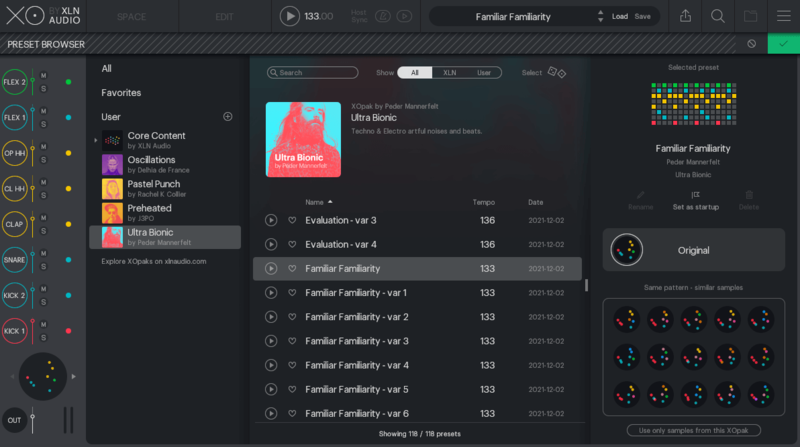
What does an XO Expansion do?

  • XO Expansions are editable beat & sample expansions for XO.
  • XO Expansion contain curated beats & samples that you build your sound upon by using XO and your samples & grooves.

Features

  • Curated, editable samples & presets.
  • Analog gear, breaks & modular sounds.
  • 118 presets & 169 one-shot samples.

System Requirements

  • XLN Audio's XO is required in order to use this expansion pack.
Installation Instructions

Please Note: XOpak: Preheated is used as an example.

Account Registration

(If you have already created an XLN Audio account previously, please skip this part).

1. Go to the XLN Audio registration page (where you can now register for an account, and register your product key at the same time).

2. Enter your details, click 'I have a product key to register' and enter the code found in your Plugin Boutique account (displayed as Serial Number).

3. Click 'I agree to the Terms & Conditions' and then click REGISTER.

XLN Audio RC-20 Account Registration

You have now created an XLN Audio account and registered your product key.

Product Registration

(If you registered your product earlier when creating an account, skip this part).

1. Log in to your XLN Audio account.

2. Hover over My Account and select Register Product Key.

3. Enter the product key found in your Plugin Boutique account and click REGISTER PRODUCT KEY.

Your product has now been added to your XLN Audio account.

Mac

XLN Online Installer Installation

1. Download the Mac XLN Online Installer from your Plugin Boutique account and open it.

2. Double-click to install the XLN Online Installer.

3. Click Open (depending on your version of macOS, you may not encounter this security message).

4. Enter your password and click OK.

5. Click Open to finalise the security prompt.

6. Log in to your XLN Audio account. 

7. Enter a name for your Mac and click Register Computer.

The XLN Online Installer is now installed.

Product Installation

1. Make sure your new product is selected and click 'Click to start - Install: 1'.

2. Your software will now install.

3. Open your DAW and launch XO > click 'Show Presets'.

Your XOpak is now ready for use!

Windows

Online Installer Installation

1. Download the Windows XLN Audio Online Installer from your Plugin Boutique account and open it.

2. Click Yes to allow the application to run.

3. Log into your XLN Audio account. 

4. Enter a name for your computer and click Register Computer.

The XLN Online Installer is now installed.

Product Installation

1. Make sure your new product is selected and click 'Click to start - Install: 1'.

2. Your software will now install.

3. Open your DAW and launch XO > click 'Show Presets'.

Your XOpak is now ready for use!

Plugin Boutique Rewards

Discover the most rewarding loyalty programme among all plugin retailers.

  • Free Loopmasters Samplepacks
  • Discounts on products and courses
  • Extra Virtual Cash claimed immediately at checkout
Find out more

Follow us:

X (Twitter) Facebook YouTube Instagram
Logo Logo

Plugin Boutique Limited, Part of the Beatport Group LLC.

Copyright © 2011-2025 Plugin Boutique. All rights reserved