


 Log In
Free gifts available with your purchase

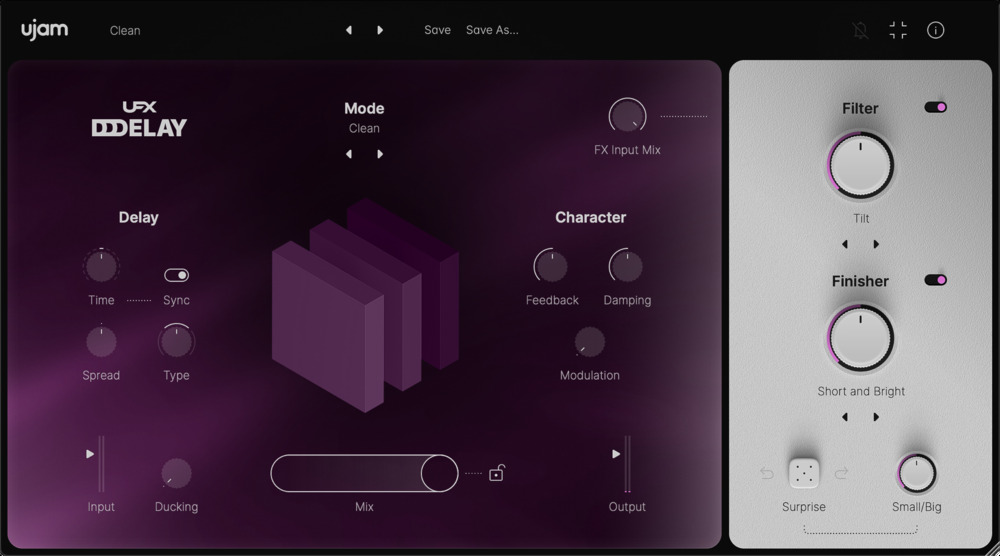
The Musical Delay
Delays Your Tracks, Not Your Workflow
Echoes Galore, Fun and Inspirational
Although UFX Delay is a powerful delay plus 2 multi-FX sections, it is incredibly easy to use: Get instant goodness from the 150+ presets, dive into the 20 delay modes and tweak away, or let the intelligent randomization vary or even invent delays for you.
What’s Inside
- 20 Delay Modes offering classic delay types, creative granular modes and complex patterns.
- Easy customization of each delay effect using controls like time to type and spread to modulation.
- Built-in multi-effect section with 40 Filter and 50 Finisher effects.
- Intelligent randomization subtly varies or invents entirely new delay effects.
Delay Modes Galore
By offering no less than 20 modes – basic to complex to creative – and making them fully adjustable, we tried to keep you in the flow while giving you a plethora of creative options.
- Clean: Straight delay
- Doubling: Detuned stereo
- Digital: 80s character
- Dirty: Saturated delay
- Tape: Vintage tape with wobble
- Low Bandwidth: LoFi character
- Warm: Bass boost
- Diffuse: Softened repetitions
- Grain: Granular delay
- Random Pitch: Detune per repetition
- Oct Up: Transpose per repetition
- Oct Down: Transpose per repetition
- Filter Up: Delay plus stepped filter upward
- Filter Down: Delay plus stepped filter downward
- Filter Complex: Complex filter pattern
- Flam: Rhythmic Pattern
- Ricochet: Rhythmic pattern
- Ricochet Filt: Rhythmic pattern
- Staccato Boost: Rhythmic pattern
- Sequencer: Rhythmic pattern
Ducking
Delays can drown the signal in echoes, leading to a mushy mix. Ducking allows you to have more echo and a pristine input signal by suppressing the wet signal while the dry signal level is high – e.g., on drum beats or guitar note attacks.
Modes
Forget about “programming” complex delay setups. In UFX Delay, we’ve done that for you – you just select which of the musical delay modes suits your signal best and tweak it to your liking.
Filter & Finisher
The Delay signal as well as your input signal can be sent into the Filter – which offers synth filters as well as all manner of character shaping – and the Finisher, which comes loaded with all kinds of effects from a simple chorus to a cloud of grains and rhythmic transformation.
Surprise
The intelligent randomization of UFX plug-ins provides instant surprises at the press of a button – adjustable using the Small/Big control from subtle variations to totally new Delay presets.
Features
- 20 Delay Modes – Classic, granular, and complex rhythmic patterns
- 150+ Presets – Instant creative inspiration
- Built-in Multi-FX – 40 Filter and 50 Finisher effects
- Easy Customization – Adjust time, spread, and modulation
- Intelligent Randomization – Instantly generate new delay effects
- Ducking Feature – Keeps echoes clear without muddying the mix
- Filter & Finisher Section – Shape character and add creative effects
- No Complex Setup – Just select a mode and tweak to your liking
System Requirements
Operating Systems
- Windows 10 - Windows 11
- macOS Catalina (10.15) - macOS Sequoia (15)
- Supported on Intel Macs & Apple silicon Macs (Rosetta and native).
- You may have success on earlier versions but UJAM doesn't support and fully qualify them.
Minimum Requirements
- 8 GB of RAM
- 300MB of free disk space
- 1280x768px Display, Internet Connection. If you want to move your .blob file to an external drive, we recommend the use of a SSD to prevent dropouts.
Plug-in Formats
- VST2, VST3, AU 2, and AAX
Fred Miller
Grammy Award Winning Engineer - Selena Gomez, David Guetta, Sean Kingston
“I was stuck with the classic delay plug-ins until I tried UJAM’s UFX Delay. The amount of features included is simply unbelievable. All you need in terms of delays and echoes in one single plug-in.”


