/ Delay / Comeback Kid
Baby Audio

Comeback Kid

4.6 (3176 Reviews)
$29.00 $69.00

57% off until Dec 08

Baby Audio Comeback Kid - Dark Theme
Baby Audio Comeback Kid | Analog Flavour Delay VST Plugin | Tutorial & Review of Main Features gallery thumbnail
Baby Audio Comeback Kid - Walkthrough gallery thumbnail
Baby Audio Comeback Kid - Plugin Review gallery thumbnail
Baby Audio Comeback Kid - Light Theme
Main Image
Buy Now
Product information

Hands-on delay with an analogue flavour.

Audio plugin for Mac and PC.
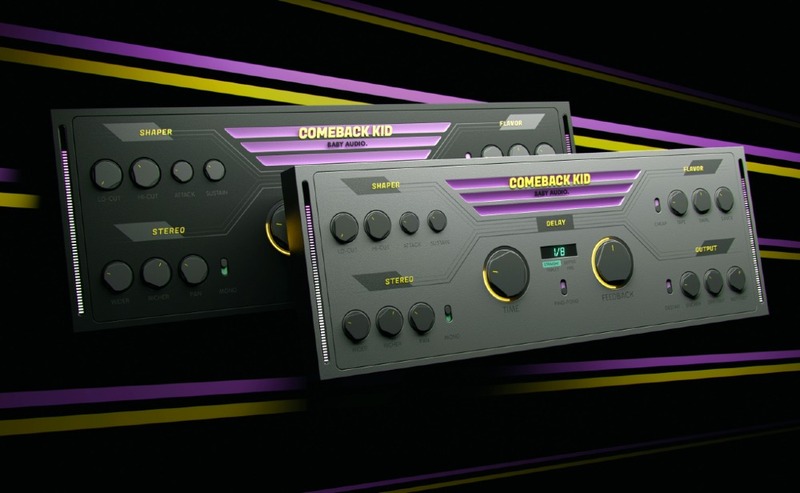
A delay worth waiting for.

Of all the essential mix tools, the delay may be the most creatively satisfying. So Baby Audio asked themselves: could they take one of their favourite effects and give it an upgrade?

They set out to develop their vision for a warmer sounding, more inspiring delay plugin: One that lets you design your own delay sounds through a versatile selection of onboard flavouring tools. Easily and intuitively.

Comeback Kid includes everything you'd expect from a new go-to delay — plus some unexpected extras.
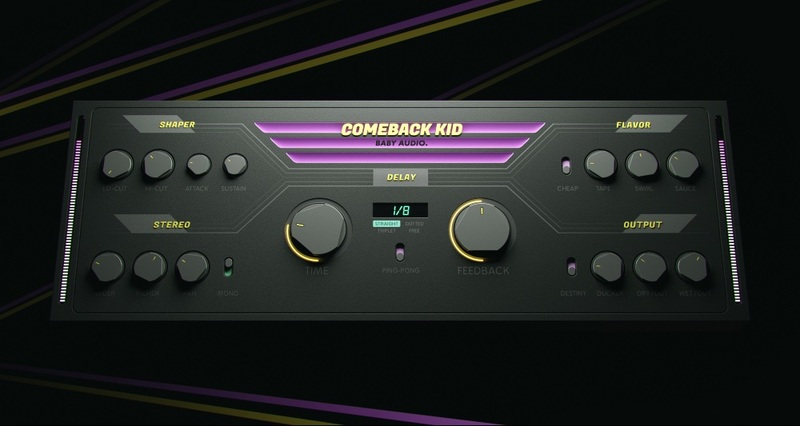
Features

Set up your delay:

  • BPM-synced modes: Straight, dotted, triplet. Free mode: 0.01 ms - 2500 ms. Ping-Pong option.

Add some character:

  • Lo-Cut + Hi-Cut: Tame your delays with analogue-modelled filters.
  • Attack + Sustain: Sculpt your delays with flexible transient designers.
  • Cheap: Degrade you delays with a custom 11-bit signal path — modelled after vintage digital units.
  • Tape: Warm-up your delays with analogue-style tape saturation.
  • Swirl: Add movement to your delays with an analogue-modelled phaser.
  • Sauce: Add space to your delays with a touch of algorithmic reverb.
  • Wider: Widen your delays through L/R time variations.
  • Richer: Add dimension to your delays through L/R pitch variations.
  • Pan: Place your delays in the stereo image.
  • Mono: Turn your delays into mono.
  • Ducker: Lower your delays when the dry signal is playing — for a cleaner, more modern sound.
  • Destiny: Leave your delays to destiny — for a less robotic, more human and unpredictable vibe.

As with Baby Audio's other effects, each knob is the tip of the iceberg—with plenty of good stuff going on under the hood. This gives you flexible sound design options, while the workflow remains fast.
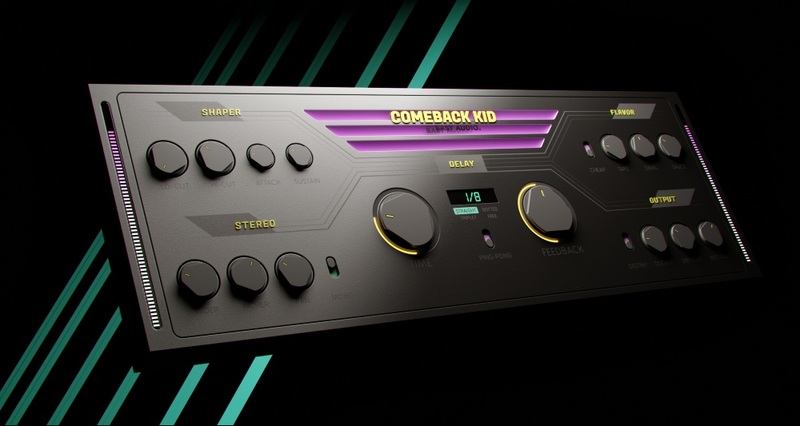
Delays that work in your flavour.

Want a tape delay vibe for your lead synth, a modern slap on your vocals and a crunchy lofi echo on your guitars? Not a problem. Want to mix and match all of the above to create something new? Also not a problem! Comeback Kid is designed to adapt to your sound — not the other way around. And with no sub-menus or hidden features, everything you need is right in front of you. Even some inspiration.

Comeback Kid comes loaded with 61 presets* created by friends of BABY Audio - including:

  • Mick Schultz: Grammy Nominated, Multi-Platinum, producer for Rihanna, Kelly Clarkson, Jeremih etc.
  • Anthony Saffery: Billboard #1 producer/engineer for Portugal. The Man, Dirty Vegas, Cornershop etc.

System Requirements

Mac

  • Mac OS X 10.7 or later (64-bit only)
  • Intel or M1 Apple Silicon Processor (Native compatibility)
  • Formats: AU, VST, VST3 & AAX
  • Compatible DAWS: Ableton Live, Pro Tools, Logic Pro, FL Studio, Cubase, Nuendo, Reaper, Reason and any other major DAW software on the market

Windows

  • Windows 7 or later (32 / 64-bit)
  • Formats: VST, VST3 & AAX
  • Compatible DAWS: Ableton Live, Pro Tools, FL Studio, Cubase, Nuendo, Reaper, Reason and any other major DAW software on the market

Please Note: an internet connection is required to authorise this software.

Important note: When accessing this software via a Rent to Own plan or the Beatport Studio membership, it's installed and run through the Beatport Access portal. An internet connection is required every 30 days to validate your license.

Product Reviews
Baby Audio Comeback Kid Review at MusicTech

If the brand’s past plug-ins left you singing, ‘Baby, come back’, you’re in luck. Its latest is a low-cost delay with features far beyond time-based processing. Pros: Fantastic time-based sound design opportunities Accessible features Pleasing selection of 60 presets Extremely affo...

Read More
Baby Audio Comeback Kid Review at Tape Op

Comeback Kid, from BABY Audio, is a fully customizable delay and echo plug-in with analogue flavour. It has 14 one-knob effects that uniquely allow control of the colour and shape of the delay. Each knob is powered by BABY Audio's delay engine and allows for easy manipulation of the plug-in witho...

Read More
Baby Audio Comeback Kid Delay review at Mixdown Mag

Baby Audio are carving their own path with their recently minted run of high quality and well-priced plugins, and as such, they’ve marketed their latest effort, the new Comeback Kid Delay, as ‘a delay worth waiting waiting for’. To some, this tagline might come across as a bit headstrong for a co...

Read More
Baby Audio Comeback Kid Review at The GarageBand Guide.com

Positives: An incredible suite of controls Great looking interface Truly unique controls and sounds Full of character, yet able to output 'normal' delay effects when needed Negatives: May be a little too technical for newcomers Score - Excellent (4.5 out of 5) Comeb...

Read More
Baby Audio Comeback Kid Review at Everything Recording

Pros: Snazzy User Interface. Incredible versatility. Can do what a stack of inserts can in one interface for a delay bus. Cons: No real cons, just suggestions listed in the review. Summary: Say hello to your new go-to delay. You don't even have to read this review. Ju...

Read More
Baby Audio Comeback Kid Review at GearNews.com

A versatile delay with many creative options. Need a versatile but easy to use delay? Baby Audio has just released Comeback Kid. It does all the regular delay stuff, and then some: With various shaping, modulation and tone degrading options, Comeback Kid looks like a worthwhile addition to any...

Read More
Baby Audio Comeback Kid Review at HappyMag.tv

Cop vintage echoes and pristine delays with Comeback Kid from BABY Audio. BABY Audio have released Comeback Kid, a custom delay plugin for Mac and PC. Comeback Kid lets you design and shape custom delay effects with 14 unique controls to create your sound. Comeback Kid’s tactile interface w...

Read More
Baby Audio Comeback Kid Review at RecordingMag.com

Deep trails of analogue flavour abound in this affordable delay plugin Baby Audio is a US plugin developer with a mission to “…passionately pursue plugins that sound good, look good, feel good, and inspire good music.” In January, we reviewed its inaugural I Heart New York parallel compression...

Read More
Installation Instructions

Important note: if you have a Loopcloud Bundle code prefixed with "Comeback Kid / Loopcloud: XXXXXXXXXX" please follow this link https://babyaud.io/comeback-kid-delay-plugin > Click Buy Now > Click through the cart until you see the option to Enter Coupon Code (in blue) and use the code after "Comeback Kid / Loopcloud: XXXXXXXXX" to obtain the plugin for free. No card details are needed.

For non-prefix codes, please follow the instructions below:

Mac

Installation

1. Download the installer from within your Plugin Boutique User Account and open the .pkg file to begin the installation > Click 'Continue'.

2. Click 'Continue'.

3. Click 'Agree'.

4. Click 'Install'.

5. Enter your computer Username and Password > Click 'Install Software'.

6. Click 'Close'.

Activation

1. Open the plugin within your DAW.

2. Enter the serial number, found within your Plugin Boutique User Account > In order to proceed, click the small green button next to the box containing your serial number.

3. Click anywhere on the plugin interface to continue.

Your software is now installed and ready to use within your DAW.

Windows

Installation

1. Download the installer from within your Plugin Boutique User Account and double-click it to extract the contents > Open the .exe file to begin the installation.

2. Select 'I accept the agreement' > Click 'Next'.

3. Click 'Next'.

4. Click 'Next'.

5. Click 'Next'.

6. Click 'Next'.

7. Click 'Install'.

8. Click 'Finish'.

Activation

1. Open the plugin within your DAW.

2. Enter the serial number, found within your Plugin Boutique User Account > In order to proceed, click the small green button next to the box containing your serial number.

3. Click anywhere on the plugin interface to continue.

Your software is now installed and ready to use within your DAW.

Bundle & Save

Baby Audio Complete Bundle
$279.00
$399.00 (30% off)

Plugin Boutique Rewards

Discover the most rewarding loyalty programme among all plugin retailers.

  • Free Loopmasters Samplepacks
  • Discounts on products and courses
  • Extra Virtual Cash claimed immediately at checkout
Find out more

Follow us:

X (Twitter) Facebook YouTube Instagram
Logo Logo

Plugin Boutique Limited, Part of the Beatport Group LLC.

Copyright © 2011-2025 Plugin Boutique. All rights reserved