


 Log In
-pluginboutique.jpg)
Free gifts available with your purchase

Don't waste your time, modulate it!
FabFilter Timeless 3 is a versatile, vintage-sounding tape delay, which will fully satisfy your everyday delay needs. And with its unique effects, filters, tap patterns and unlimited modulation options, you can just as easily turn it into the ultimate sound-mangling machine!
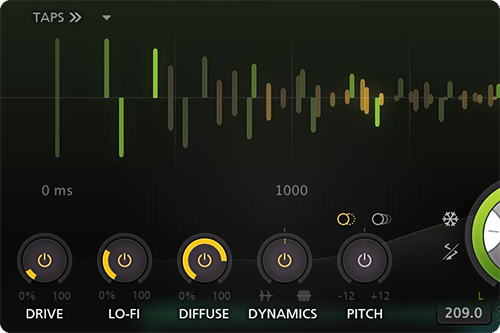
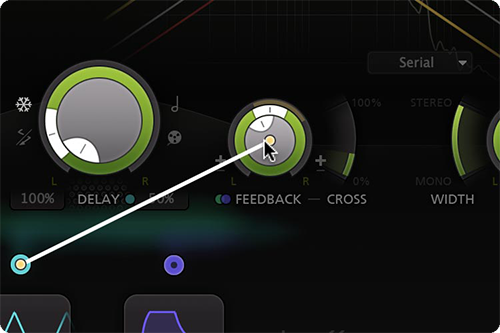
Vintage Filters and Creative Effects
The stereo delay signal is routed through five unique effects and up to six analogue-sounding filters and then routed back to the input with adjustable feedback. Easily program your own delays using the well-laid-out controls and interactive delay and filter displays.
Easy Drag-and-Drop Modulation
Easily setup ducking, wow and flutter, dynamic diffusion or more creative effects, using Timeless's unique and versatile modulation system. Creating new modulation connections could not be easier: just drag and drop.
FabFilter Goodies
Finally, you get all the usual FabFilter goodies: perfectly tuned knobs, MIDI Learn, Smart Parameter Interpolation for smooth parameter transitions, extensive help with interactive help hints, CPU optimization, and much more.
Features
- Fully redesigned, highly simplified interface, with an easy workflow and new modulation engine
- Optional Drive, Lo-Fi, Diffuse, Dynamics and Pitch effects to creatively color the feedbacked delay sound
- Analog tape delay or smooth time-stretching behavior when changing the delay time
- Up to 6 filters, which can be either the original, vintage LP/HP/BP filters or Bell/Shelving/Notch EQ filters
- Create rhythmic patterns using up to 16 delay taps, which can be controlled and modulated individually
- Improved the sound quality of overall feedback, the filters, and internal saturation
- Feedback and cross-feedback, and modulatable freeze option
- Mid/side processing
- Ping-pong modes
- Live modulation visualization for targets and sources
- Carefully designed and curated factory presets, plus support for earlier Timeless presets
- Interactive delay and filter displays
- GPU-powered graphics acceleration
- Various interface sizes and Full Screen mode
- Curve control in EGs and transient detection in EFs
- Easy drag-and-drop modulation with 50-slot modulation matrix
- Supports common Pro Tools hardware control surfaces
- Interactive MIDI Learn
- Extensive help file with interactive help hints
- Unique per-component presets for modulation sources and tap patterns
- Endless modulation options, with all the 16-step XLFOs, XY controllers, envelope generators, envelope followers and MIDI sources you will ever need
- Smart Parameter Interpolation
- Undo, redo and A/B switch features
System Requirements
Mac
- macOS 10.12 or higher (Intel or M1 Apple Silicon processor) (64-bit only)
- VST2, VST3, AU, AAX Native
Windows
- Windows 11, 10, 8, 7, or Vista (32 or 64-bit)
- VST2, VST3, AAX Native
Formats
All FabFilter plug-ins are available in VST, VST3, Audio Units, AAX Native and AudioSuite formats.
Awards


Damien Lewis
Grammy-nominated producer, mixer and engineer.
"FabFilter Timeless is another favourite of mine. I love the ability to create crunchy modulated delays and creative effects have changed my mixes forever!
ComputerMusic
The world's best-selling magazine dedicated to making music with Mac or PC.
"If there's a delay-shaped hole in your plug-in folder, then you should find that Timeless 3 is a perfect fit. Verdict: 10/10!"


