Log In

Free gifts available with your purchase
Bouncing Ball Delay
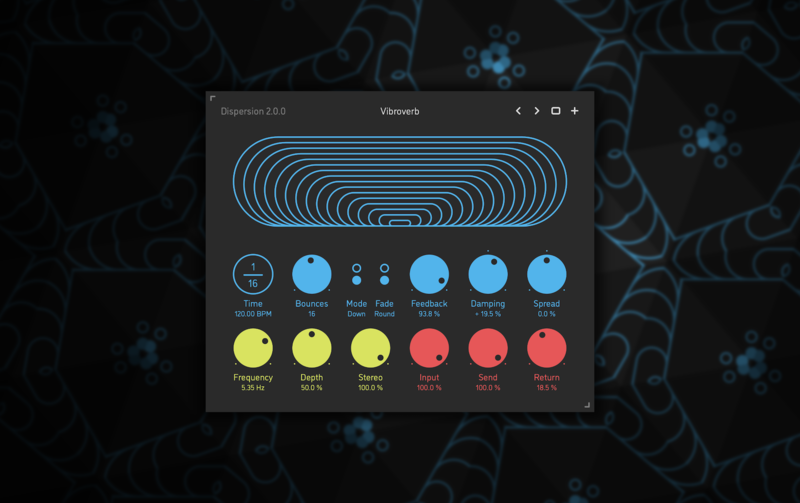
Dispersion is a bouncing ball delay effect plugin for Mac. It has up to 32 sequential delay lines whose times are spread exponentially via a special formula developed at Sinevibes, in order to produce sound repetitions akin to a bouncing ball. The key feature is that a single round of such delay bounces is always summing up to a precise tempo fraction - making this a rhythmical effect. Dispersion can also gradually spread the pan of the bounces left to right and vice versa so that the imaginary ball moves within the stereo field. With an optional inverse time spread, multiple feedback shaping features, and trademark alternating-polarity modulation, Dispersion is capable of a whole universe of unusual yet musically rich effects which simultaneously combine the characteristics of delay, reverb, chorus ensemble, and stereo widening.
Features
Sound Engine
- Up to 32 sequential delay lines with tempo-synchronized “bouncing ball” time spread
- Gradual and stepped feedback modes
- Optional two-pole low-pass or high-pass feedback damping filter
- Adjustable delay bounce stereo pan spread
- Delay time modulation with unique alternating-polarity routing and variable stereo phase offset
- Lag filters on all continuous parameters for smooth, click-free adjustment
- Supports mono › mono, mono › stereo, and stereo › stereo channel configurations
Graphic Interface
- Colour-coded graphic elements
- Consistent name, mapping, value, and unit implemented for all parameters in both graphic user interface and host control/automation
- Built-in preset management functions
- Supports window size scaling up to 200%
System Requirements
Mac
- macOS 10.9 or later (64-bit only)
- Intel or M1 Apple processor.
- AU / AAX / VST3
Windows
- Windows 8.1 or later (64-bit only)
- PC computer with x86 processor.
- AAX / VST3