


 Log In

Free gifts available with your purchase
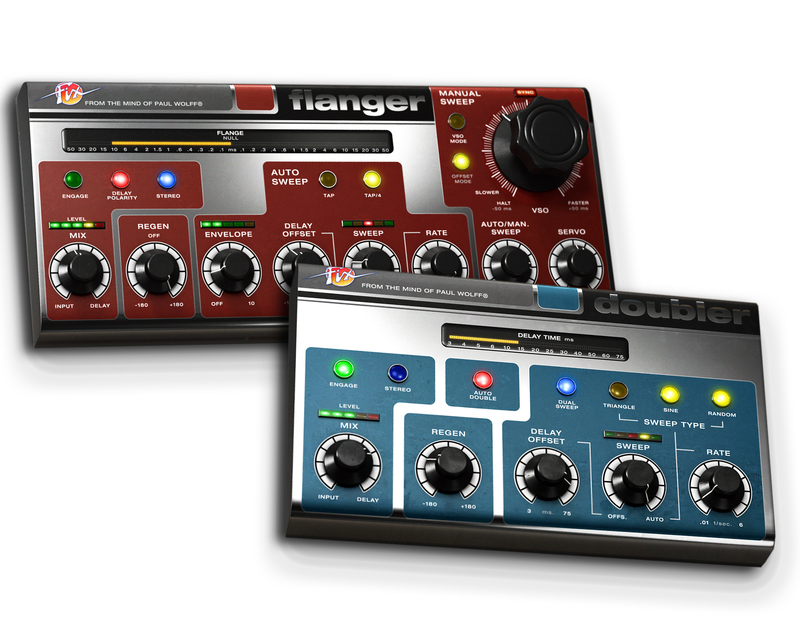
From the mind of legendary audio equipment designer Paul Wolff comes the new Fix Flanger and Fix Doubler. They take the legacy and sound of classic flanging and vocal doubling of the 1960s, but with all the benefits of the digital world.
In 1979, Paul Wolff formalized a vision which was turned into an exclusive limited edition hardware, that became loved among musicians and sound engineers. In 2015, the Fix Flanger and Doubler is the reincarnation of this vision—a plug-in package that handles hands-on flanging with unique stereo widening methods, as well as vocal doubling with lush chorus and rich textures.
Classic Flanging Reimagined
The Fix Flanger is versatility personified—this flanger is capable of both classic guitar pedal style flanging with a automatically swept flange as well as direct interaction in the manual mode. A VSO mode features unprecedented hands-on control with emulated servo motor bounce and true cross zero flanging, just like a tape machine. Added features such as tap tempo sweep, unique stereo widening methods and selectable delay polarity makes the Fix Flanger the swiss army knife of flangers.
Doubling Made Simple
The Fix Doubler delivers texture and extraordinary richness to vocals and polyphonic instruments. The algorithms of the Fix Flanger, combined with a streamlined interface and Paul Wolff's unique Auto Double algorithm, makes it easier than ever to get lush chorus and rich layers to your vocal track. With Auto Double, you can get smooth doubling without flanging at delays as low as 3 ms, which no one has ever been able to do before.
Features
- Fix Flanger delivers the sound of classic flanging, with extreme control and flexibility
- Unprecedented hands-on VSO flange control, with servo motor bounce emulation
- Fix Doubler provides lush chorus and rich textures to your vocals
- 'Auto Double' uses a unique method of accurate phase-cancellation to make a natural sounding doubler effect
- No USB iLok key required
System Requirements
- macOS Big Sur 11, Monterey 12, Ventura 13
- Windows 10 (64-bit), Windows 11
- Softube account
- iLok account
- Computer with AU, VST, VST3, and/or AAX-compatible DAW host software
- Internet access (for downloading installers and managing licenses)
Supported CPU Families
- Apple macOS computers with Intel Core i3/i5/i7 or Apple silicon (M1 or newer) CPU. Apple silicon is supported natively.
- Windows computers with quad-core Intel Core i3/i5/i7 or AMD quad-core processors with SSE 4.2 support.
- Other Intel processors (Celeron, Pentium, and Xeon) are compatible if they support SSE 4.2 instructions.
Supported Host Software (DAW)
Any 64-bit VST, VST3, AU, or AAX (Pro Tools 11.0.2 or higher) compatible host application should work. However, due to plug-in host differences between DAWs—and our rigorous standards—Softube only officially test their plug-ins and instruments in the most recent versions of Pro Tools, Logic Pro, Cubase, Ableton Live, Studio One, and Reaper. Softube plug-ins are not tested regularly in non-listed systems. They will likely work if the system requirements are met. However, the manufacturer cannot guarantee a solution for issues in unsupported systems.
Softube strongly recommend using VST3, as some of their plug-ins have features that are not present in the older VST format. Supported sample rates: 44.1, 48, 88.2, 96, 176.4, and 192 kHz, in both mono and stereo. The most recent maintenance release of your DAW application is recommended. AAX DSP is not currently in active development. TDM/VENUE/RTAS are no longer supported. See Legacy Installers.
Important Note: Make sure that you always use the latest iLok License Manager. It is not included in the Softube installer but can be downloaded from www.ilok.com
Ross Hogarth
Multi-Grammy Award winning producer, mixer and engineer for Van Halen, Keb 'Mo' R.E.M. and Ziggy Marley.
"Both units are very smooth and creamy. Fix Flanger is the first in-the box-flanger that sounds like real old school flanging with a new school twist. And the Fix Doubler adds a wonderful sonic quality and depth."
Jon Castelli
Mix engineer for Cam, Lady Gaga and Ariana Grande.
"The only software flanger worth using."
Greg Wells
Producer and songwriter for Katy Perry, Weezer, Adele, Timbaland, Mika, OneRepublic, Pink, The Deftones, Rufus Wainwright, etc.
"The Fix Doubler sounds like the singer cloned themselves and is singing along with the original vocal. It uses techniques that are unique and the sound is so musical."
Reviews Summary
While it aims to provide a helpful overview, it may not capture every perspective or detail. We encourage you to read individual reviews to make an informed decision.
Users highly praise the plugin for its fantastic workflow, great interface, and versatile, warm sound suitable for mixing and mastering, although one reviewer noted high plugin latency.


