Buy Beat ReBuilder, get a free gift with purchase:
Replace and Rebuild Beats
Grab beats out of thin air! This plugin deciphers a beat and adds layers of sound on it. You can use this to replace or augment parts of a beat, or as inspiration for new midi patterns and audio loops.
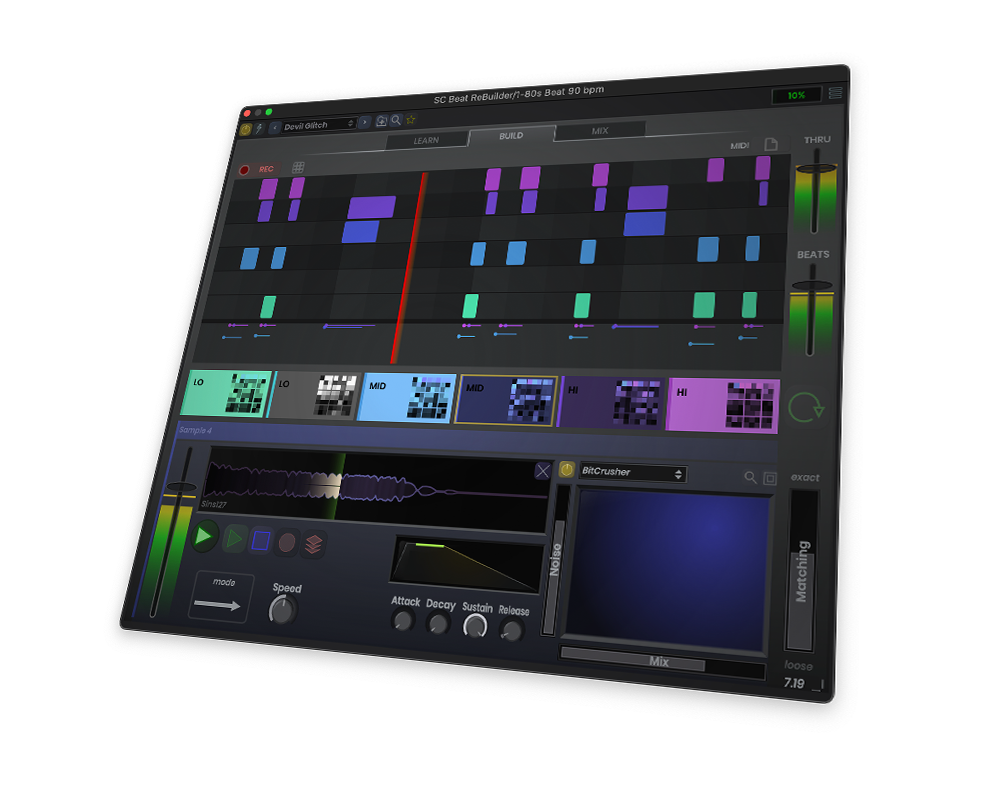
Decompose Beats
Using audio classification, Beat ReBuilder detects various beat hits like the snare, kick, or high hat. With this data, you can layer on your own samples on top of the beat or replace it entirely. Alternatively, you can drag-and-drop the MIDI data for use in your own drum machine.
Chain Effects
Need a kick with massive reverb? Want to add a glitch sequence to the ride cymbal? Not a problem, because you can add any of our custom effects to any individual sample. Advanced effects chaining gives you millions of options on any kit.
System Requirements
All downloads are full versions that can be used for free for a 30 days trial period.
Mac
- macOS 10.13 or newer (Intel / M1 Apple Silicon supported) (64-bit only)
- AAX, AU, VST3
Windows
- Windows 7 or newer (64-bit only)
- AAX, VST3
Windows Installation (Addiction Synth is used as the example)
1. Download and run the installer. This can be found in your Plugin Boutique User Account under option 2.
2. Open the .zip (Windows) or .pkg (Mac) and unzip the files.

3. Place the two VST files (the DLLs) in whatever directory you prefer to keep VST plugins in, on your system.
(Please note: The two plugin files are identical except that one is 32 bit, and the other is 64. Keeping both ensures that you can run this on any VST host).

4. Use a VST plugin host to scan the directory that contains the plugin files.
5. Find the "SC Addiction Synth" plugin on your host's plugin list and double click it.
6. Enter your serial number (which can be found in your Plugin Boutique User Account) and enter the email address in which the plugin will be registered to).

Your plugin will now be ready to use!
Mac Installation (Addiction Synth is used as the example)
1. Download the Mac installer from your Plugin Boutique user account.
2. Once downloaded, open the .pkg file.
3. Follow the instructions in the installer.

4. Select the destination where you wish to install your plugin.

5. If you're happy with the install location, click 'Install'. If not, click 'Change Install Location' and select ano different folder.

6. Your plugin will now be fully installed.

7. Open your host DAW and open the plugin.
8. Enter your serial number (which can be found in your Plugin Boutique User Account) and enter the email address in which the plugin will be registered to.
