Log In

Free gifts available with your purchase
Kirnu Cream is a very powerful MIDI performer VST/AU/LPX MIDI FX plugin for Windows and Mac.
It works on both 32 and 64 bit systems on Windows and 64 bit on Mac.
Cream is intended to be used in both live and offline DAW usage.
With Cream it’s very easy to create catching lead parts, bouncing bass lines, swinging drums and lots of other cool stuff. The only obstacle is your imagination :)
Cream isn't like any traditional MIDI arpeggiator or sequencer. It's a lot more. With simple and clever design it has been made easy to learn and operate. You can easily create cool performances by tweaking only couple of controls. If this is not enough for you there are so many ways you can control Cream that you never feel bored with it.
Kirnu Cream is good for everybody; hobbyists, professionals, producers, composers, mamas, papas... whoever needs a good MIDI performer to make their songs PERFECT!
If you are sick and tired of conventional MIDI arpeggiators, performers, sequencers you should try Cream and see yourself how it differs from the rest.
Chord Memory

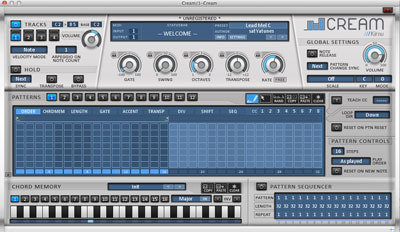
Chord memory makes it possible to play complete chords with only one note. Cream chord memory has 16 memory slots and the ability to save chord memory presets. Chords are easily inverted using the inversion tool. Also copying/pasting between chord memory slots is possible.
Pattern Sequencer

Cream features 12 patterns in every Track. Patterns can be automatically changed with the pattern sequencer. Using the pattern sequencer enables you to make complex sequences from simple pattern snippets easily. Patterns can also be changed with control zone using external MIDI keyboard or MIDI clips.
Sample accurate MIDI

Kirnu 1 was famous for its ability to generate MIDI notes with accuracy where no samples are skipped. Kirnu Cream is no exception from this. Its state of the art MIDI engine
performs at the same level with very low CPU usage.
Tracks

Cream features 4 independent tracks with independent key areas and MIDI in/out functionality. This means 4 independent MIDI engines can be programmed to produce different output at the same time. Even two tracks playing at the same time can produce amazing sequences to fill important parts of your song.
Patterns

There are 12 patterns in every track. Patterns are the 'heart' of Cream which actually generates the output MIDI notes. Every pattern has 9 step data controls - managed in tabs- which are used to manipulate the input MIDI stream. Every step data section features independent looper control which enables for example LENGTH control to advance different direction as the others.
Much more...

Kirnu Cream has so many cool features - it would be impossible to list all them here. Go and grab the demo version and test Cream yourself. If you like it, purchase a license and support our future plugin development!
You are about to experience something you haven't experienced before because no one has been able to produce anything similar like Cream is. Explore, experiment and enjoy. There's nothing more enjoyable than making your own music.
System Requirements
Mac:
- VST/AU for Mac OS X 10.5 or higher (64-bit only)
Windows:
- VST for Windows 2000 / XP / Vista / 7 / 8 (32 / 64bit)
Formats:
- VST / AU / LPX MIDI FX
Awards