/ EQ / PSP E27
PSP Audioware

PSP E27

4.8 (30 Reviews)
$149.00
PSP Audioware PSP E27
PSP E27
PSP E27: Introducing the new E27 Multistage Equalizer Plug-in gallery thumbnail
PSP Audioware PSP E27se
Buy Now
Product information

PSP E27 is a multi-stage equalizer plug-in modeled after the famed analog E27 equalizer produced by Avedis Audio Electronics. PSP E27 offers three-band equalization with nine selectable frequencies in a standard 500x package.

This equalizer offers +/-16dB of control at musically selected frequency ranges, and offers gentle saturation. Low and high filters can work in bell or shelf mode with a single click. The E27 EQ is suitable for both mixing and mastering and offers additional preamp stage for global level control. This EQ plug-in also accurately emulates the nonlinear behavior of analog devices.

The additional PSP E27se (included in the bundle) is a simplified version of PSP E27. The PSP E27se is based on the same great audio engine, but it has a redesigned, simpler GUI making quick adjustments a snap. The PSP E27se is equipped with one E27 and one PA11 module.

Included In Bundle

  • PSP E27
  • PSP E27se

System Requirements

In order to run PSP L'otary2 in 30-day trial mode or activate it, you need an iLok user ID which you can create for free at www.ilok.com, and you need to install the free iLok License Manager application but you don't need any hardware dongle.

You can activate the license in 3 separate locations, each of which can be either a computer or an iLok dongle (2nd generation or above). You can move these licenses at any time using PACE's iLok License Manager software.

PC

VST3:

  • Windows 7 – Windows 11
  • 64-bit VST3 compatible application

VST:

  • Windows 7 – Windows 11
  • 64-bit VST compatible application

AAX:

  • Windows 7 – Windows 11

  • Pro Tools

All DAWs:

  • The latest iLok License Manager application installed 

Mac OS X:

Audio Unit:

  • macOS 10.14 – macOS 14 Sonoma
  • 64-bit AudioUnit compatible host application

VST:

  • macOS 10.14 – macOS 14 Sonoma
  • 64-bit VST compatible host application

VST3:

  • macOS 10.14 – macOS 14 Sonoma
  • 64-bit VST3 compatible host application

AAX:

  • macOS 10.14 – macOS 14 Sonoma
  • Pro Tools

All DAWs:

  • The latest iLok License Manager application installed 

Installation Instructions

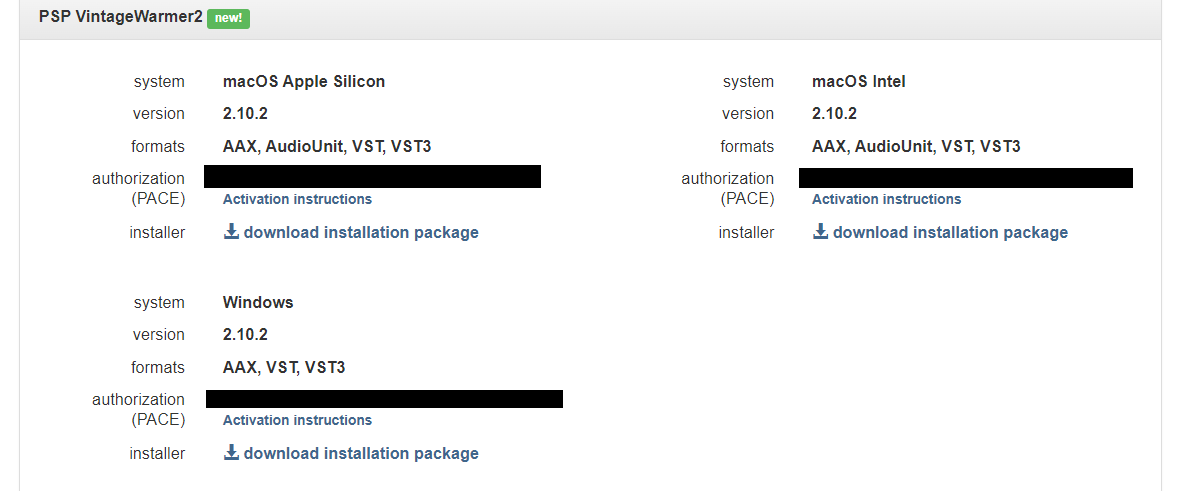
Please Note: PSP VintageWarmer2 is used as an example.

Activation

1. Visit the PSP Registration Centre and create/log into your PSPaudioware account.

2. Select the Manual Product Activation link and copy and paste/manually enter the serial number that is provided with your User Account. > click 'Activate!.'

3. Your PSP product will now show up in your PSP customer account. Your 30-digit iLok activation code will also be listed under authorization (PACE). Download the relevant installer.

iLok Registration

1. Go to the iLok website and create a new account if you are not currently registered and do not have the iLok Licence Manager installed on your computer.

2. Download and install the iLok License Manager.

3. Open your iLok license manager application > click 'Sign In'.

4. Enter your iLok registered User ID and password > click ‘Sign In'.

5. Once you are signed in, click the ‘Redeem’ icon which is located at the top-right corner of the iLok Licence Manager’s interface.

6. Copy and paste/manually enter the 30-digit code from your PSP Audioware account into the available Activation Code boxes, and then click ‘Next'.

7. Select your activation destination > Click 'Activate'.

8. Click 'Ok'.

Installation

Mac

1. Open the recently downloaded .dmg file to begin the installation.

2. Click 'Continue'.

3. Click 'Continue'.

4. Click 'Continue'.

5. Click 'Agree'.

6. Click 'Continue'.

7. Click 'Install'.

8. Click 'Close'.

9. Open your DAW > Open your newly installed software.

Your software is now activated and ready to use.

PC

1. Open the recently downloaded .exe file to begin the installation.

2. Click 'Next >'.

3. Select 'I Accept the Agreement' > Click 'Next'.

4. Click 'Next >'.

5. Click 'Next'.

6. Click 'Next'.

7. Click 'Next' to begin the installation.

8. Click 'Finish'.

9. Open your DAW > Open your newly installed software.

Your software is now activated and ready to use.

Plugin Boutique Rewards

Discover the most rewarding loyalty programme among all plugin retailers.

  • Free Loopmasters Samplepacks
  • Discounts on products and courses
  • Extra Virtual Cash claimed immediately at checkout
Find out more

Follow us:

X (Twitter) Facebook YouTube Instagram
Logo Logo

Plugin Boutique Limited, Part of the Beatport Group LLC.

Copyright © 2011-2025 Plugin Boutique. All rights reserved