Log In
Free gifts available with your purchase
Paramount MP Mastering EQ
A dozen precision variations on “analog,” all in one equalizer.
Beautiful analog architectures, twelve in all, that will take your work out of the ordinary.
Looking for “color” without all the downsides of outboard gear and modeling? thEQblue is a collection of twelve 80 bit minimum phase equalizer architectures derived from reverse engineering a variety of well respected hardware EQs.
thEQblue are idealized digital versions, with no noise, distortion or other secondary effects inherited from analog. Series and Parallel architectures are available as are all the features and fidelity our thEQ family is known for. An added advantage is the inclusion of FiDef®
Yes, Your Blueness
Why develop yet one more parametric equalizer (PEQ) when there’s already hundreds on the market? The answer is simple…’Cuz there was room for improvement! It was customers of the original LinearPhase PEQ Red and Orange who asked Algorithmix to develop a classic EQ, for recording and mixing tasks, with unparalleled purity and transparency. Over several years, MAAT's Dr. Christoph closely analyzed many of the best out there, and compiled a vast knowledgebase of analog EQ best practices. Cherry picking from that, he implemented not just one or two, but an entire collection of trad minimal phase EQs. The result? A distillation of analog antecedents, while others are based on new ideas.
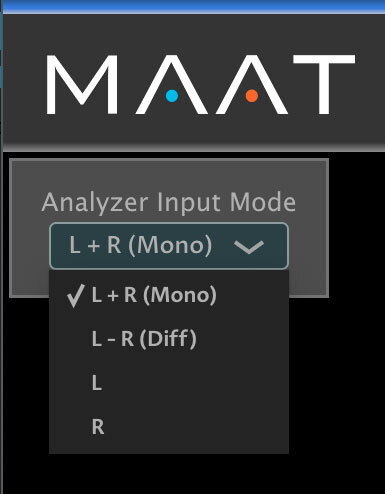
MAAT know you’ll enjoy their dozen variations of blue, newly revised by MAAT, and will find your favorite sound. They've also added subtle but important touches, like the ability to freely assign Sections to either stereo [left/right] or sum/difference [L+R/L-R] at the same time, and to “group” all Sections and make a global gain change without disturbing the relationship of individual Sections.
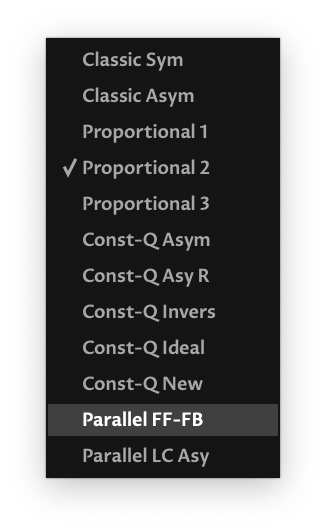
The Twelve
MAAT wanted to lift analog to another level, so they reverse engineered a variety of well respected hardware EQs, creating idealized digital versions from that inspiration. Rather than models or simulations that carry analog baggage, thEQblue has no noise, distortion or other secondary effects inherited from analog.
thEQblue is the most complete collection of classic equalizer Architectures ever assembled into one package. You get precise, idealized examples of legendary analog equalizer circuitry, complemented by progressive new models. Whether it’s vintage, modern, or experimental, thEQblue is a sonic sandbox for every mixing and mastering engineer to play in.
Dither…For Your Brain
Even though thEQblue is lauded by the top echelon of audio pros, MAAT weren’t satisfied. The sound quality was as good as anything available, but benchmark analog still had an edge. So, they added a radical new tech to thEQblue. It’s called FiDef and it adds that indescribable beauty lent by the best of analog.
FiDef by FideliQuest (www.fidef.com) is a very low amplitude, psychoacoustic stimulus designed specifically for audio engineers. FiDef can be thought of as dither for your brain. It makes a receptive brain relax and pay closer attention to an incoming audio stimulus. In brain physiology laboratory tests using functional neuroimaging techniques, FiDef has proven to excite brain activity related to perception and attention, and to enhance the subjective processes of listening and engagement.
You have to simply try FiDef and see if you hear an improvement. You may, or maybe not. Better yet, give your customer two almost identical versions of a song, the only difference being FiDef or no FiDef, and let them decide.
BFF
The equalizer is perhaps the oldest and the most popular of sound processing tools. From its earliest days, the main function was correction or enhancement by boosting or cutting certain frequencies.
For a century, engineers have developed countless equalizers. A few became legend, MAAT's thEQorange is one. The most popular version in recording and post is the parametric equalizer or PEQ, first perfected by Massenburg in 1972. It offers maximum flexibility with only three controls. Properly used, the PEQ is a powerful tool and the best friend of every audio engineer in the quest for perfect sound. As Spidey (and Voltaire) always remind us though, “With great power comes great responsibility.” When designed by a clueless or cost–constrained software engineer, it can truly degrade your work.
Choice Is Good
In order to give you a choice of features and price, thEQblue is available in two versions:
thEQblue6, with 6 Architectures; №s 1 through 6 below
thEQblue12, with 12 Architectures; all twelve below
| № | Type |
Comments & Analog Kinfolk |
|---|---|---|
| 01 | Classic Sym |
Series symmetrical, almost constant Q bell — common mix desk & outboard gear Architecture, try on “surgical” applications |
| 02 | Classic Asym |
Series asymmetrical — Old Skool, boost like № 1 but with narrower cut |
| 03 | Proportional 1 |
Series proportional — More musical than constant Q, especially for mixing and post. Bells are wider at <6dB and narrower at >6dB |
| 04 | Proportional 2 |
Series proportional — Like № 3 but with bigger changes at large gain settings > ±6dB, try on vocals |
| 05 | Proportional 3 |
Series proportional — Like № 3 but with extra wide bells at small gain settings, from 0 to 3dB |
| 06 | Const-Q Asym |
Series asymmetrical, constant Q — Boost like № 1, cut like № 5 (extra wide), as found in some USA products & mixers |
| 07 | Const-Q Asy R |
Series asymmetrical, constant Q — Like № 6 but with mirrored boost & cut |
| 08 | Const-Q Invers |
Series symmetrical, constant Q — Similar to № 7 |
| 09 | Const-Q New |
Series proportional, constant Q — Our proprietary Architectural style…try it, we know you’ll like it! |
| 10 | Const-Q Ideal |
Series ideal & constant Q — Another special, similar to № 1, all three parameters (resonant ƒ, gain & Q) are independent, no analog relatives! |
| 11 | Parallel FF-FB |
Parallel feed forward/feedback — Complementary amplitude and phase characteristics for boost & cut (symmetrical), found in high end graphic EQs, 1st choice for mastering [reference Massenburg] |
| 12 | Parallel LC |
Parallel passive LC — Tonal advantages with band interaction & asymmetry disadvantages, found in old or newly recreated PEQs, another choice for mastering [reference Massive Passive, Sontec] |
Constant Q is more for surgical applications, while proportional EQs are best when combining multiple overlapping Sections. As a point of reference, API, Pultec, Masselec and Avalon EQs are all of the proportional type.
Note that all 12 Architectures are normalized to have exactly the same bell shape at 6.02dB of boost. This allows you to easily compare the sound of each Architecture.
Better By Design
thEQblue is built on the belief that exceptional fidelity, enhanced workflows and less visual fatigue are hallmarks of better quality toolsets. Our reliance on hard science and focused research balanced by in–depth listening and customer feedback, redefines audio tools for you and your fellow hardcore media professionals worldwide.
Features
thEQblue borrows the innovative code from Algorithmix’s original PEQ Blue, and wraps it in a modern, higher fidelity environment designed to help you be more productive.
- The most complete collection of classic analog (recursive IIR) equalizer emulations
- One dozen different equalizer types: 10 serial & 2 parallel
- Up to twelve PEQ styles for every job: classic, vintage, modern and unconventional
- Exclusive proprietary FiDef® processing: the audience feels their music like never before
- Different Q characteristics: classic, constant–Q, proportional, ideal–Q and special
- True high resolution emulation of analog equalizers, not modeling: no added noise, distortion or other non–linearities
- Support for up to 384 kHz sample rate, suitable for HRA and game production and post
- Extended center and/or resonant frequencies up to 80 kHz for filtering and correction in the ultrasonic
- Bell filters in all PEQ types are normalized to look identically at +6 dB of gain and Q of 0.71, ideal for quick comparisons between types
- Twelve sections with 5 freely assignable parametric filter variants: bell, low shelf, high shelf, low cut and high cut
- Extremely low noise and low nonlinear distortion algorithms result in residual THD+N significantly lower than 24 bit quantization noise
- Adjustable Q Factor for shelving and cut filters
- Multiple low and high cut filters can be overlapped to achieve brickwall slopes
- Very low noise and distortion upsampling for analog–like filters at baseband sample rates
- 80 bit internals (long double floats) virtually eliminate rounding errors
- Resizable and zoomable frequency response rendering for precise adjustments
- Parameter editing via numerical fields or directly on the Graph
- Presets for quick setup comparison
- Several instances, each with different PEQ architectures, can be opened simultaneously
- Stereo/Left–only/Right–only/Mono/Diff mode for each Section for all Serial types
- Band grouping function lets you simultaneously alter ƒ, Q and gain for multiple Sections
- Six fMODES quantize the resonant ƒ setting of all Sections, including Massive Passive & Maselec
- Keyboard button enables you to target frequencies by ear then lock them to a Section with a click
- Tunable Keyboard so that the sonogram aligns with material’s tuning
- ƒ lock function when you’ve found your resonant frequency and want to alter just Q or gain
- True Peak metering alerts you to TP overs
- Sort button rearranges Sections in order, from low to high, with a single click
System Requirements
- Available formats: AAX Native (Pro Tools 10.3.10 and newer), AU, VST 2, VST 3
- macOS 10.9 and newer, 64 bit only
- Windows 7 and newer, 32 & 64 bit
- OpenGL 3.2 or newer