


 Log In

Free gifts available with your purchase
EFEKTOR Paten
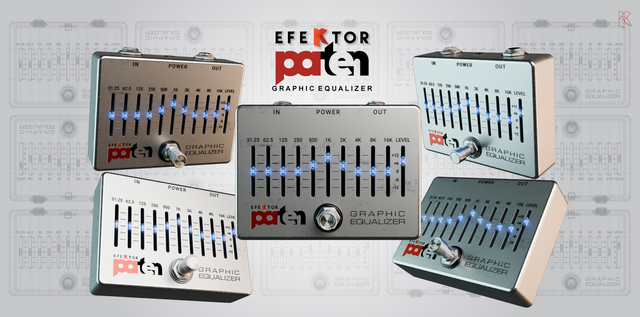
Precision 10-band graphic equalizer with parallel architecture, providing transparent and isolated adjustments for each frequency band
Kuassa Efektor PATEN is a powerful 10-band equalizer designed to give you complete control over your audio’s tonal profile. Efektor PATEN allows users of all levels to make accurate adjustments across the frequency spectrum, enhancing tone and presence in any instrument. Efektor PATEN’s simple controls are perfect for those new to audio production while offering the flexibility that seasoned professionals demand.

Built with versatility in mind, Efektor PATEN adapts to any audio related works, making it an essential tool in your tone shaping arsenal. Its low CPU usage ensures smooth performance even in the most complex sessions, while Kuassa’s ‘Protean Algorithm’ delivers high quality sound with no compromises. Whether you’re working in a professional studio or creating music at home, Efektor PATEN empowers you to achieve a polished, professional sound every time. Experience the difference, where great sound meets effortless control.
Features
- 10 bands, one band per octave frequency points
- Parallel architecture with variable Q
- Resizable window
- User friendly interface: Straightforward single screen GUI.
- Available as an Amplifikation 360 module
*Kuassa’s proprietary Protean Algorithm provides smooth curves across the frequency spectrum with minimal phase issues or comb filtering. The response remains consistent on boosting or cutting frequencies.
System Requirements
Mac
- Mac OS X 10.7 or later (Intel / M1 Apple Silicon supported) (64-bit only)
- Core2 Duo, or better (latest Intel i3 recommended)
- 4 GB minimum RAM
- VST, VST3, or Audio Unit compatible host / DAW
Windows
- Windows Vista or Later (64-bit only)
- Core2 Duo, or AMD Phenom ii X4 or better (latest Intel i3, AMD A4, or better is recommended)
- 4 GB minimum RAM
- VST or VST3 compatible host / DAW
Important Notes:
- Pro Tools 11 or later is required for AAX format
- Reason 7.1 or later is required for Rack Extension format
- A VST, VST3, AU, or AAX compatible host / sequencer is required to run this software.

















