/ EQ / Q10 Equalizer
Waves

Q10 Equalizer

$27.99 $99.00

71% off until Dec 07

Waves Q10 Equalizer
Waves Q10 Equalizer
Waves Q10 Equalizer
Waves Q10 Equalizer gallery thumbnail
Buy Now
Product information

Q10 Equalizer

Pinpoint Precision with True Transparency

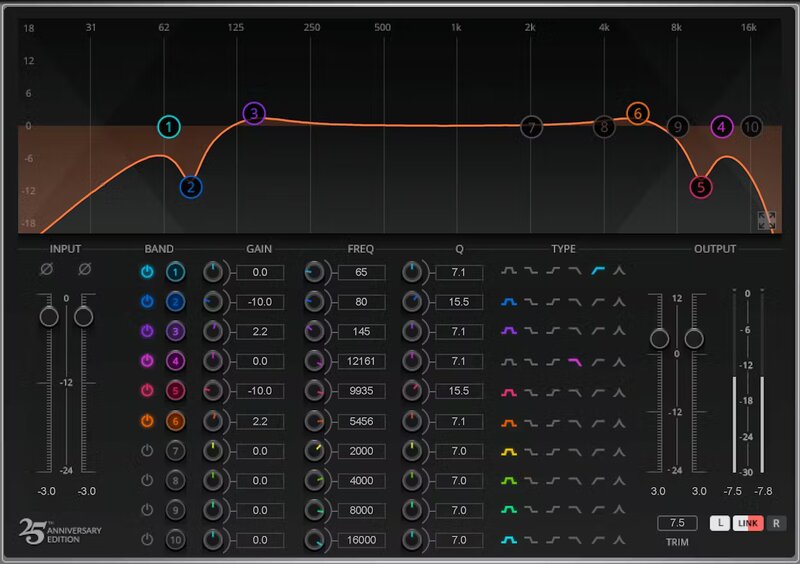
As it celebrates 30 years of service to the pro audio industry, the reason for the Q10’s longevity is simple: it solves problems. The recent 25th anniversary update retains the transparency, versatility, and efficiency of this industry standard, but raises the bar yet again with significant improvements.

With an added proportional-Q curve, double-precision math, and a modern interface that shows all bands or focuses on one, the Q10 is primed for 30 more years of equalization excellence.

Features

  • EQ left and right channels independently, or link together
  • 10 parametric bands with 6 curves, and controls for Q, freq, and gain
  • Combine and stack filters for ultra-deep, steep, or broad curves
  • Hipass, lowpass, bell, proportional, high shelf, low shelf for each band
  • Modern multitouch-friendly, or space-saving legacy, interface
  • Proportional-Q curve keeps the Q proportional to gain
  • Enter specific, numeric values for extra precision
  • Focus view expands the display, and shows one band’s controls
  • Comes with instant expertise—50 factory and artist presets
  • Accuracy for surgical fixes, transparency for tone shaping

System Requirements

Mac

  • macOS Monterey 12, Ventura 13, Sonoma 14, Sequoia 15
  • VST / AU / AAX

PC

  • Windows 10+
  • VST / AAX
Installation Instructions

1. Head to https://www.waves.com/create-account

2. Enter your email and choose a password to create an account (if you already have a Waves account, choose Log in, enter your details and head to Step 5) > click 'Submit'

3. Open your email inbox > click the activation link in the email from Waves

4. Click 'Log in here' > Log in to your Waves account

5. Click 'Register New Products'

6. Enter the Serial Number found in your Plugin Boutique user account > click 'Submit'

7. Click download in your Plugin Boutique user account or head to https://www.waves.com/downloads/central > download the Waves Central app for your operating system

8. Install Waves Central > Open Waves Central

9. Click 'Log in' > enter your log in details

10. Click the 'Install Products' tab

11. Tick the blue dot on all products you wish to install or click the top dot to install all products > click 'Install & Activate'

12. Click 'OK'

13. Open your DAW > open the Waves plugin

Your Waves plugins are installed and ready to use, enjoy!

Plugin Boutique Rewards

Discover the most rewarding loyalty programme among all plugin retailers.

  • Free Loopmasters Samplepacks
  • Discounts on products and courses
  • Extra Virtual Cash claimed immediately at checkout
Find out more

Follow us:

X (Twitter) Facebook YouTube Instagram
Logo Logo

Plugin Boutique Limited, Part of the Beatport Group LLC.

Copyright © 2011-2025 Plugin Boutique. All rights reserved