/ EQ / API 550
Waves

API 550

5.0 (1 Reviews)
$29.99 $149.00

79% off until Dec 07

Waves API 550
Waves API 550
Waves API 550
Waves API 550 gallery thumbnail
Buy Now
Product information

API 550

Shape Your Tone with Exceptional EQ Curves

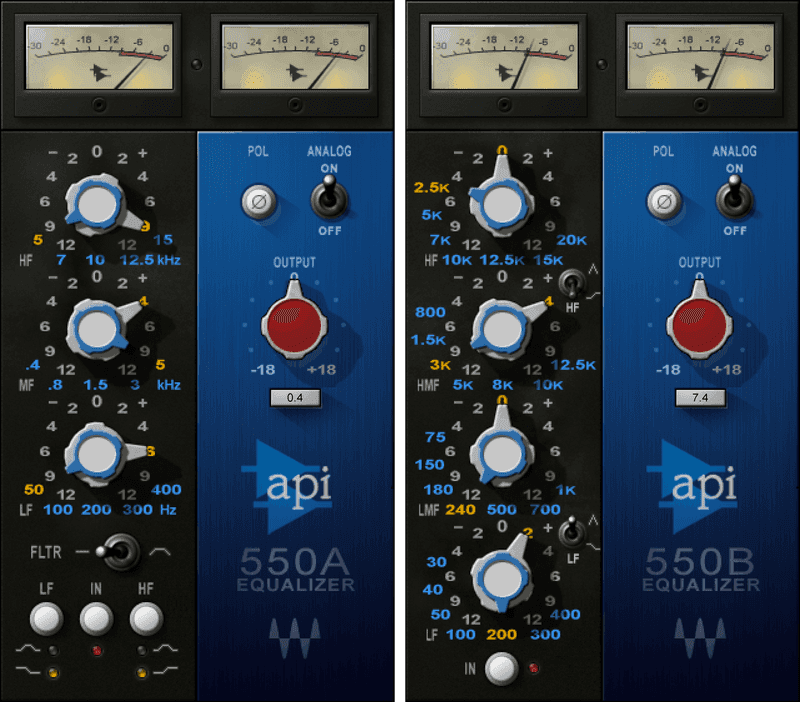
The API 550 introduced visionary EQ curves. Q varies with gain, so boosting adds a more focused musical quality—while reducing gain provides natural, subtle-to-steep tone shaping. Developed in close collaboration with API, the 550A/B are loving re-creations of these late-60s legends.

Expertly selected frequencies lift instruments up, or place them further back—just as easily as they can sweetly shape a mix’s contour. For individual tracks, buses, or full masters, the 550 defines musical transparency.

Features

  • 550A: 5 selectable frequencies for 3 bands, and 50 Hz – 15kHz filter
  • 550B: 4 overlapping EQ bands with multi-octave ranges
  • Ideal for general problem-solving or sweetening
  • High/low bands for 550A and B switch between peak and shelving
  • Switchable analog harmonic distortion and hiss
  • Convenience features like phase switch, output trim, and metering

System Requirements

Mac

  • macOS Monterey 12, Ventura 13, Sonoma 14, Sequoia 15
  • VST / AU / AAX

PC

  • Windows 10+
  • VST / AAX
Installation Instructions

1. Head to https://www.waves.com/create-account

2. Enter your email and choose a password to create an account (if you already have a Waves account, choose Log in, enter your details and head to Step 5) > click 'Submit'

3. Open your email inbox > click the activation link in the email from Waves

4. Click 'Log in here' > Log in to your Waves account

5. Click 'Register New Products'

6. Enter the Serial Number found in your Plugin Boutique user account > click 'Submit'

7. Click download in your Plugin Boutique user account or head to https://www.waves.com/downloads/central > download the Waves Central app for your operating system

8. Install Waves Central > Open Waves Central

9. Click 'Log in' > enter your log in details

10. Click the 'Install Products' tab

11. Tick the blue dot on all products you wish to install or click the top dot to install all products > click 'Install & Activate'

12. Click 'OK'

13. Open your DAW > open the Waves plugin

Your Waves plugins are installed and ready to use, enjoy!

Plugin Boutique Rewards

Discover the most rewarding loyalty programme among all plugin retailers.

  • Free Loopmasters Samplepacks
  • Discounts on products and courses
  • Extra Virtual Cash claimed immediately at checkout
Find out more

Follow us:

X (Twitter) Facebook YouTube Instagram
Logo Logo

Plugin Boutique Limited, Part of the Beatport Group LLC.

Copyright © 2011-2025 Plugin Boutique. All rights reserved