Log In

Free gifts available with your purchase
Bring Your Mixes To Life with Musical EQ and 3 Unique Saturation Flavors
The Kiive Audio M5133 is based on 3 Generations of a World-Renowned mastering EQ known for being used on records across every genre imaginable.
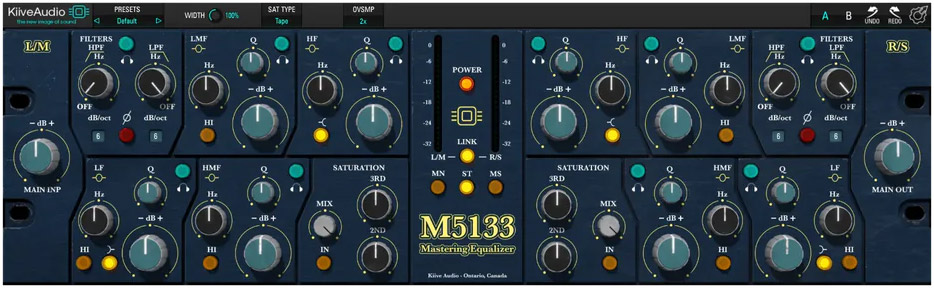
Featuring 4 Variable Bands, High and Low Filters, as well as 3 additional saturation types for adding that final touch of color to your tracks.
From the top to the bottom of your mix, this EQ handles each frequency band with curves perfectly designed for your master bus.
Introducing The M5133 Mastering EQ
Get Access to an Extremely Musical Mastering EQ Based on 3 Generations of Legendary Hardware!
This EQ is a staple in many mastering studios around the world, and it’s no surprise with its ability to shape up sounds perfectly without feeling “over EQ’d”.
With its meticulously modeled circuits capturing the best features of each revision, as well as additional saturation modes modeled by Kiive Audio, this EQ can handle any genre’s needs.
Modern Functionality, Classic Sound
Get the classic sound of this unit, with the modern functionality of a plugin.
Use the Headphone Icon on each band to hear exactly what you're adding or taking away.
Instantly change the saturation modes, and adjust the 2nd and 3rd order harmonics separately for the ultimate control.
Features
- Based on 3 generations of a legendary mastering EQ
- 4 variable bands + high & low filters for precise tonal shaping
- 3 unique saturation modes for added color and warmth
- Mastering-grade curves designed for mixbus perfection
- Solo band monitoring for pinpoint EQ adjustments
- Independent 2nd & 3rd order harmonic control for ultimate flexibility
- Classic analog tone with modern plugin functionality
System Requirements
Mac
- Mac OS X 10.7 or higher (macOS 10.14 or higher recommended) (64-bit only)
- Processor - 1 GHz Intel Dual Core or higher
- Screen Resolution - 1024 x 768 or higher
- Plugin Formats - VST, AU, AAX
Windows
- Windows 7 and above (64-bit only)
- Processor - 1 GHz Intel Dual Core Processor or AMD equivalent
- Screen Resolution - 1024 x 768 or higher
- Plugin Formats - VST, AAX