


 Log In
Free gifts available with your purchase
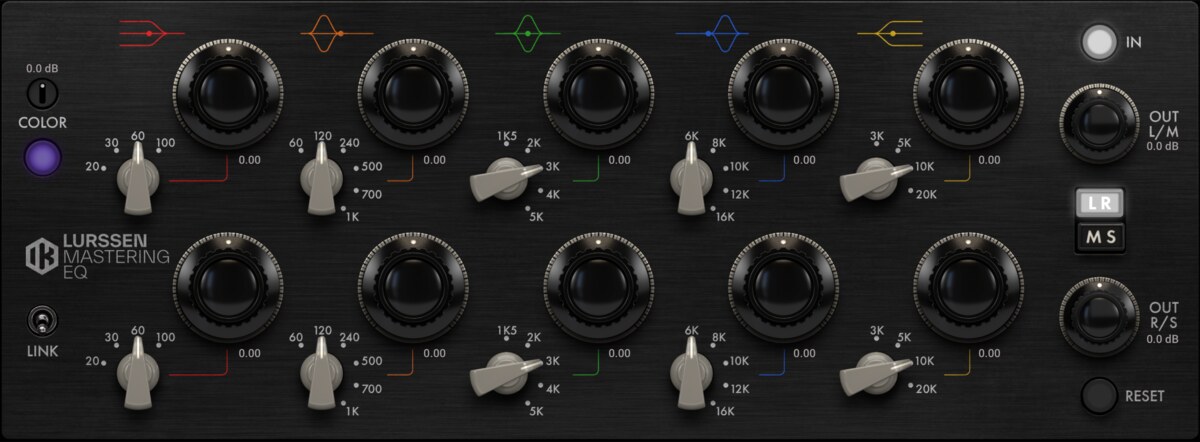
The EQ behind the legendary sound.
A faithful emulation of the legendary 825 Tube EQ used by Gavin Lurssen.
The T-RackS Lurssen Mastering EQ faithfully emulates the renowned 825 Tube EQ, a classic studio tool cherished in mastering circles for its warm, musical character and unique tonal coloration. It has become a benchmark for analog equalization.
Initially custom-developed for mastering legends Gavin Lurssen and Reuben Cohen, who have long relied on this sonic approach, the plug-in offers smooth, nuanced curves that deliver a stunning high and low end, enabling subtle yet powerful tonal enhancements.
Thanks to the detailed emulation of the preamp section, a unique “Color” control offers precise adjustment of harmonic saturation. This allows you to fine-tune the unit’s character for a cleaner sound or one enriched with harmonics.
Gavin Lurssen is the president and principal engineer at Lurssen Mastering, Inc. Since IK modeled his original 825 Tube EQ exclusively for his use, Gavin has used the Lurssen Mastering EQ on all his recordings. The plug-in faithfully emulates his cherished device and even adds features like the Color knob and mid/side processing to match his preferred workflow.
Lurssen Mastering EQ boasts a streamlined interface that integrates independent stereo controls with enhanced functionality. The plug-in replicates the original’s left/right EQ controls while introducing output controls, parameter linking, adjustable preamp input levels, and Mid/Side processing. Shelving filters offer intuitive manipulation of both high- and low-frequency ranges, and 3 tuned semi-parametric filters enable precise sound shaping.
You can use Lurssen Mastering EQ as a standalone or inside the T-RackS 6 plug-in to build custom channel strips combining other T-RackS modules. You can save your favorite signal chains and quickly reapply them, easily tailoring your setup to your creative needs.
The authentic sonic character and intuitive controls of Lurssen Mastering EQ will enhance your creative processes and workflows, making it an indispensable tool for achieving professional mastering quality. It includes a variety of presets from Gavin Lurssen and Reuben Cohen, saving you valuable time and making it easy to achieve exceptional results. You can use them straight out of the box or as a starting point to develop your custom presets.
Like all T-RackS plug-ins, the T-RackS Lurssen Mastering EQ can be used as a single plug-in or inside the T-RackS 6 shell.
Features
- Authentic 825 Tube EQ Emulation – Faithfully replicates the legendary mastering equalizer.
- Warm, Musical Character – Smooth, nuanced curves for refined tonal shaping.
- Unique "Color" Control – Adjust harmonic saturation for added richness or clarity.
- Mid/Side Processing – Enhanced flexibility for professional mastering workflows.
- Independent Stereo Controls – Left/right EQ with parameter linking for precise adjustments.
- Tuned Semi-Parametric Filters – Shelving and parametric bands for detailed sound sculpting.
- Standalone or T-RackS Integration – Use independently or in custom channel strips.
- Presets from Gavin Lurssen & Reuben Cohen – Professional starting points for quick results.
System Requirements
Mac (64-bits)
- Minimal: Intel® Core™ 2 Duo, 4 GB of RAM (8 GB suggested), macOS 10.15 or newer.
- Supported Plug-in formats (64-bit): Audio Units, VST 2, VST 3, AAX.
Windows® (64-bits)
- Minimal: Intel® Core™ 2 Duo or AMD Athlon™ 64 X2, 4 GB of RAM (8 GB suggested), Windows® 10 (64-bit only) or newer. Requires an ASIO compatible sound card.
- Supported Plug-in formats (64-bit): VST 2, VST 3, AAX.


