Buy PSP Tilt-Q, get a free gift with purchase:
Tilt Equalizer with Three Characteristics
Musical tilt EQ offering three distinct curve shapes, allowing you to quickly rebalance lows vs highs while choosing between classic, low-high focused, or mid-centric behavior.
Contour (Loudness) Equalizer with Three Characteristics
A loudness-style EQ designed to enhance lows and highs while shaping the midrange, with three selectable response characteristics inspired by classic hardware loudness designs and soft curve equalisers.
High-Pass & Low-Pass Filters
Independent HPF and LPF with selectable 6, 12, or 24 dB/octave slopes for precise low- and high-frequency range control.
Flexible Channel Processing
Apply processing to Left, Right, Mid, Side, or full stereo signals—ideal for stereo imaging, mastering, and corrective EQ work.
FAT Double Sampling
Automatic oversampling for lower sample rates (below 50 kHz) ensures consistent, high-quality processing across all supported sample rates.
64-bit Double-Precision Processing
Ultra-high-accuracy internal processing minimizes cumulative errors, preventing noise buildup and preserving natural filter behavior.
Second-Generation Output Saturation (SAT)
Optional soft saturation at the output stage adds smooth analog-style drive while protecting against digital clipping.
Integrated PSP Spector PSPEC-31 Analyzer
Built-in 31-band spectrum analyzer with bar or curve display modes, allowing real-time visualization before or after EQ processing.
Intuitive, Console-Style Interface
Designed for fast, musical decisions with minimal controls—ideal for mixing, mastering, and tone shaping without overthinking.
- Windows 7 – Windows 11
- macOS 10.14 – macOS 14 Sonoma
- 64-bit compatible host application
- Up to date iLok License Manager application required

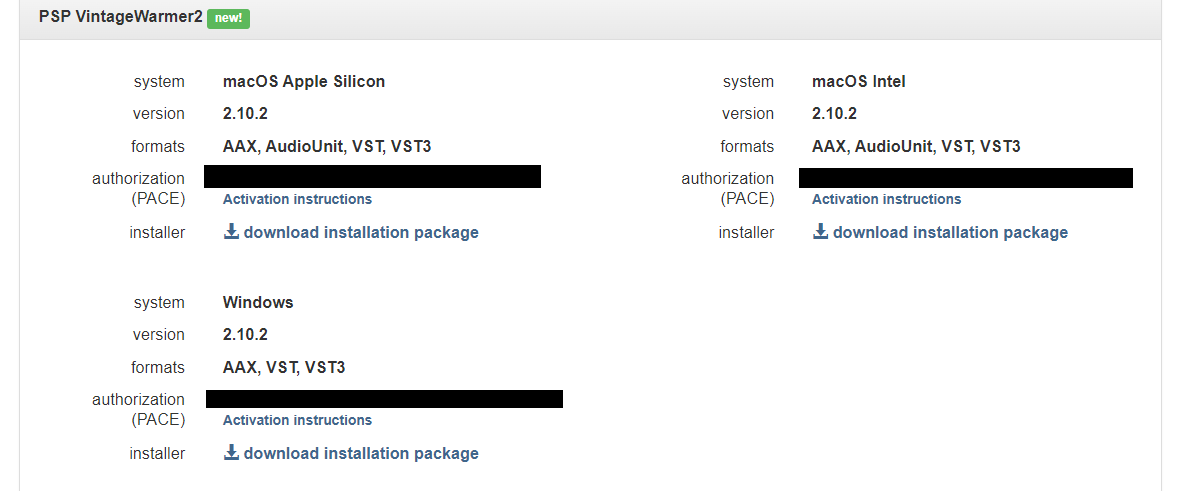
Please Note: PSP VintageWarmer2 is used as an example.
Activation
1. Visit the PSP Registration Centre and create/log into your PSPaudioware account.

2. Select the Manual Product Activation link and copy and paste/manually enter the serial number that is provided with your User Account. > click 'Activate!.'

3. Your PSP product will now show up in your PSP customer account. Your 30-digit iLok activation code will also be listed under authorization (PACE). Download the relevant installer.

iLok Registration
1. Go to the iLok website and create a new account if you are not currently registered and do not have the iLok Licence Manager installed on your computer.

2. Download and install the iLok License Manager.
3. Open your iLok license manager application > click 'Sign In'.

4. Enter your iLok registered User ID and password > click ‘Sign In'.

5. Once you are signed in, click the ‘Redeem’ icon which is located at the top-right corner of the iLok Licence Manager’s interface.

6. Copy and paste/manually enter the 30-digit code from your PSP Audioware account into the available Activation Code boxes, and then click ‘Next'.

7. Select your activation destination > Click 'Activate'.

8. Click 'Ok'.

Installation
Mac
1. Open the recently downloaded .dmg file to begin the installation.
2. Click 'Continue'.

3. Click 'Continue'.

4. Click 'Continue'.

5. Click 'Agree'.

6. Click 'Continue'.

7. Click 'Install'.

8. Click 'Close'.

9. Open your DAW > Open your newly installed software.
Your software is now activated and ready to use.

PC
1. Open the recently downloaded .exe file to begin the installation.
2. Click 'Next >'.

3. Select 'I Accept the Agreement' > Click 'Next'.

4. Click 'Next >'.

5. Click 'Next'.

6. Click 'Next'.

7. Click 'Next' to begin the installation.

8. Click 'Finish'.

9. Open your DAW > Open your newly installed software.
Your software is now activated and ready to use.