


 Log In

Free gifts available with your purchase
Sovereign of Analog Mastering Equalizers
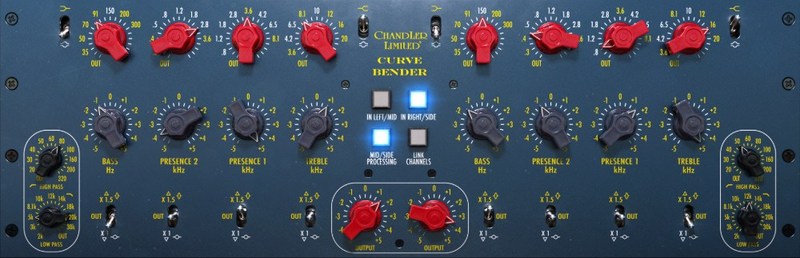
If there was a hierarchy of analog studio gear (and let’s face it, there kind of is) it’d be hard to dispute the Chandler Limited® Curve Bender’s claim to the throne. Among analog mastering grade equalizers, this one’s about as blue-blooded as they come.
With tremendous pedigree, huge yet controlled power, and most importantly, exceptional sound quality, thanks to component-level modelling of the original germanium and inductor circuits, the Curve Bender, now available for the first time in native format, reigns supreme over the domain of tone-shaping in analog mastering.
Legendary Circuits
The sound of this unit comes from equalizer circuits which can trace their lineage back to one of the most legendary high-end British consoles of all time, the EMI TG12345.
Subtle, yet powerful
With its gentle, carefully designed curves, silky top-end, and tight lows, it’s impossible not to improve your sound. Just set and forget.
Modern Royalty
In software form, the majestic sound quality of the Curve Bender is only built upon and expanded by the addition of Mid/Side processing.
Impeccable Lineage
The Chandler Limited® Curve Bender is based on desk circuits from the world-famous Abbey Road Studios in London, used to create albums of genuinely legendary status, such as Dark Side Of The Moon by Pink Floyd, and Abbey Road by The Beatles. And as with any truly supreme successor to a noble line, it builds on the greatness of its ancestors.
The Curve Bender has more bands (four, compared to the original console’s two), more fixed filter points (a huge fifty-one, up from just nine, chosen and designed in the image of the original circuits by Chandler Limited® founder, Wade Goeke), more Q and gain options, and added low and high pass filters, making the unit a mastering powerhouse without sacrificing the exquisite analog sound-flavor which made it a leader.

Modern Power
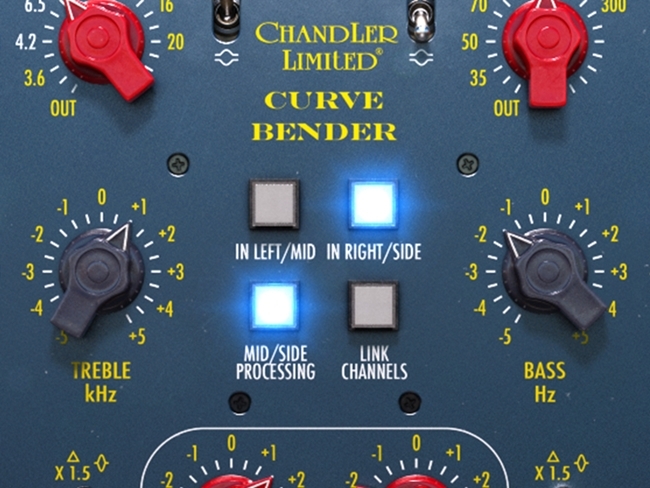
In software form, the Curve Bender plug-in not only allows you the luxury of using this ultra-special crown-jewel mastering EQ in multiple places in the same mix (across instrument groups AND the master bus, for example), but also adds functionality to the original hardware, with Mid/Side processing and channel linking. From left to right, mid to side, everything the light touches is yours.
A mastering grade processor, the Curve Bender is perfect for gently sculpting the entire mix, with never a hint of harshness despite its endless power.
Professional presets
To help you get the best out of the Curve Bender, we've asked some top professional mixing and mastering engineers to create presets. Quickly and easily dial in a sound you like by referencing Joe Chicarelli, Tony Maserati, Howard Willing, Kevin Kadish, and Maor Appelbaum.
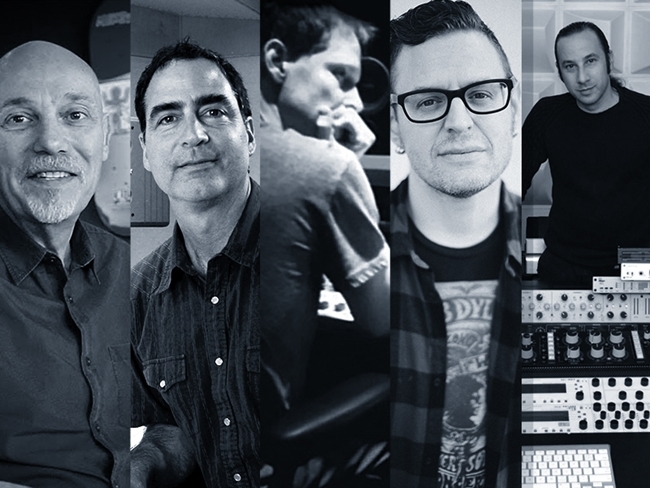
Mastering, in particular, is all about subtlety, so you'll want to tweak to taste, but these professional presets will give you great ideas, and get you in the ballpark of a stellar sound in seconds.
A Crowning Glory
Not all equalizers are created equal. The crisp, powerful, performance of the Chandler Limited® Curve Bender will open up the soundscape of any song, and take it to glorious new levels. Whether on the master bus, the drum group, or a lead vocal track, this kind of quality rules your sound without being brash or crude. It’s refined, natural, regal, and it will elevate your mixes whether you’re a club DJ, an urban poet beatmaker, a rock & roll rebel, or a pop princess. All people are the Curve Bender’s people.
In Short
- Mastering grade analog equalizer.
- Silky top-end and tight lows.
- Based on legendary British console EQ circuits used on innumerable classic records.
- Professional engineer presets from Joe Chicarelli, Tony Maserati, Howard Willing, Kevin Kadish, and Maor Appelbaum.
- Improved with more bands, more filter-points, greater gain and Q flexibility, and additional low and high pass filters.
- Added Mid/Side processing and channel linking in the plug-in.
- Subtle yet authoritative; carefully considered curves and exceptional quality mean you can boost with confidence.
- Set it and forget it – it always sounds good.
- Use on master bus, instrument groups, or even individual tracks – it’s great on vocals.
- A real crown jewel in your collection.
System Requirements
- macOS Big Sur 11, Monterey 12, Ventura 13
- Windows 10 (64-bit), Windows 11
- Softube account
- iLok account
- Computer with AU, VST, VST3, and/or AAX-compatible DAW host software
- Internet access (for downloading installers and managing licenses)
Supported CPU Families
- Apple macOS computers with Intel Core i3/i5/i7 or Apple silicon (M1 or newer) CPU. Apple silicon is supported natively.
- Windows computers with quad-core Intel Core i3/i5/i7 or AMD quad-core processors with SSE 4.2 support.
- Other Intel processors (Celeron, Pentium, and Xeon) are compatible if they support SSE 4.2 instructions.
Supported Host Software (DAW)
Any 64-bit VST, VST3, AU, or AAX (Pro Tools 11.0.2 or higher) compatible host application should work. However, due to plug-in host differences between DAWs—and our rigorous standards—Softube only officially test their plug-ins and instruments in the most recent versions of Pro Tools, Logic Pro, Cubase, Ableton Live, Studio One, and Reaper. Softube plug-ins are not tested regularly in non-listed systems. They will likely work if the system requirements are met. However, the manufacturer cannot guarantee a solution for issues in unsupported systems.
Softube strongly recommend using VST3, as some of their plug-ins have features that are not present in the older VST format. Supported sample rates: 44.1, 48, 88.2, 96, 176.4, and 192 kHz, in both mono and stereo. The most recent maintenance release of your DAW application is recommended. AAX DSP is not currently in active development. TDM/VENUE/RTAS are no longer supported. See Legacy Installers.
Important Note: Make sure that you always use the latest iLok License Manager. It is not included in the Softube installer but can be downloaded from www.ilok.com

Joe Chiccarelli
Mixer, Engineer & Producer | Beck, U2, The Strokes, Elton John and more.
"The Curve Bender can deliver a simple one-click notch of air on an organic mix or a healthy amount of low-end thump to punch up an electronic track."

Ryan Hewitt
Grammy award-winning engineer | Red Hot Chili Peppers, The Avett Brothers, Blink-182 and more.
"The Curve Bender plug-in has all the hallmarks of the original, with the added benefits of M/S processing and channel linking - it sounds amazing!"
Jack Stevens
Electronic music producer, best known as one half of SpectraSoul and more recently as Workforce. Jack Stevens has three critically acclaimed studio albums, countless EP, singles and remixes under his belt, with much more to come.
"The Curve Bender EQ has some of the smoothest and creamiest top-end of any of the Eq's I've used. I've also used the lo and hi-cut to great effect. Lovely character EQ for the Master Buss too. Love it."
Reviews Summary
While it aims to provide a helpful overview, it may not capture every perspective or detail. We encourage you to read individual reviews to make an informed decision.
The Chandler Limited Curve Bender is overwhelmingly praised as an exceptional, highly musical EQ with distinct analog character. Users highlight its silky top end, solid lows, and natural curves, making it a favorite for mastering, mix buses, and adding warmth, polish, and depth without harshness.


