


 Log In

Free gifts available with your purchase
Freakishly powerful.
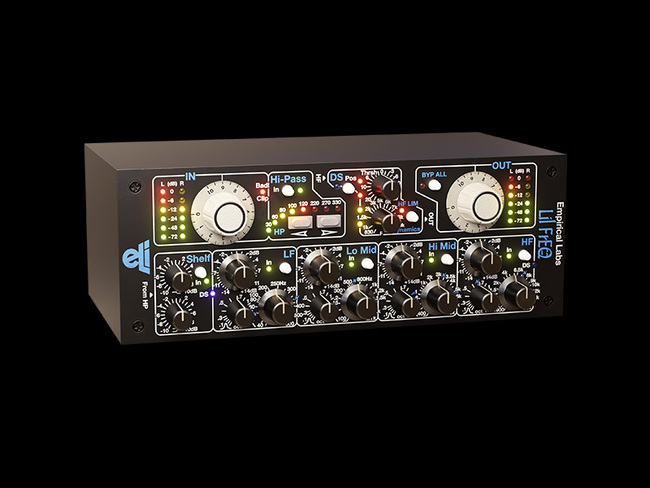
The warm and punchy analogue sound of the Empirical Labs Lil FrEQ makes it something of an oddity in the world of equalizers. But it’s no sideshow. With its heart-shaped box of tricks, mighty analogue tone, and de-essing chops, Softube were hard-pressed to think of a more powerful analogue EQ. It’s what makes Lil FrEQ the ace in the hole for so many high-profile recording engineers and mixing professionals. When your equalizer features eight different processing sections, you can ditch the multi-plug-in setup and get on with it. The native software version—expertly modelled under the watchful eye of Dave Derr himself—gives you all that tone-shaping and correction power, plus supernatural sound quality, and flavour galore. In a word, it's un-freakin-believable.
Designed by Experts, Built on Legacy
Softube has a long history of modelling professional gear. After nearly two decades working in collaboration with premium pro audio brands like Tube-Tech, Solid State Logic, Chandler Limited®, Weiss Engineering, and Trident, Softube have a solid track record recreating indisputable classics in software form that sound precisely like their hardware counterparts.
Empirical Labs Lil FrEQ is built on this legacy, and Softube took the same meticulous approach they always do – everything needs to be exact, with skilful recording, precise testing, and fine-tuning to sound exactly like the hardware that inspired it or even better. Nothing less.
Funhouse: Eight Processing Sections
With a super-useful parameter set spread out over an unheard-of eight sections of processing, Lil FrEQ offers you the ability to instantly A/B the effect of each section as you adjust and fine-tune them. Because, in addition to a master bypass, each of Lil FrEQ’s eight sections features its own dedicated bypass switch. Lil FrEQ lets you do with one EQ what you’d normally need to combine several other tools to do. Lil FrEQ helps you mix faster and gets you the sound you want quicker.
Freak Show: The DS Section
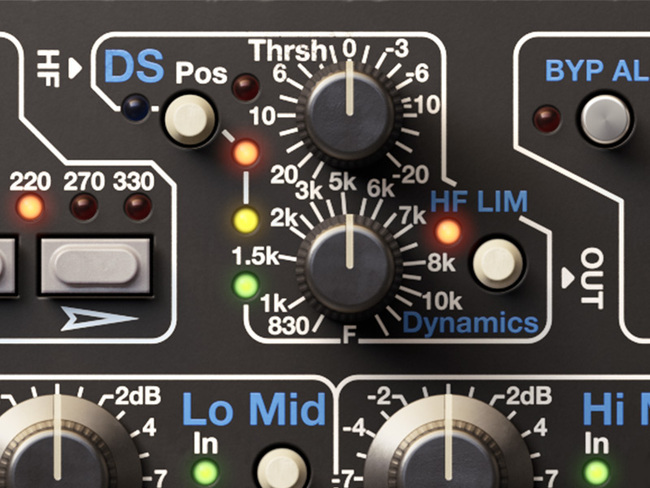
Step right up, folks! Witness this never-before-seen de-ess function. The Lil FrEQ DS section combines tunable filters and a level independent high-frequency detection circuit that restrains excessive high frequencies, such as sibilants or other sharp transients, especially in the absence of lower-frequency content. It also acts as a unique soft-knee, high-frequency limiter and can even emulate analogue tape. With talents like these, you can see why Lil FrEQ is the vocal EQ of choice for countless engineers and has been used in numerous hit records, major live performances, and to shape vocals, snare, and bass. It’s not every day a freaky little EQ spawns a de-esser, but Lil FrEQ’s DS section is just that good.
Freaks Flock Together: The EQ
For all its unusual traits Lil FrEQ is dependably classic in some respects. Take, for instance, its four sections of fully parametric EQ (LF, Lo Mid, Hi Mid, and HF), each section with individual gain, bandwidth (Q), and frequency controls. The conventional becomes extraordinary when it's executed to this level. Every component is masterfully modelled to give you a better workflow. The result is soaring sound quality that stands out from the crowd.
Freak Scene: The User Interface
The big white knobs set the scene. Immediately, you know you're working with high-quality craftsmanship and legendary analogue sound, all in a super intuitive interface—to include those blue markings. They let you accurately simulate the settings of one of the most classic British EQs. Softube authentically modelled not just the look of the Empirical Labs Lil FrEQ but also the care and intention that goes into making it easy to use and a whole lot of fun.
Carnival of Soul
Lil FrEQ succeeds in being uncommonly powerful and musical with just the right hit of analogue warmth. The unique set of un-EQ-like features Lil FrEQ boasts make it an incredibly valuable tool in your box. It can replace several plug-ins in a signal chain and gives you better sound faster. If you’re going for super punchy and fat-sounding drums, less harsh cymbals, a natural-sounding vocal track, or just trying to fit a ho-hum acoustic guitar recording into the mix, Lil FrEQ is the gal for the job.
Destined to become a modern classic—just like her siblings, Distressor and Fatso—Lil FrEQ punches like no other, does uber-transparent correction work, and is a wickedly-aggressive and singular tone shaper. She’s totally unique. She’s the Lil FrEQ.
Tape Tip
Try your hand at using Lil FrEQ's one-of-a-kind de-ess section to emulate analogue tape:
- Set to HF LIM with the frequency at 6KHz
- Adjust until the frequencies harshly pile up
- Let the de-ess section kick in
- Hear it integrate and smooth out the high end
- Done!
Superknown
Raised by a family of engineers, Dave Derr has gone from a chance encounter at Radio Shack to having his gear used in every major studio and on thousands of records. A rocker in his own right, his name is now synonymous with analogue warmth, but he's not resting on his laurels. On the contrary. The humble genius behind Empirical Labs continues thinking and tinkering and incrementally improving on the already amazing array of products he’s gifted the music industry. Products like Fatso, DerrEsser, and Distressor. It's that work ethic and empirical spirit that has made ELI so well-regarded in the pro audio sphere. Its products are real-world tested and built to get the better of obsolescence. Softube couldn’t be prouder to be part of the Dave Derr and Empirical Labs legacy with their authentic emulations of their modern analogue classics: Mike-E, Lil FrEQ, Trak Pak, and the Empirical Labs Complete Collection.
Features
- An expert component modelled native plugin version of the Empirical Labs Lil FrEQ hardware
- Input Gain after Meter with clip indicator
- Vintage style High-pass filter: 18 dB/octave
- Super smooth High and Low shelving EQ
- 4-band fully parametric EQ: LF, Lo Mid, Hi Mid, and HF: +-14 dB
- Super-wide to super-narrow bandwidth and generous frequency ranges
- Blue markings for vintage British style of equalization
- DS section – the same as the famous DerrEsser
- Individual bypass on all bands and sections
- Punchy, fat and analogue sound
System Requirements
- macOS Big Sur 11, Monterey 12, Ventura 13
- Windows 10 (64-bit), Windows 11
- Softube account
- iLok account
- Computer with AU, VST, VST3, and/or AAX-compatible DAW host software
- Internet access (for downloading installers and managing licenses)
Supported CPU Families
- Apple macOS computers with Intel Core i3/i5/i7 or Apple silicon (M1 or newer) CPU. Apple silicon is supported natively.
- Windows computers with quad-core Intel Core i3/i5/i7 or AMD quad-core processors with SSE 4.2 support.
- Other Intel processors (Celeron, Pentium, and Xeon) are compatible if they support SSE 4.2 instructions.
Supported Host Software (DAW)
Any 64-bit VST, VST3, AU, or AAX (Pro Tools 11.0.2 or higher) compatible host application should work. However, due to plug-in host differences between DAWs—and our rigorous standards—Softube only officially test their plug-ins and instruments in the most recent versions of Pro Tools, Logic Pro, Cubase, Ableton Live, Studio One, and Reaper. Softube plug-ins are not tested regularly in non-listed systems. They will likely work if the system requirements are met. However, the manufacturer cannot guarantee a solution for issues in unsupported systems.
Softube strongly recommend using VST3, as some of their plug-ins have features that are not present in the older VST format. Supported sample rates: 44.1, 48, 88.2, 96, 176.4, and 192 kHz, in both mono and stereo. The most recent maintenance release of your DAW application is recommended. AAX DSP is not currently in active development. TDM/VENUE/RTAS are no longer supported. See Legacy Installers.
Important Note: Make sure that you always use the latest iLok License Manager. It is not included in the Softube installer but can be downloaded from www.ilok.com


