


 Log In

Free gifts available with your purchase
Whether you're a bedroom producer or a Grammy-winning pro, you want to take control to develop your own musical voice. Claro will empower you to make informed musical decisions in a unique and intuitive way.
Claro is a comprehensive EQ plugin that serves the production process from composition to final mix, with three distinct views, progressively adding deeper insight and precision to prevent mud, clutter, or harshness, helping you blend your tracks into a clear and balanced mix.
How Does Claro Benefit You?
Staying focused is difficult, it slows the production process and kills creativity.
Specifically designed to offer "Vibe first, detail later", Claro has three distinct views which help to build your EQ intuition and confidence without interrupting the flow. You'll be guided towards making the right decision for you, first time, every time.
After having reduced masking from your previously muddy mix, have you ended up with something lifeless or sterile?
Of course, you have, but were you aware that not all masking is bad all of the time? Masking can impart body, thickness and presence to your tracks. Claro identifies masking and empowers you to learn and choose whether it is problematic or positively contributing to the tone you're trying to achieve.
Resonance isn't always bad.
Resonances are the sharp, tonal characteristics that ring over time, as the overtones of a bell. They can cause things to sound harsh or boxy, and while you might be tempted to notch out or remove all of the resonances, they also help determine that sound's character, including its pitch.
When searching for resonant areas to tweak, Claro shows precise peaks and highlights those that resonate most over time.
You don't always refer to audio in specific Hz, so why should your Plugin?
Claro's friendly, intuitive interface guides you towards frequency ranges using familiar words such as 'Mud' and 'Harshness' in addition to Hz. A piano keyboard is also displayed to set your EQ band to a specific note helping you to work musically.
Produce | Tweak | Mix
Three Distinct Views
Claro sustains focus and accelerates your workflow through three distinct views.
The first is the PRODUCE view, offering a fast, creative EQ that actively promotes your musical creativity while removing unnecessary distractions and complex technical terminology.
TWEAK view then opens up more correctional possibilities, providing you with the cleanest, most flexible filters. The real-time analyser adapts to your moves and helps to identify problematic resonances.
Finally, use the MIX view to understand and assemble your mix. Every track is simultaneously displayed for you to prioritise, explore interactions and swiftly address frequency collisions between competing tracks.
Claro is an equaliser that aids the production process from composition to final mix. Progressively adding deeper insight and precision, Claro maintains focus and accelerates your workflow through three distinct views.
Produce - Tone
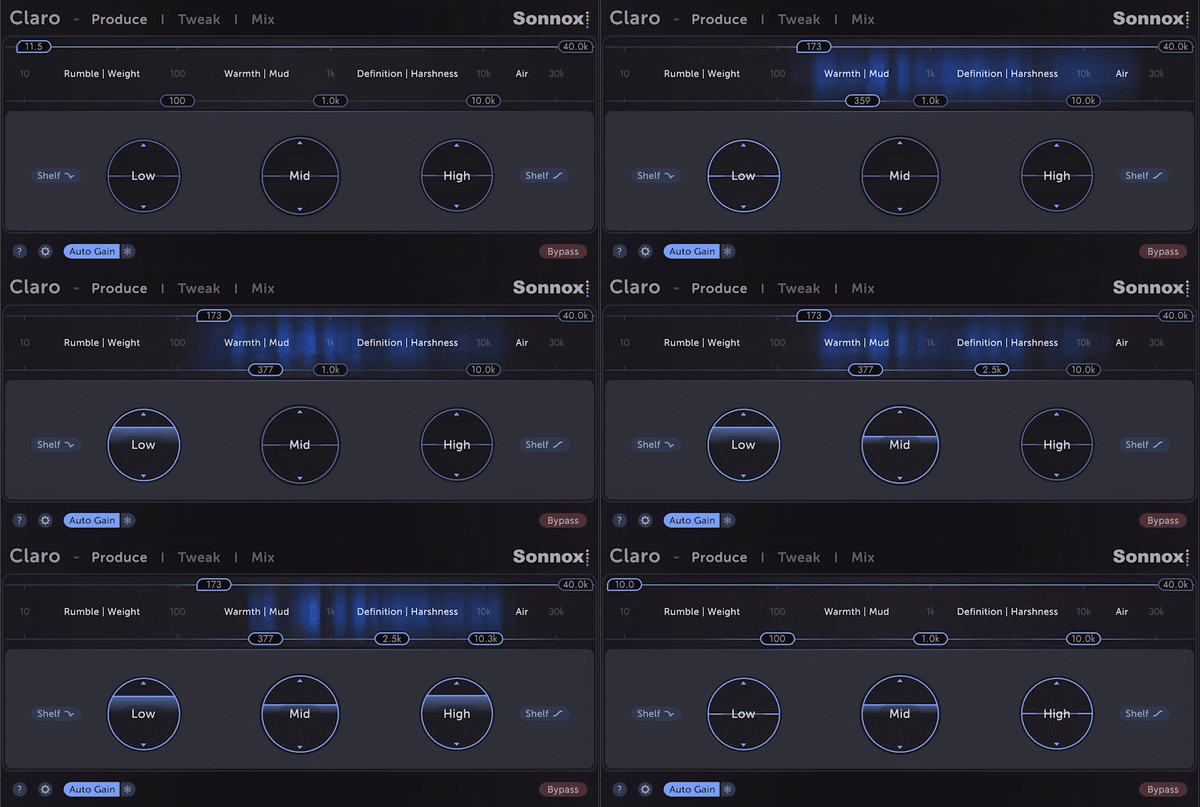
Build EQ intuition and confidence without interrupting your flow.
Broad EQ moves while creating, even if they're subtle, often inspire you to make different musical decisions.
Focus on where the energy is and discover what tonal characteristics you want to achieve.
Produce - Width
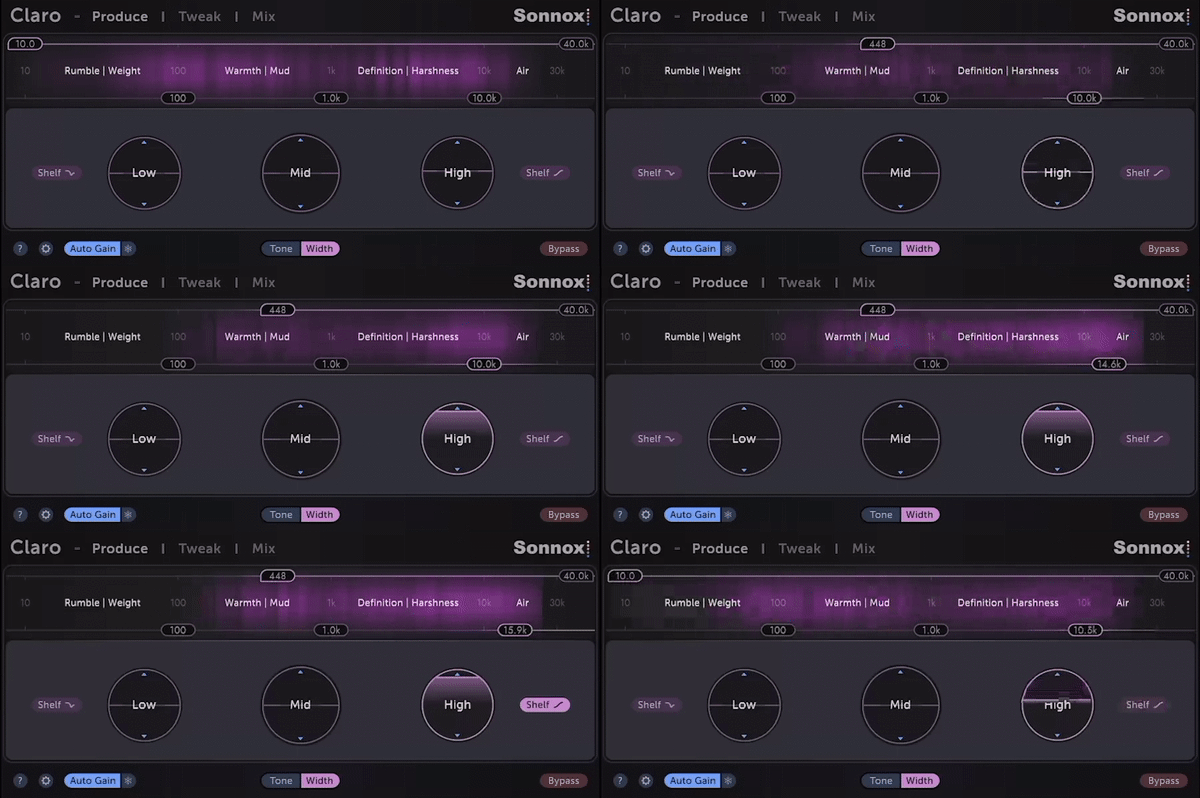
Mid-side EQ is often essential for cleaning up stereo synths and loops or creating space for vocals, and it's just as quick as Tone shaping.
Flip to Width mode to see the side-channel energy and tweak it.
Too much rumble in the sides? Mono the bass with the Low Cut Filter.
Tweak
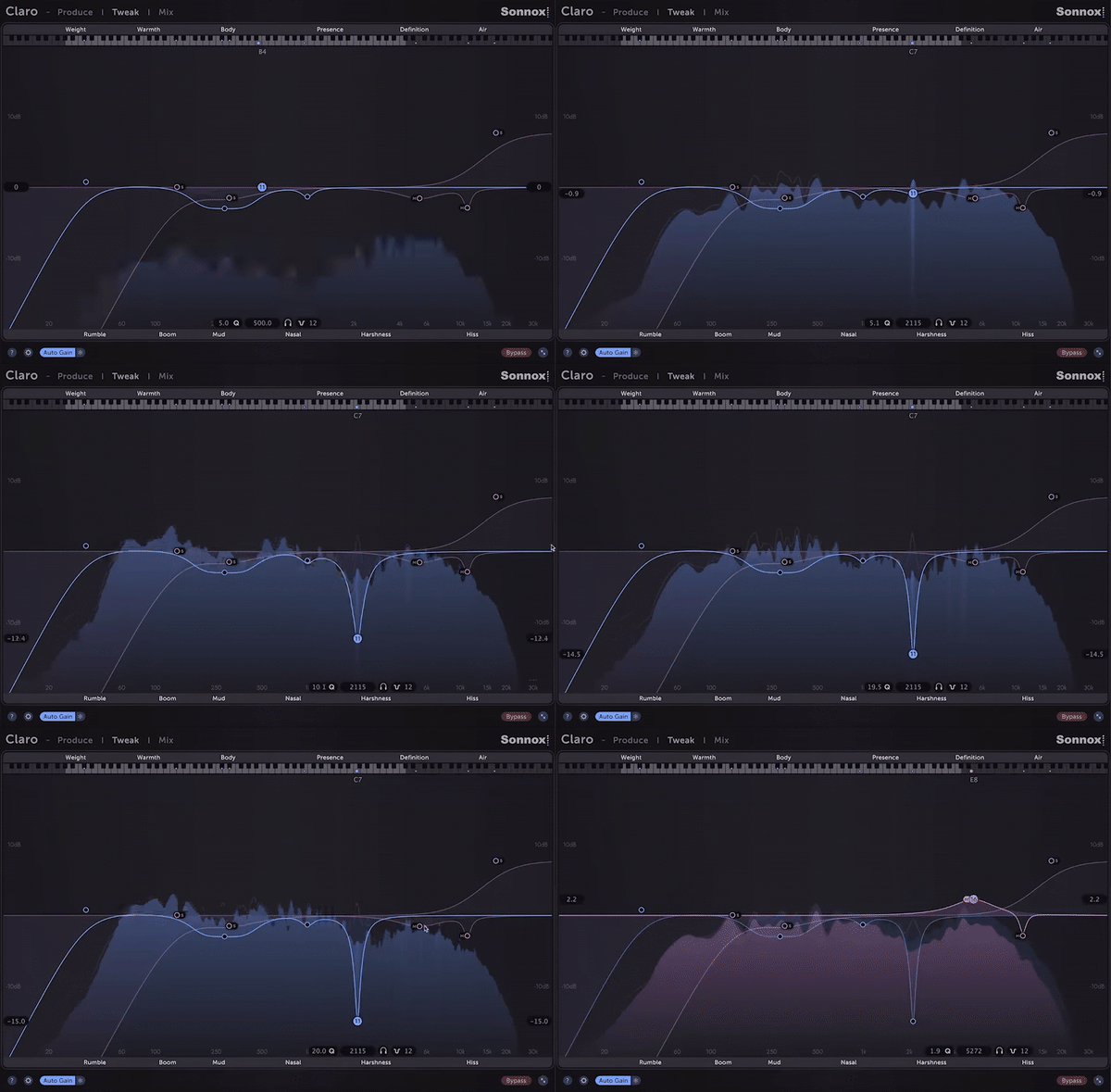
Sometimes you'll need to dive into finer details, tweak filter resonance, adjust left/right and mid/side balance, or attenuate areas that contribute to boxiness or harshness.
Claro's adaptive spectrum analyser follows the channel (stereo, left/right or mid/side) and the Q of the band you're adjusting to show you what you need to see.
No more boosting and sweeping. Claro identifies resonances and highlights them so you can be in control of how much or little you wish to attenuate those resonances.
Mix
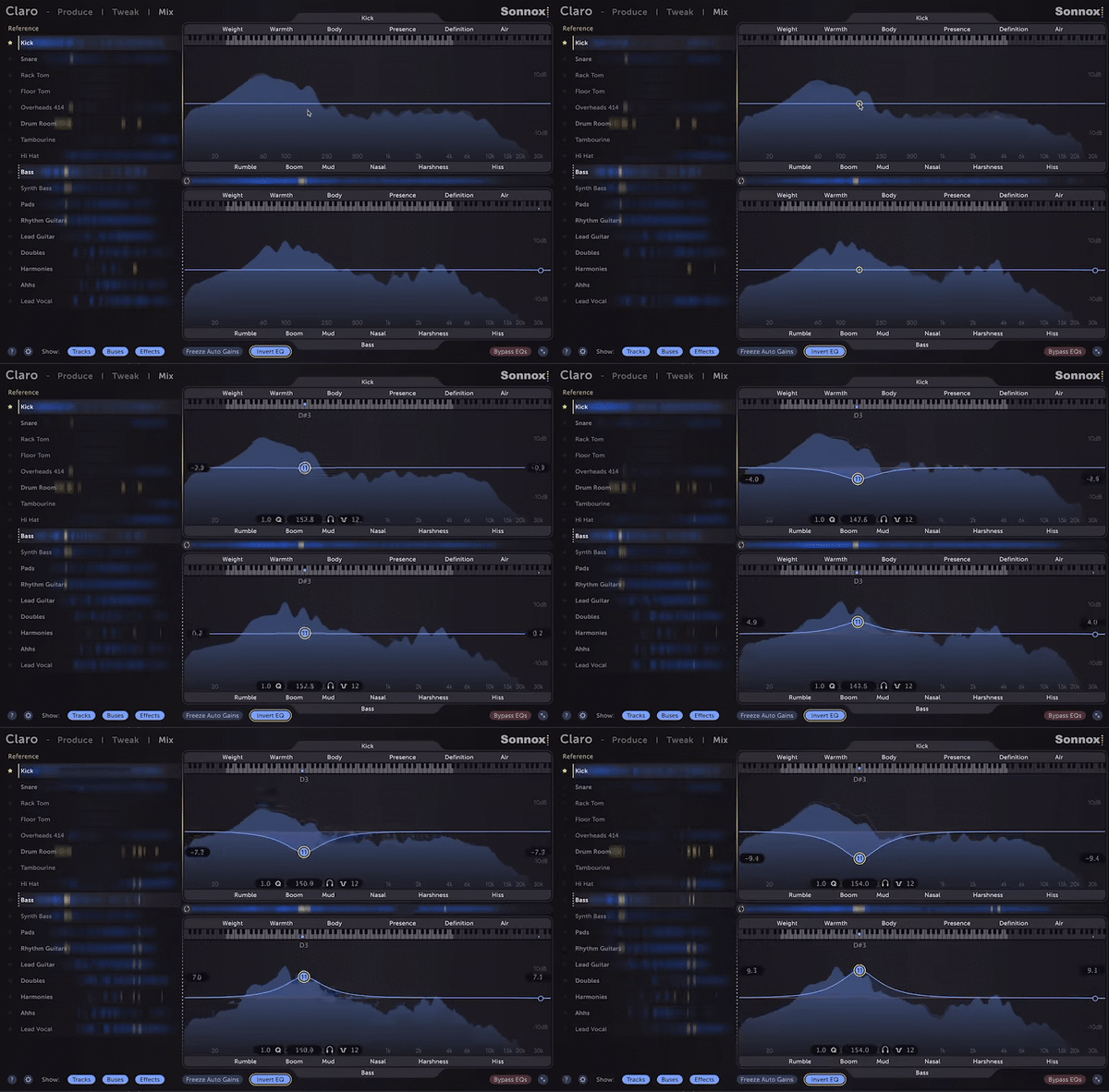
View all Claro instances across your project and see how the audio interacts.
Drag & drop tracks to explore corrective EQ moves across any combination of tracks from the same window.
Yellow highlights indicate where each track in your mix competes against, or masks, your chosen reference track. Areas of masking can lead to it sounding boomy, muddy, or harsh.
Use the Invert EQ function to apply corresponding boosts to one track and cuts to another to reduce masking and give each track its own spectral space.
Features
- Claro's EQ is highly flexible, with each of its 26 bands offering:
- A clean, musical-sounding EQ that resembles the well-loved Neve types, their modern derivatives and the SSL G Series, as well as many high-end outboard equalisers.
- Left, Right, Mid, Side, Mono, or Stereo channel processing giving you the capability to correct, widen, narrow, or make space within each track.
- A wide 20hz - 40kHz range. The extended high-frequency range offers a smooth, airy quality - excellent for vocals and mix busses.
- Variable Q, including resonance and overshoot on the cut and shelving filters, respectively, giving you the ability to mimic classic synth filters and hardware EQ curves.
- Variable slopes on all band shapes, up to super-steep (120dB per octave) for surgical work and treating precise audio bands
- Claro's automation is smooth and artefact-free, unlike most premium EQs.
- Auto Gain uniquely keeps your track at the same loudness, no matter the signal content or how you choose to EQ it.
Nuno Fernandes
(Bryan Adams, Jeff Lynne, KT Tunstall)
"It’s such a huge time saver to be able to do everything in one plugin."
Adam Hawkins
(Twenty One Pilots, Machine Gun Kelly, Yungblud)
"You know, I'm a complainer. And really, honestly, everything with Claro is really well thought out."
Mike Exeter
(Black Sabbath, Judas Priest, Cradle of Filth)
"I love the sound and feel of this plugin, and the resonance visual feedback is better than anything else I’ve used"
macOS
- macOS 10.12 or later (Intel / M1 Apple Silicon supported) (64-bit only)
- Plugin Formats - AAX Native, AU, VST3
- Supported Hosts - Pro Tools 11 or above or any desktop application that supports Audio Unit (AU) or VST3 plugins.
Windows
- Windows 10 or later
- Plugin Formats - AAX Native, VST3
- Supported Hosts - Pro Tools 11 or above or any desktop application that supports VST3 plugins.
Activation
The Toolbox range offers 2 activations for each product licence you buy.
Providing you have an iLok account, each activation will allow you to authorise your plugin on one of these devices:
- Machine
- iLok device, iLok2 / iLok3 required with latest drivers OR
- iLok Cloud (Active internet connection required)
Reviews Summary
While it aims to provide a helpful overview, it may not capture every perspective or detail. We encourage you to read individual reviews to make an informed decision.
Users highly praise the EQ plugin for its intuitive interface, distinct workflow modes, and powerful multi-track interaction that makes identifying frequency masking and resonances effortless. Features like mid/side processing, tonal-to-surgical flexibility, and auto gain are widely appreciated for achieving balanced mixes. Minor criticisms center on a slight initial learning curve, potential CPU or GPU resource usage, iLok licensing, and mixed impressions regarding sound necessity.


