/ EQ / GotoEQ
Klevgrand

GotoEQ

4.9 (7 Reviews)
$59.99
Klevgrand GotoEQ
Klevgrand GotoEQ
Klevgrand GotoEQ - GUI
Klevgrand GotoEQ - Overview Video gallery thumbnail
Klevgrand GotoEQ - Examples Video gallery thumbnail
Klevgrand GotoEQ - Demonstration Video gallery thumbnail
Buy Now
Product information

Premium Equalizer

A classic EQ unit reinvented for the digital age

GotoEQ is a new evolution of a vintage passive tube-based program equalizer, expanding on that classic sound with dynamic EQ bands.

GotoEQ performs the classic ‘low-end trick’ with dual Boost and Attenuate controls for its low shelf, but it also offers the ability to perform a 'high-end trick', with a similar formulation of high shelving.

With continuous frequency selection, you can tune each band as you like. But most importantly of all, GotoEQ’s two mid bands offer dynamic attenuation, bringing a musical approach to the classic EQ unit.

Usage

Simultaneously boost and cut the low shelf to create that low-mid scoop on bass tracks. De-ess vocals or de-harsh overheads by engaging dynamic attenuation and tuning the high-mid band. Add air to signals with the high shelf filter, and ‘scoop’ the high-mids using a ‘high-end trick’. Get control over the ‘nose’ of bass tracks with dynamic attenuation of the Low Mid and High Mid bands. Subtly EQ a whole mix or bus using light settings and mild compression

Anatomy
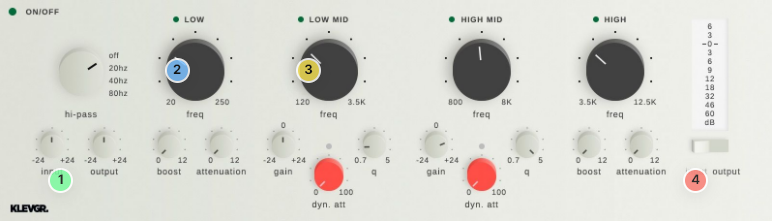
1. Prepare for treatment - To let the dynamic processors work at their best, make sure to set the right input level.

2. Classic style filters - Two shelving filters with separate Boost & Attenuation controls. To achieve the 'Pultec' effect, both boost and attenuation must be above 0 dB.

3. Dynamic parametric EQs - These work a bit differently than the Low & High filters – a dynamic processor attenuates the signal. Fine-tune with the gain knob.

4. Level like a boss - VU-meters for Input or Output levels.

Features

  • Low and High Shelf filters, with detailed modelling of a classic passive EQ unit
  • Two parametric dynamic filters
  • High-pass filter: 20/40/80 Hz
  • Preset library
  • Continuous frequency selection for all four bands
  • Boost and Attenuation for the Low and High shelving bands
  • Gain, Q, and Dynamic Attenuation for the two mid bands
  • Finely-tuned compression algorithm makes mid bands react dynamically to the signal
  • Global Input and Output Gain controls (+/-24dB)
  • Global bypass and individual band bypass
  • Peak metering for the input or output

System Requirements

  • macOS 10.10 or later (optimized for the M1-processor)
  • Windows 7 SP1 or later
  • AU, VST-2, VST-3, AAX

Installation Instructions

Please Note: Pana is used as the example:

Mac

License Redemption

1. Navigate to https://klevgrand.com/redeem > Paste your 16 digit redemption code found in your Plugin Boutique User Account > Click 'Submit!'.

2. Your redemption code has been accepted > Scroll down to Step 2.

3. Click either 'Sign in' if you already have a Klevgrand account, or 'Create new account' if you do not > Fill in your personal details > Click 'I'm ready'.

4. Your account has now been created.

5. Navigate to your email inbox and locate the activation email that you should have received from Klevgrand > Click 'Let me in!' to activate your account.

6. Create a password for your account > Click 'Enter Klevgrand'.

7. Your software and serial number is now available within your Klevgrand account > Click the Apple logo to download the installer file.

Installation

1. Launch the pana_x_x_x_macOS.dmg installer file.

2. Double click the KLEVGR. logo to launch the installer.

3. Click 'Continue'.

4. Click 'Continue'.

5. Click 'Agree'.

6. Click 'Install'.

7. Enter your system password > Click 'Install Software'.

8. Click 'Close'.

9. Navigate back to your Klevgrand My Account page > Click on the serial number to copy it to your clipboard.

10. Launch your DAW > Create a new audio track > Insert Pana onto the channel > Paste your serial number into the box.

Your software is now activated and ready to use within your DAW

Windows

License Redemption

1. Navigate to https://klevgrand.com/redeem > Paste your 16 digit redemption code found in your Plugin Boutique User Account > Click 'Submit!'.

2. Your redemption code has been accepted > Scroll down to Step 2.

3. Click either 'Sign in' if you already have a Klevgrand account, or 'Create new account' if you do not > Fill in your personal details > Click 'I'm ready'.

4. Your account has now been created.

5. Navigate to your email inbox and locate the activation email that you should have received from Klevgrand > Click 'Let me in!' to activate your account.

6. Create a password for your account > Click 'Enter Klevgrand'.

7. Your software and serial number is now available within your Klevgrand account > Click the Windows logo to download the installer file.

Installation

1. Unpack the pana_x_x_x_win.zip installer file > Launch the pana_x_x_x_win.exe file.

2. Click 'I accept the agreement' > Click 'Next'.

3. Click 'Next'.

4. Click 'Next'.

5. Click 'Next'.

6. Click 'Install'.

7. Click 'Finish'.

8. Navigate back to your Klevgrand My Account page > Click on the serial number to copy it to your clipboard.

9. Launch your DAW > Create a new audio track > Insert Pana onto the channel > Paste your serial number into the box.

Your software is now activated and ready to use within your DAW

Plugin Boutique Rewards

Discover the most rewarding loyalty programme among all plugin retailers.

  • Free Loopmasters Samplepacks
  • Discounts on products and courses
  • Extra Virtual Cash claimed immediately at checkout
Find out more

Follow us:

X (Twitter) Facebook YouTube Instagram
Logo Logo

Plugin Boutique Limited, Part of the Beatport Group LLC.

Copyright © 2011-2025 Plugin Boutique. All rights reserved