


 Log In
Free gifts available with your purchase
A Different Equalizing Experience
The most complete passive EQ plugin. Musical and intuitive, a must-have for mixing and mastering.
Pulsar MP-EQ is an emulation of a legendary analog EQ found in almost every mastering studio worldwide. Designed as a synthesis of the best passive equalizers of the past 70 years, its fully parallel topology offers a unique and musical frequency response compared to digital EQs with the same settings. Because of this design, the bands naturally interact, producing a more musical overall response.
Its entirely passive circuit, featuring custom hand-wound inductors, tubes, and transformers, delivers creamy highs, balanced mids, and organic warmth through magnetic saturation. Pulsar MP-EQ faithfully recreates every sonic detail of the original hardware while adding modern features like visual curve editing, drive control, linear phase mode, or auto-gain.
Improving on a classic
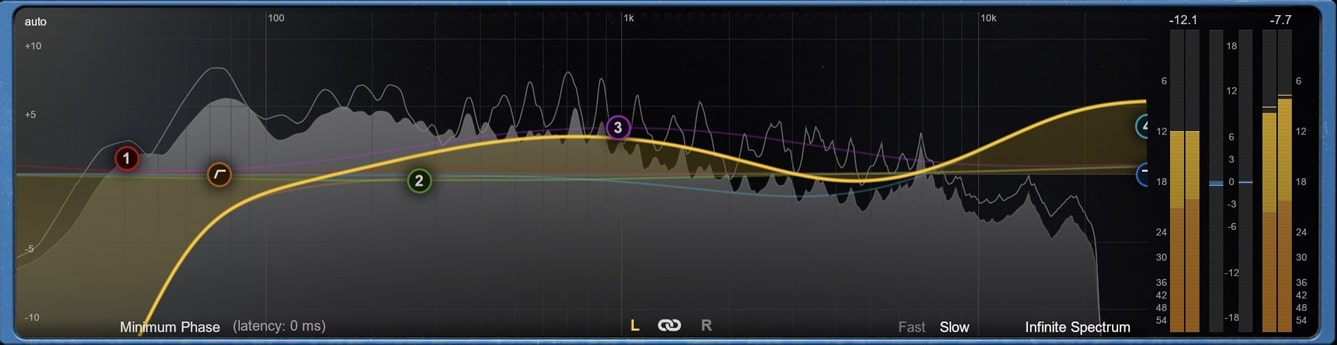
Pulsar MP-EQ comes with a complete on-screen curve editor and spectrum analyzer. This best-of-both-world approach gives an accurate overview of your EQ changes while highlighting the singular behaviors of the original unit. The easy-to-use graphic interface allows a fast and radical workflow for mixing applications.
Analog Drive and Harmonic Character
The Drive control allows usage of the plugin at internal levels where the analog vibe of the original unit is unusual and musical. Pulsar MP-EQ's accurate models of transformers, tubes, and inductors produce large amounts of harmonics and non-linearities. All coupled together, these are responsible for the subtle, dynamic and program-dependent low-end compression beloved by generations of sound engineers.
True Parallel EQ Architecture

Pulsar MP-EQ is a component-accurate model of the original unit, perfectly emulating its parallel EQ design and the unique sound-sculpting feeling. With parallel EQ, band gains don’t accumulate as in most other EQs, but rather recombine to produce natural-sounding corrections. The Pultec-like low-shelf filters allow a generous and tight low end, even at extreme boost settings. The high-shelf filters provide a pristine top end and air without harshness.
Linear Phase Correction
In most EQ emulations, each frequency experiences a different phase shift, a natural result of analog circuit behavior. Pulsar MP-EQ introduces, for the first time in an audio plugin, a process that optionally realigns all frequencies after the EQ stage, transforming an analog-style EQ into a true linear-phase EQ.
The result is pristine transient accuracy, free from the temporal smearing that traditional EQs can introduce.
In the low end, this phase correction restores the clarity and punch often lost when fundamentals and harmonics drift out of sync, preventing that familiar “muddy” or “bloated” bass.
For EDM producers, preserving the exact waveform of synthesizers is particularly important, because phase rotations can alter the signal’s peak-to-RMS ratio, and therefore influence cascaded dynamics processors.
Additionally, during M/S processing, Pulsar MP-EQ eliminates the asymmetrical artifacts that typically occur around a band’s center frequency when the Mid and Side channels are recombined in traditional analog-style EQs.
How does it sound?
Smooth and musical
Just ask any experienced engineer to hear a ringing endorsement of passive EQ and its uses! Pulsar MP-EQ's sound can be described as giving a creamy top-end, well-balanced mids, and a punchy low-end. Whether you’re using subtle or extreme settings, audio never sounds over-equalized, but rather vivid and natural, keeping true to the nature of your source material.
For mastering
In mastering, Pulsar MP-EQ is the perfect tool to add sparkle and heft to your mix. For instance, it’s often used to add power to the low end (47 or 68 Hz) while retaining dynamic separation and balance between kick and bass, or to add air (16 kHz high-shelf) without any harshness. Pulsar Massive is also mind-blowing when used in Mid/Side mode, for perfect control over the stereo scene.
On vocals
A creative and musical tool for lead vocals, Pulsar MP-EQ is excellent for adding presence (with the 3.3kHz or 4.7kHz bell filters), and some low-mid warmth without any mud (with the 220Hz low-shelf for instance), thanks to the Bandwidth parameter. The 1.6kHz bell filter is magic to add or remove density, helping a vocal to sit in the mix. Don’t hesitate to really push the drive for some creamy saturation!
Mixing electric guitar
Saturated electric guitars are very busy in the midrange – especially in extreme musical styles, and this can make them difficult to mix. Because the human ear is very sensitive to spectrum and phase manipulation in these areas, Pulsar MP-EQ, with its smooth parallel EQ curves and naturally gentler phase alteration, is the perfect tool for shaping tone without messing with the phase.
Working the drum bus
Whether it’s used for cleaning mud (a gentle bell cut at 180Hz), to tame harshness on overheads (a gentle bell cut at 2.2kHz), or to add brilliance (a gentle high-shelf boost at 8.2kHz), Pulsar Massive will bring a coat of polish to push your drums to the next level. To top it off, you can adjust how Pulsar Massive reacts to the transients of the kick and snare with the Drive control, for a customized dynamic response.
Electronic music
Pulsar MP-EQ can be used as a sculpting tool for very rich sources like synth pads or synth basses. Use it in creative ways, experimenting with extreme curves and driving it hard – you won’t have to work hard to get great results. In addition, on a mixbus, choosing the right transformer will allow you to beef up your kick drum or keep it tight.
Features
- Modern EQ Edition
- Drive control
- Mid-Side processing
- Auto-gain
- Metering & Spectrum analyser
- Transformer
- Oversampling
- Linear Phase Correction
John Nathaniel
Producer, Composer, Mixer
"This eq is incredibly cool! It gives you the vibe and sonics of an analog EQ, but you can also control it like a modern slick digital EQ, taking full advantage of the digital power!"
Andrei Lepori
Producer, Mixing Engineer
"Pulsar MP-EQ gives a whole new and more modern appeal to the sound even when used in the more ‘traditional’ boost/cut way – but it also adds the flexibility of actually sculpting sounds to their core in a super musical way"
Mac
- MacOS 10.9 and higher (M1 Apple Silicon supported) (64-bit only)
- CPU: Intel Core i3 / i5 / i7 / Xeon / Apple Silicon (M1)
- Memory: 4 GB RAM / 1 GB free disk space
- GPU: OpengGL 2.0 compatible GPU
- Monitor: Resolution: minimum 1024×768, recommended 1920×1080 / Refresh rate: 60 Hz
Windows
- Windows 7 with SP1 64 bit / Windows 8.1 64 bit / Windows 10 64 bit
- CPU: Intel Core i3 / i5 / i7 / i9 / Xeon or AMD Quad-Core minimum
- Memory: 4 GB RAM / 1 GB free disk space
- GPU: OpengGL 2.0 compatible GPU
- Monitor: Resolution: minimum 1024×768, recommended 1920×1080 / Refresh rate: 60 Hz
Compatible plugin formats
- AAX Native
- Audio Unit (AU)
- VST 2.4
- VST 3
Reviews Summary
While it aims to provide a helpful overview, it may not capture every perspective or detail. We encourage you to read individual reviews to make an informed decision.
Users highly praise the plugin as an exceptional, easy-to-use tool for sculpting and sweetening tracks, particularly on the master bus. Reviewers consistently highlight its intuitive workflow, its ability to impart a rich, bright, and silky character, and its capability to be pushed hard without compromising audio quality.


