


 Log In
.jpg)
Free gifts available with your purchase
An Era-Defining Digital Reverb
Now compatible with any soundcard on Mac and PC
From the moment it was unleashed in 1978, the Lexicon 224 Digital Reverb — with its tactile, slider-based controller and famously lush reverb tail — single-handedly defined the sound of an entire era.
From Talking Heads' Remain In Light to U2's The Unforgettable Fire, the Lexicon 224 remains one of the most popular digital reverb units of all time. Now you can track and mix with this singular piece of audio history with the Lexicon 224 Reverb plug-in.

A Breakthrough in Emulation
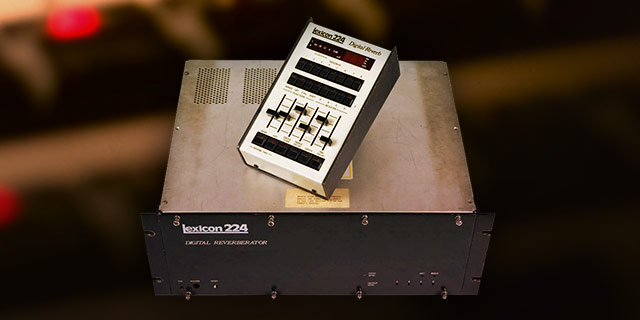
Using the exact algorithms and control processor code from the original hardware, the Lexicon 224 plug-in precisely captures all eight legendary reverb programs and the chorus program — based on the Lexicon 224's final and hard-to-find firmware version 4.4. The Lexicon 224 plug-in also incorporates the original hardware’s input transformers and early AD/DA 12-bit gain stepping converters.
Easy Navigation
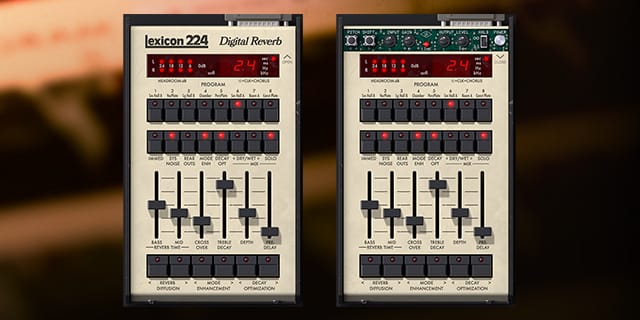
Every parameter from the original hardware is present in the Lexicon 224 plug-in, and exposed as dedicated sliders and buttons. Lexicon’s distinctive Bass/Mid “split decay” adjustments and Crossover control set the highly tunable reverb image, while the Treble Decay rolls off high frequencies. Use the Depth control to adjust the distance between source and reverb, while Predelay produces a short delay between the sound source and the onset of reverberation. Diffusion affects how quickly the echo density in the reverb builds up over time.
Modeled to the Last Detail
For total authenticity, the UA-exclusive System Noise control enables or disables the inherent dynamic system noise of the original Lexicon 224 hardware — removing the modeled gain stepping, parameter zippering, and quiescent noise. Clicking the “Open” text to the right of the display panel exposes several hidden controls, including Input/Output gain and Pitch Shift, and even a selectable “Bug Fix” mode which enables/disables historical bug fixes from the Hall B and Chorus programs. Taken together, the Lexicon 224 plug-in is the world’s most authentic model of a true studio classic.
Features
- Use any audio interface, with both UAD Native and Apollo Realtime/UAD-2 versions included
- Track and mix with the legendary Lexicon 224 Digital Reverb, using the same algorithms as the original hardware
- Employ eight classic reverb programs and one chorus program on drums, vocals, guitars, and more
- Use the Plate and Concert programs for vintage '80s sounds
- Mix with presets from famous Lexicon 224 users Chuck Zwicky (Prince), Kevin Killen (Peter Gabriel), and others
Versions Included with your Purchase
- UAD Native: Runs on your Mac or PC without any UA hardware
- Apollo Realtime & UAD-2: Runs accelerated on Apollo interfaces and UAD-2 hardware
- macOS Big Sur 11, Monterey 12, Ventura 13, Sonoma 14, Sequoia 15 and Tahoe 26
- Windows 10 or Windows 11 (64-bit editions)
- Intel, AMD, or Apple silicon processor
- Internet connection to download software and authorize UAD Native plug-ins (UADx)
- Free iLok account
- Compatible with iLok USB (2nd generation or higher) but not required
- Free UA Connect application for managing UAD Native plug-ins (UADx)
- A supported DAW compatible with VST3, AU, or AAX plug-in file formats.
Reviews Summary
While it aims to provide a helpful overview, it may not capture every perspective or detail. We encourage you to read individual reviews to make an informed decision.
Customers highly praise this iconic reverb for its top quality, ease of use, and authentic, lush Lexicon sound. Reviewers consider it versatile enough for any instrument—especially snare drums and sustained sounds—highlighting its ability to create gorgeous atmospheric backdrops, making it a widely recommended favorite.


