/ Reverb / Blackhole Immersive
Eventide

Blackhole Immersive

4.7 (18 Reviews)
$79.00 $299.00

73% off until Jan 05

Eventide Blackhole Immersive GUI
Buy Now
Product information

Immersed in Space

Designed from the ground up for immersive, Dolby Atmos, and surround workflows, Blackhole Immersive expands the signature sound of Eventide’s stereo version across your entire immersive mix. Used as a send or insert, Blackhole Immersive remains respectful yet reactive to your carefully chosen track positioning. From delicate ambience to massive decays, you create and shape the listener's immersed experience- what, when, and where they feel it. Warning: taking the controls of this cosmic beast of a reverb is just plain fun. The vast range of the original fit perfectly in your mix, but now it's everywhere!

Workflow Evolved

The clean and intuitive interface seamlessly fits into your projects- whether it be mixing music, post-production for film, or sound design for games. This enhanced workflow gives you full control over the reverb across channels, for an evolving immersive experience- from subtle to radical.

Workflow Examples 
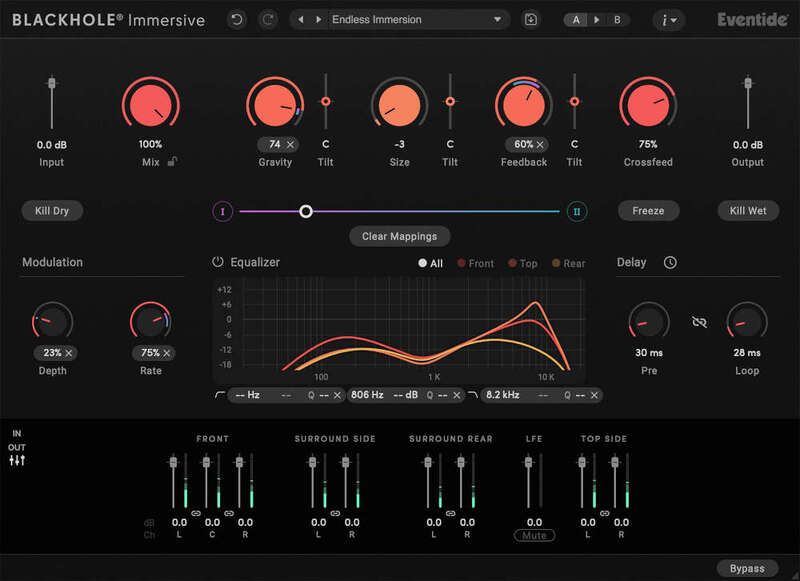
  • Tilt the Gravity, Size, and Feedback parameters to quickly and easily tailor the immersive experience
  • EQ the Front, Top, and Rear speakers separately to sculpt the reverb around the listener
  • Use Crossfeed to blend the reverb between speakers- make a mono source trulyimmersive in one simple gesture
  • Morph between two distinct settings smoothly and seamlessly- great for sound design

The Universe is Expanding

An immersive ecosystem awaits you, your creations, and your clients, and Blackhole Immersive gets you in. The list of platforms supporting immersive is substantial, and growing:

  • Music: Amazon Music Unlimited, Apple Music, and Tidal.
  • Film and Television: Amazon Prime, AppleTV+, Disney+, Kaleidescape, Max, Netflix, and Vudu.
  • Games: Xbox X|S. PS5

Features

  • Powerful and flexible reverberation algorithm- create spaces from subtle ambience all the way up to supernatural decays and drones
  • Supports LCR, Quadraphonic, 5.0-5.1.4, and 7.0-7.1.4 channel layouts
  • Easy-to-use UI optimized for immersive workflows- same core controls for all channel layouts, with no menu diving required
  • Transparent signal processing-effect always sounds the same across all immersive formats, and always maintains incoming spatial image integrity
  • Quickly set individual speaker levels using the integrated Levels section
  • Kill Dry, Kill Wet, and Freeze controls are great for creating drastic effects
  • Mix Lock allows for scrolling through presets or settings while keeping the wet/dry mix constant
  • Resizable GUI with Undo/Redo and A/B comparison
  • Comprehensive Presets Library includes over 150 presets

System Requirements

Windows

  • Windows 10 and later (Windows 11 supported) (64-bit only)
  • AAX, VST2, VST3

Mac

  • macOS 10.14 and later (Intel / Apple Silicon supported) (64-bit only)
  • AAX, AU, VST2, VST3

Important Notes:

  • Eventide tests their desktop plugins in Ableton Live, Cubase, FL Studio, Logic Pro, Pro Tools, and Studio One (However, their plugins should work with any compatible host.)
  • No iLok dongle is required to run this software - only a FREE iLok account/Manager is required for authorisation.
Installation Instructions

Please note: Blackhole is used as an example.

Registration

1. Create an iLok account by following the steps from our help centre article - Getting Started with the iLok License Manager. If you already have an iLok account, skip this step.

2. Go to https://www.eventideaudio.com/login > Click 'Create Account' at the bottom of the page.

3. Enter your details (including your iLok Account User ID) > Click 'Register'.

4. You will now be redirected to your My Account page.

5. In the bottom right corner of the page, enter the license key (format 1234-1234-1234) found in your Plugin Boutique account, as well as your iLok Account User ID > Click 'Register'. Please note: a Serial Number is now not required

Please note: Make sure there are no spaces at the beginning or after your license key.

6. Your software is now registered.

7. Launch the iLok License Manager application > Sign into your account.

8. Enter your iLok user ID and password > Click 'Sign in'.

9. Your license should now be listed within your iLok account.

10. Double-click on the license to bring up additional options > Click 'Activate' (located on the right of the screen).

11. Select where you wish the license to be activated > Click 'Activate'.

12. Click 'OK'.

13. Click 'OK'.

Mac Installation

1. Download the Mac installer from https://www.eventideaudio.com/downloads/ > Run the installation > Click 'Next'.

2. Click to accept the license agreement > Click 'Next'.

3. Choose which plugin formats you'd like to install > Click 'Next'.

Please note: If you're unsure, leave all options selected or check out our help centre article Plugin Formats Explained for more information.

4. Select the destination folders (or leave them as the defaults) > Click 'Next'.

5. Click 'Next'.

6. Click 'Finish'.

Your new software is now fully activated and ready to use within your DAW!

Eventide Blackhole Main Image

Windows Installation

1. Download the Windows installer from https://www.eventideaudio.com/downloads/ > Run the installation > Click 'Next'.

2. Read the License Agreement > Select 'I accept the agreement > Click 'Next'.

3. Choose which plugin formats you'd like to install > Click 'Next'. If you're unsure, leave all options selected or check out our help centre article Plugin Formats Explained for more information.

4. Select the destination folders (or leave them as the defaults) > Click 'Next'.

5. Click 'Next'.

6. Click 'Finish'.

Your new software is now fully activated and ready to use within your DAW!

Eventide Blackhole Main Image

Plugin Boutique Rewards

Discover the most rewarding loyalty programme among all plugin retailers.

  • Free Loopmasters Samplepacks
  • Discounts on products and courses
  • Extra Virtual Cash claimed immediately at checkout
Find out more

Follow us:

X (Twitter) Facebook YouTube Instagram
Logo Logo

Plugin Boutique Limited, Part of the Beatport Group LLC.

Copyright © 2011-2025 Plugin Boutique. All rights reserved