


 Log In

Free gifts available with your purchase
Spring Reverb is an authentic spring reverb recreation that will add vintage character and grit to any audio track. It also includes novel features such as a fully automatable Shake control that will shake the virtual springs around for those thunderous spring effects. Get some recognizable character in your mix with the Spring Reverb!
When your mix lacks that certain something, Softube's Spring Reverb may very well be it. A spring reverb is built into a lot of classic guitar amplifiers and is consequently often used for guitars. But you wouldn't do it justice to think a reverb of this type was limited to guitars only. It can add a lot of personality and character to a vocal track, a snare drum, percussion, an electric organ or just about anything. It's very much a sound of its own and it will help set your mix apart from the rest.
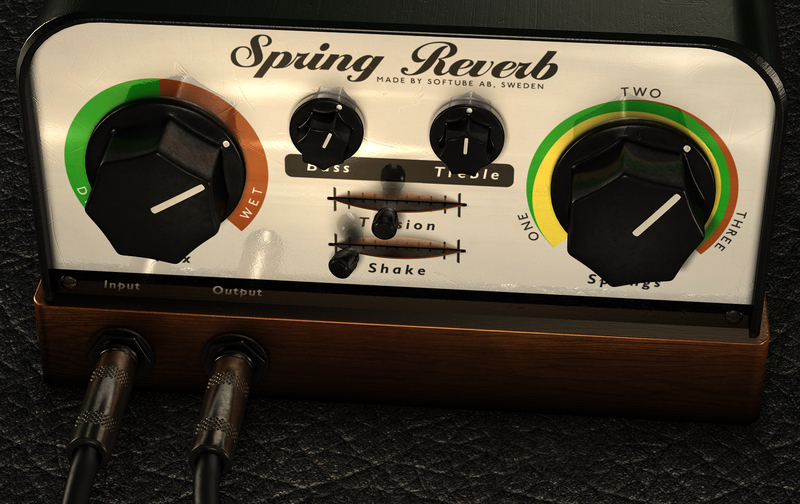
Plus, there's not only one spring reverb sound. We included a few settings so you can choose which spring reverb character you're after. The number of springs and their tension highly affects the sound and feel, so it's up to you to determine what your track needs. There are also tube-driven Bass and Treble controls to further affect the sound. And if you want that explosive boom you'll get from shaking a true spring reverb (making the springs bounce and slam into each other), we modeled that too.
Features:
- Personality and character for your mix
- Tension control to shape the spring character and reverb length
- Number of spring pairs continuously adjustable from 1 to 3
- Tube driver simulation with Bass and Treble in the reverb section
- Shake control that shakes the springs around
- Can be used both as a send and an insert effect
- Very CPU friendly
Springs:
- Control the number of springs in use. There are three sets of springs in the reverb unit and you can choose how many of the sets you would like to use. Set the control to ONE for a more pronounced springy sound and to THREE for a smoother sound.
Shake:
- Since we don't want you to smack your computer to get that thunderous springs-being-shaken sound, Spring Reverb features a slider that can be used to accomplish the same thing safely.
Tension:
- Tunes up or down the tension of all three springs. Adjusting the Tension parameter will change the sound of the strings from slow and smooth (left) to quick and harsh (right). Together with the Springs knob, this control is an excellent tool to change the overall character of the reverb.
Bass, Treble & the Input Stage:
- Authentic tube simulation using the same technology as the Amp Room products on the wet signal.
System Requirements
- macOS Big Sur 11, Monterey 12, Ventura 13
- Windows 10 (64-bit), Windows 11
- Softube account
- iLok account
- Computer with AU, VST, VST3, and/or AAX-compatible DAW host software
- Internet access (for downloading installers and managing licenses)
Supported CPU Families
- Apple macOS computers with Intel Core i3/i5/i7 or Apple silicon (M1 or newer) CPU. Apple silicon is supported natively.
- Windows computers with quad-core Intel Core i3/i5/i7 or AMD quad-core processors with SSE 4.2 support.
- Other Intel processors (Celeron, Pentium, and Xeon) are compatible if they support SSE 4.2 instructions.
Supported Host Software (DAW)
Any 64-bit VST, VST3, AU, or AAX (Pro Tools 11.0.2 or higher) compatible host application should work. However, due to plug-in host differences between DAWs—and our rigorous standards—Softube only officially test their plug-ins and instruments in the most recent versions of Pro Tools, Logic Pro, Cubase, Ableton Live, Studio One, and Reaper. Softube plug-ins are not tested regularly in non-listed systems. They will likely work if the system requirements are met. However, the manufacturer cannot guarantee a solution for issues in unsupported systems.
Softube strongly recommend using VST3, as some of their plug-ins have features that are not present in the older VST format. Supported sample rates: 44.1, 48, 88.2, 96, 176.4, and 192 kHz, in both mono and stereo. The most recent maintenance release of your DAW application is recommended. AAX DSP is not currently in active development. TDM/VENUE/RTAS are no longer supported. See Legacy Installers.
Important Note: Make sure that you always use the latest iLok License Manager. It is not included in the Softube installer but can be downloaded from www.ilok.com

Bil VornDick
Engineer/Producer who's worked on more than 40 Grammy-nominated projects (eight have been Grammy winners).
"I have and used an original AKG BX20. The Softube Spring Reverb is so like it, that it is remarkable. I have unplugged my BX and it is now a high table for a lamp"
Dave Isaac
Recording and mix engineer for Marcus Miller, Dionne Warwick, Stevie Wonder, Aretha Franklin, R Kelly and Luther Vandross. Three-time Grammy winner.
"The Spring Reverb makes me high every time I hear it - and I don't smoke!"
Gitarre & Bass
The best-selling musician magazine in German-speaking! Made with pride since 1986!
"This Spring Reverb beats all others heard before."


