


 Log In

Free gifts available with your purchase

Dial in the echoes of the past
Revolv is a unique reverb plugin like no other, emerging directly from cultural and sonic heritage. Whether you place your mix in a peaceful forest, an ancient ruin, or a sweaty sauna, Revolv’s impulse responses capture the unique ambiance of each location. Explore historically and acoustically unique spaces like the medieval Gotland ruins or Uppsala Cathedral, meticulously recorded to give your audio a sense of depth and authenticity that sets it apart.
A labor of love (and obsession)
At the heart of Revolv is the dedication of Klevgrand's close friend and sound designer Oscar Björk, who embarked on an epic journey across Sweden in a project called "Echoes of Our Time", capturing the unique acoustic fingerprints of a diverse selection of handpicked locations. His passion for preserving the soul and sound of these locations has resulted in an extraordinary collection of impulse responses, each a testament to his painstaking efforts and deep appreciation for Sweden's acoustic heritage.
Wheels of time and space
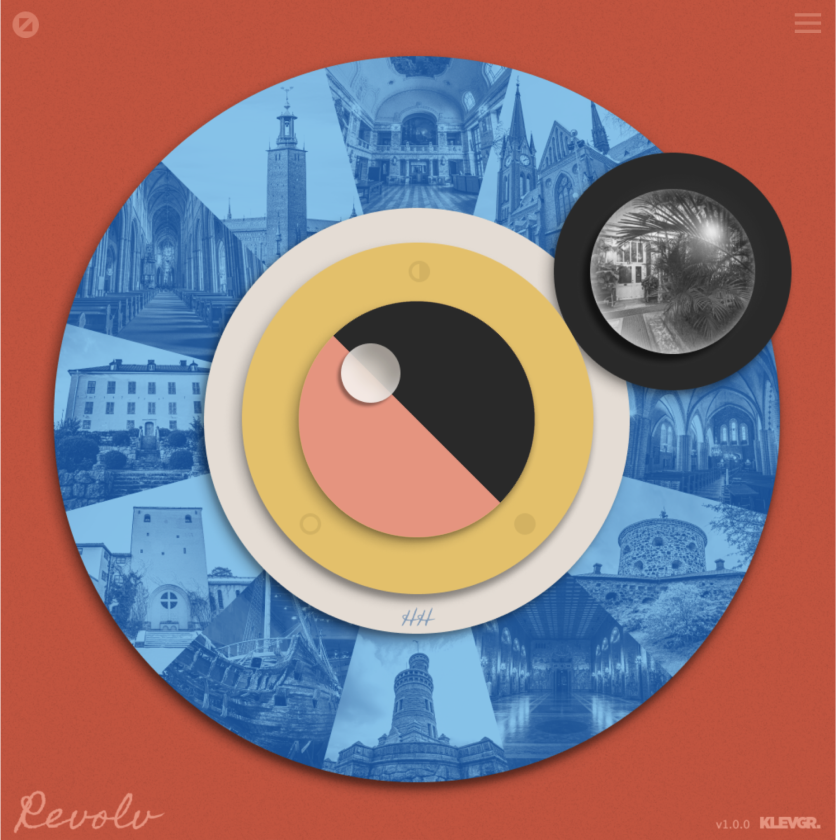
Revolv features an innovative design, revolving around "location wheels" and a loupe selector. Simply move the selector around the wheels to change location and sound. Each location also offers a detailed view where you can learn more about the site and customize the decay, predelay, and width, as well as adjust your microphone preference and recording distance. Six wheels are available, each representing a group of locations, ranging from rare and quirky to epic halls.
No AI, Just Pure Acoustics
A convolution reverb blends your audio with an impulse response (IR) from a real acoustic space. Revolv simplifies this complex process, offering a user-friendly interface and an extensive variety of authentic environments.
Revolv’s impulse responses are hand-recorded and processed (no AI involved). Each IR is a genuine audio snapshot of a space’s natural acoustics, ensuring that the reverb you add to your recordings is as real and rich as the location itself. This authenticity makes Revolv an invaluable tool for musicians, sound designers, and audio engineers, particularly in fields like film and video game sound design where convincing space replication is key. Each location has a unique acoustic character, and the diversity caters for many different creative ideas.
Despite convolution reverbs being resource-heavy, Revolv is designed for efficient performance without sacrificing quality.
Features
- 100+ carefully captured impulse responses from historic and modern Swedish locations.
- Unique, fast workflow for quickly switching between different IR:s.
- Works both as a traditional reverb and an exquisite room processor.
- Extensive background info on the many different locations.
- Up to three mic placements for each locations, featuring different microphone models.
- Fine-tune decay, predelay, width, and more for precise control over each space.
- Efficient optimized CPU design allows high-quality reverb without sacrificing your system’s performance.
- Tailor-made for film, TV, and video game sound design where authenticity and realism are critical.
- Powerful EQ featuring two parametric filters available (low / high cut, low / high shelf, bell)
System Requirements
- Requires macOS 10.10 or later (optimized for the M1-processor), Windows 7 (SP1) or later, running a AU, VST3 or AAX compatible 64-bit host.



























