/ Reverb / Abbey Road Reverb Plates
Waves

Abbey Road Reverb Plates

4.0 (1 Reviews)
$29.99 $149.00

79% off until Dec 07

Waves Abbey Road Reverb Plates
Waves Abbey Road Reverb Plates gallery thumbnail
Buy Now
Product information

Abbey Road Reverb Plates
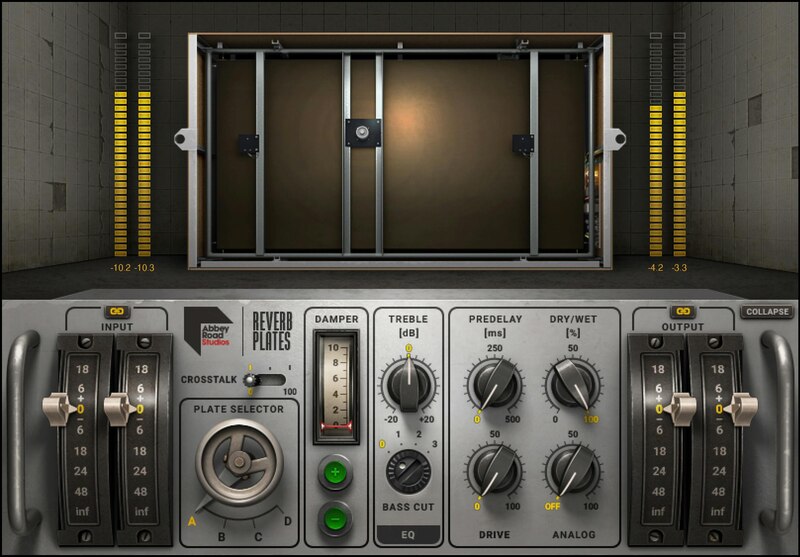
Versatile, Lush Reverb with a Legendary Heritage

Plate reverbs have a diffused, bright, idealized sound quality that’s unlike acoustic spaces. Developed in collaboration with Abbey Road Studios, this definitive plugin captures the 4 versatile plates used for film scores, classical projects, and pop music from Pink Floyd to Adele.

The EMT plates installed in 1957 remain in use today—because they sound incredible. Modeled with meticulous detailed and validated by Abbey Road, these sounds are now available to all.

Features

  • Includes all four reverb plates from Abbey Road Studios
  • The reverb sounds on Beatles, Pink Floyd, Radiohead recordings
  • Give vocals and instruments a bright, present reverb quality
  • High diffusion smooths drums and other percussive instruments
  • Short and snappy to huge and lush, with variable decay times
  • Models Abbey Road’s custom hybrid preamp circuits
  • Includes pre-delay, EQ, crosstalk, and drive controls
  • Developed in close collaboration with Abbey Road Studios

System Requirements

Mac

  • macOS Monterey 12, Ventura 13, Sonoma 14, Sequoia 15
  • VST / AU / AAX

PC

  • Windows 10+
  • VST / AAX
Installation Instructions

1. Head to https://www.waves.com/create-account

2. Enter your email and choose a password to create an account (if you already have a Waves account, choose Log in, enter your details and head to Step 5) > click 'Submit'

3. Open your email inbox > click the activation link in the email from Waves

4. Click 'Log in here' > Log in to your Waves account

5. Click 'Register New Products'

6. Enter the Serial Number found in your Plugin Boutique user account > click 'Submit'

7. Click download in your Plugin Boutique user account or head to https://www.waves.com/downloads/central > download the Waves Central app for your operating system

8. Install Waves Central > Open Waves Central

9. Click 'Log in' > enter your log in details

10. Click the 'Install Products' tab

11. Tick the blue dot on all products you wish to install or click the top dot to install all products > click 'Install & Activate'

12. Click 'OK'

13. Open your DAW > open the Waves plugin

Your Waves plugins are installed and ready to use, enjoy!

Plugin Boutique Rewards

Discover the most rewarding loyalty programme among all plugin retailers.

  • Free Loopmasters Samplepacks
  • Discounts on products and courses
  • Extra Virtual Cash claimed immediately at checkout
Find out more

Follow us:

X (Twitter) Facebook YouTube Instagram
Logo Logo

Plugin Boutique Limited, Part of the Beatport Group LLC.

Copyright © 2011-2025 Plugin Boutique. All rights reserved










