/ Reverb / Lofi Space
Waves

Lofi Space

4.0 (1 Reviews)
$24.99 $99.00

74% off until Dec 07

Waves Lofi Space
Waves Lofi Space
Waves Lofi Space
Waves Lofi Space gallery thumbnail
Buy Now
Product information

Lofi Space

Echo and Reverb with Lofi Attitude

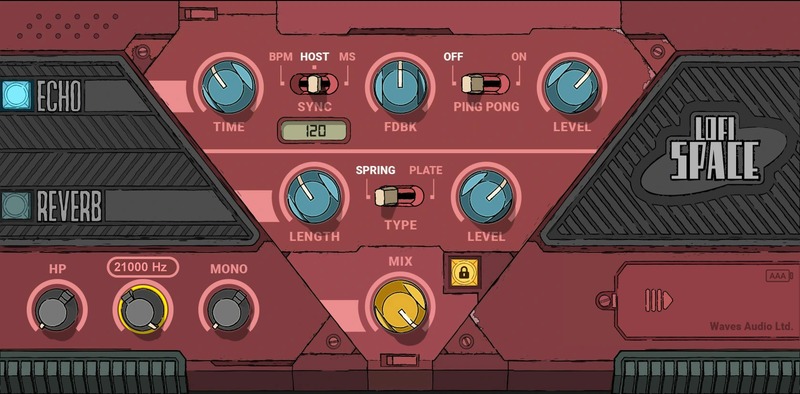
Most reverbs spend their lives shyly in the background. Lofi Space is primed to steal the stage. With Echo to create rhythms, and Spring or Plate reverbs for a twisted metallic vibe, playing with the controls starts feeling more like a brash musical instrument with attitude than just an “effect.”

For hip hop, R&B, or rock—Lofi Space’s in-your-face sounds hit hard and add character. For DJs, “playing” space like a dance floor beat is a dream come true. When you want to stop being polite with your sound, hit Lofi Space.

Features

  • Saturated delay up to 3500 ms, with BPM or DAW sync
  • Spring or plate reverb, with decay from 0.5 to 20 seconds
  • Mix knob, plus independent reverb and delay control
  • Adjustable echo feedback and ping-pong delay on/off
  • Stereo slimmer for a more vintage sound
  • Tweak the timbre with highpass and lowpass filters
  • 133 super presets by top hip hop, R&B, rock producers
  • Fantastic for sound design—feed in pink noise, and start tweaking

System Requirements

Mac

  • macOS Monterey 12, Ventura 13, Sonoma 14, Sequoia 15
  • VST / AU / AAX

PC

  • Windows 10+
  • VST / AAX
Installation Instructions

1. Head to https://www.waves.com/create-account

2. Enter your email and choose a password to create an account (if you already have a Waves account, choose Log in, enter your details and head to Step 5) > click 'Submit'

3. Open your email inbox > click the activation link in the email from Waves

4. Click 'Log in here' > Log in to your Waves account

5. Click 'Register New Products'

6. Enter the Serial Number found in your Plugin Boutique user account > click 'Submit'

7. Click download in your Plugin Boutique user account or head to https://www.waves.com/downloads/central > download the Waves Central app for your operating system

8. Install Waves Central > Open Waves Central

9. Click 'Log in' > enter your log in details

10. Click the 'Install Products' tab

11. Tick the blue dot on all products you wish to install or click the top dot to install all products > click 'Install & Activate'

12. Click 'OK'

13. Open your DAW > open the Waves plugin

Your Waves plugins are installed and ready to use, enjoy!

Plugin Boutique Rewards

Discover the most rewarding loyalty programme among all plugin retailers.

  • Free Loopmasters Samplepacks
  • Discounts on products and courses
  • Extra Virtual Cash claimed immediately at checkout
Find out more

Follow us:

X (Twitter) Facebook YouTube Instagram
Logo Logo

Plugin Boutique Limited, Part of the Beatport Group LLC.

Copyright © 2011-2025 Plugin Boutique. All rights reserved