/ Reverb / IR-L Convolution Reverb
Waves

IR-L Convolution Reverb

$24.99 $129.00

80% off until Dec 07

Waves IR-L Convolution Reverb
Buy Now
Product information

IR-L Convolution Reverb
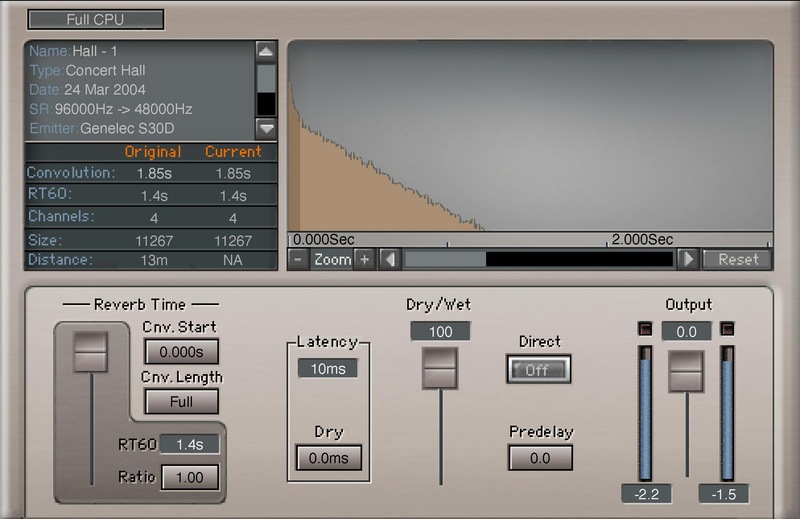
Add Thousands of World-Class Acoustic Spaces to Your Studio

For hyper-realistic acoustic spaces, nothing beats convolution reverb—it’s like the difference between a photograph of a concert hall, and a painting of a concert hall. However, unlike traditional reverbs, convolution reverbs can have a daunting collection of parameters and options.

IR-L cuts through the complexity. Featuring the acclaimed sound quality of Waves’ IR1 audio engine, you can bring over 2,000+ acoustic spaces into your studio—from stairwells to cathedrals.

Features

  • 4.8 GB library includes a carefully curated collection of impulses
  • Easy editing, with standard reverb parameters
  • Trim beginning and end of the reverb impulse
  • Beautifully recorded impulses with first-class, field-recording gear
  • Import WAV and third-party impulse files
  • Variable pre-delay from 0 up to 500 milliseconds
  • Choice of two different levels of CPU usage
  • With mono, mono-to-stereo, full stereo, or efficient stereo modes

System Requirements

Mac

  • macOS Monterey 12, Ventura 13, Sonoma 14, Sequoia 15
  • VST / AU / AAX

PC

  • Windows 10+
  • VST / AAX
Installation Instructions

1. Head to https://www.waves.com/create-account

2. Enter your email and choose a password to create an account (if you already have a Waves account, choose Log in, enter your details and head to Step 5) > click 'Submit'

3. Open your email inbox > click the activation link in the email from Waves

4. Click 'Log in here' > Log in to your Waves account

5. Click 'Register New Products'

6. Enter the Serial Number found in your Plugin Boutique user account > click 'Submit'

7. Click download in your Plugin Boutique user account or head to https://www.waves.com/downloads/central > download the Waves Central app for your operating system

8. Install Waves Central > Open Waves Central

9. Click 'Log in' > enter your log in details

10. Click the 'Install Products' tab

11. Tick the blue dot on all products you wish to install or click the top dot to install all products > click 'Install & Activate'

12. Click 'OK'

13. Open your DAW > open the Waves plugin

Your Waves plugins are installed and ready to use, enjoy!

Plugin Boutique Rewards

Discover the most rewarding loyalty programme among all plugin retailers.

  • Free Loopmasters Samplepacks
  • Discounts on products and courses
  • Extra Virtual Cash claimed immediately at checkout
Find out more

Follow us:

X (Twitter) Facebook YouTube Instagram
Logo Logo

Plugin Boutique Limited, Part of the Beatport Group LLC.

Copyright © 2011-2025 Plugin Boutique. All rights reserved










